User Profile

upfaffer
Brass Contributor
Joined 8 years ago


User Widgets
Recent Discussions
Error in Co Autoring
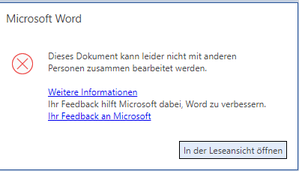
Hello, in some szenarios we working with Word (just word not the other office Apps) in Co-Authoring we face a issue when open the Word document stored in Onedrive, Teams, SPO: In English like: This document couln't not edited in Co-Authoring mode Issue appears mostly if the person which opens the document first with the Word Client App and the secound User with the browser. Already known is the first User needs to activated Automatic Save. But if we test this with different users the behaviour is not the same for all of them. Sometimes the secound user gets the message could not safe the file do you want to save it as a copy We all work with this Word Version:1KViews0likes1CommentForms on Public Hompages
Hello a user ask to use Forms on a public homepage for a german company. AFAIK the data for this are stored in europe if the tenant is in europe, but is there any other reason to advice against it or is there any recommended setting in the admin center for this usecase like to ask for personal data or things like that. Thx688Views0likes0CommentsExcel Pivot (Source PowerBI Workspace) - Move Columns in Value are not possible
Hello, sorry if the description is a bit confusing, using a german excel and perhaps some translations of the functions are not correct. We connect a excel sheet to a powerbi workspace dataset. The data appears in excel as pivot Add / choose some columns is no problem, with a click they appear in the row area When we try to move some columns in the value area or try to get some results like sum or average this is not possible? Error Message (Translated) You try to move a field in a area of the report which is not possible. Get this message with each column... What is the mistake? What are the prerequisites and activities to make this possible?422Views0likes0CommentsMenuentrys does not work in Modern View
Hello, installed SP Subscription Edition with March 2022 Update and try to use the modern view. If i use some menu entries like websitepermission form the gear icon or the three dot menu from documents nothing - really nothing happens. If i change to the classic sharepoint view, everything works fine. ULS Views and Event Views no helpful informations. What could be the reason for that? Use and Install Sharepoint since Version 2013 in different companies and have never the same expernience before. Same situation on all browsers IE, Firefox, Chrome on all clients and even directly on the server with Webapps are not behind the loadbalancer. Just to let you know in the company are some "experts" who like to manipulate all Settings (Security, GPO, Operation System) Any helpful ideas? ThxBackup Azure Active Directory
Hello, my main focus is Office 365 and for this are many soultions for backups (SPO, Teams, EXO ...) on the market. But how is it about backup the Azure AD itself? The configuration and identities? Is there any solution or a documentation from MS what happens if this crash? Is there any kind of versioning specially if it comes to configuration What about disaster situations? ThxAttachement Create Date
Hello, not a pure Outlook question but perhaps someone could help anyway. Got some pictures by email as attachement, for me its interesting when they are created. If i download them all got the date for the download. No more informations in the "Details" Tab visible. Any hints welcome. Thx816Views0likes2CommentsOutbound SPAM Policy - Inform affected User
Hi, i know how to configure a outbound SPAM Policy here: https://security.microsoft.com/antispam But how i configure the details around the information to the affected user, he should know his mail is blocked. Is there any option to add there some CI Schema to get more trust of this message? Best regards487Views0likes0CommentsCaching Issue with news aggregation in Sharepoint Online Hubsites
Hello, we're facing from time to time caching issues using the news aggregation of sharepoint online hubsites. If this happens, some users with different browsers get not the actual message, for them a bit older message is shown. If the hit F5 serveral times the newest messages appaears as expected. On Sharepoint Online there is not the root cause in my opinion. But is there any related setting on the browser like MS Edge or Chrome i could check? Best regards1.5KViews0likes2CommentsSharepoint Online Website Usage Statistics
Hello, for analyzing the usage of a sharepoint online intranet site (Hub) we already know the usagestatistics but our internal team needs more detailed staistics: Statistic for one special day (Only possible for Users but not for sites or files) Statistic for a defined timeperiod (Only possible for 7, 30, 90 days) Could somebody give a hint to resolve this? Is Powerbi or Graph a option? 3rd Party Tools are not a option in the first step.1.1KViews0likes1CommentList all Sitecollection Configurations (Powershell)
Hello, work with a large intranet which contains multiple Sitecollections connected by Hubsites. Because of less KnowHow in the past, there a differents between the sitecollection configurations (Sharing, Hubsite and some more). My plan is to align them all to the same settings. Is there any powershell command or script which list all Settings? Or other workarounds to doublecheck this? Best regards436Views0likes0CommentsAdd Multiple Calender in Outlook (Dynamic Userset)
Hello, is there any option to add mutliple calenders in outlook which depending for example on a dynamic Azure AD Group? The Idea is to add the Calenders of a complete team or project (members) with some click to outlook and not all of them one by one. Import ist the dynamic Part behind so when users come to teams or into a project the Calender should be updated automatically or if not possible manual on a central location. If there are workarounds in the browser or things like that as plan B recommendations would we helpful. Thx Best regards Mirko885Views0likes3CommentsTeams Tabs in all Channels not visible (Client)
Hello, some users face a issue from time to time. For them the Tabs in all Chanels in the Teams Client are not visible. A App Restart helps for a while. This issue does not occur in the browser. Its not a permission issue.... Any ideas?9.3KViews0likes4Comments

Recent Blog Articles
No content to show