User Profile

PeterBartholomew1
Silver Contributor
Joined 8 years ago


User Widgets
Recent Discussions
Re: Please update Excel to handle more than 15 digit numbers!
The limit is determined by the storage allocated to hold a number in a standard IEEE format. There is always a compromise to be struck between the storage demands & processing time required for a calculation, and the accuracy achieved. Some calculations such as the solution of large ill-conditioned systems of simultaneous equations can run into problems but I think it very unlikely that you are concerned with the precision to which numbers are represented. It appears to me that the 'numbers' you wish to manipulate are in fact text strings that happen to based upon the digits 0-9 rather than A-Z. In which case the limit appears to be 32,767 of which 1024 may be displayed as a single row within the cell. This is not a workaround, a credit card number cannot be meaningfully doubled or square-rooted, so text is the appropriate format. The catch is that Excel is like an eager puppy in the way it attempts to convert anything that could be considered as a number in order to perform numerical calculation. SergeiBaklan has shown ways of suppressing this behaviour by setting options. Another approach is to prefix a possible number by a single apostrophe, say when loading the data from VBA. Once Excel is allowed to convert the text to a number the original text cannot usually be recovered and would need to be read once more from the database.10Views0likes0CommentsRe: TOCOL/TOROW Treat Thunks as Errors
I had somewhat resigned myself to the idea that I couldn't use the TOCOL error criterion to filter errors without also taking out the #CALC! errors that represent functions. I now think I was wrong to settle for that! As you have observed, ISERROR does not treat functions as errors so why should TOCOL? In a functional programming environment in which functions are first class citizens it is simply wrong that TOCOL should treat them as errors.29Views0likes0CommentsRe: Return of the Corkscrew with Spilled Arrays
Hi James I am not sure why this reappeared in my feed, especially since it is marked as a solved problem! However, this time I have attached a possible solution using a complicated form of the SCAN function that works with array of array problems. My intention is that SCANHλ helper function should be reasonably easy to incorporate into a model. The core element of the financial models I have seen, is the Lambda function that addresses a single period within the model and, knowing the opening balances, calculates the closing balances. Being a single period, model circular references are avoidable. This function may be used within SCAN (or a generalisation of SCAN) to calculate the closing balances for the entire model. Closing balances are brought forward to form opening balances, here using B∕Fwdλ. Once they are known the entire model can be calculated and presented as a single array calculation. The catch with going so far into array manipulation is that the flow of the calculation is best read from the formulas rather than by examining cells on the worksheet. That will ruffle many feathers.26Views1like3CommentsRe: Advanced Excel Formula discussion - Problem with dynamic range
This may not be of much assistance for your current challenge but there are no issues with using defined names in conjunction with dynamic arrays. A defined name is simply a name given to a snippet of code that, when used within a worksheet formula will execute to formula to which it refers. The most widely used defined names refer to simple range references, e.g. fixed range = $A$1:$B$40 in which case you have an absolute range reference. However, it is quite possible to name the anchor cell of a dynamic range, in which case using the name followed by the # operator is the dynamic range. An alternative is to define the name to refer to the dynamic range by including the # within its definition. anchor = Sheet1!$A:$1 Worksheet formula = anchor# or dynamicRange =Sheet1!$A$1# Worksheet formula = dynamicRange returns a reference to the same range. Not only that, but finalRow =TAKE(anchor#,-1) is a reference to the final row of a dynamic range and will move up and down the sheet as the data changes. Please accept my apologies if this is obvious to you, but it is likely that there will be other users that have never had cause to explore the possibilities.7Views1like0CommentsRe: Advanced Excel Formula discussion - Problem with dynamic range
My approaches to returning the landlord as contact where they have no agent were 1. to trap the error = IFNA(XLOOKUP(landlord, landlords, agent), landlord) 2. to look up agent for each house individually using MAP = MAP(landlord, LAMBDA(name, XLOOKUP(name, landlords, agent, name)) ) [I realise the programming style may cause communication difficulties but I stopped using direct cell referencing 10 years ago]84Views0likes2CommentsRe: Dependent calculations in tables
I usually move away from tables for calculation fields in order to use dynamic arrays. A shorter version of your formula may be obtained by taking the multiplication by the 'total' field outside the conditional statement and also by using the SWITCH function. = total * SWITCH(Cur, "EUR", 1, "NOK", nokeur, "SEK", sekeur, "GBP", gbpeur, 1 ) It is difficult for an end user to tamper with an array formula without destroying it altogether (somewhat conspicuous!)30Views0likes0CommentsRe: How can I display negative values for time in calculation results
To get time differences to display as hours and minutes (as opposed to a decimal part of a day), the value must be recorded as positive, even it that means using a formula in the form = ABS(end - start) That doesn't prevent you from formatting the number to show as negative (with a minus sign or even with the accountancy trick of a red value within parentheses). A formula-based conditional format using the condition = start > end could be used to apply the number format [Red]([h]:mm) The catch is that, like the text solution, the value in the cell cannot be used directly in dependent formula without correcting the sign. There is another different trick used to express fractions by showing the numerator after the decimal place, with the denominator as given within the function. So = DOLLARFR(24*(end - start), 60) will give -1.45 for a negative time difference of 1 hour 45 minutes.42Views0likes0CommentsRe: Nesting SortBy and Filter functions
You can filter first but then the sort must reference columns of the filtered array, not the original. = SORT(FILTER(worklistTbl, worklistTbl[Column4]=0), {1,3,2}) With LET the formula might read = LET( filteredTable, FILTER(worklistTbl,worklistTbl[Column4]=0), SORT(filteredTable, {1,3,2}) )35Views1like1CommentRe: Issues attaching files to posts
The problem persists! The workbook appears to upload but does not appear in the final posted version. Code windows and pictures get one so far but, since I only use dynamic array solutions, the OP tends to give up if called to implement a solution. The other problem I have encountered is responding to a post that shows 0 replies, only to find there are several once I have posted. It would be good to get the issues sorted!96Views3likes0CommentsRe: How to distribute the value of one cell evenly in a sequence for the value of another cell?
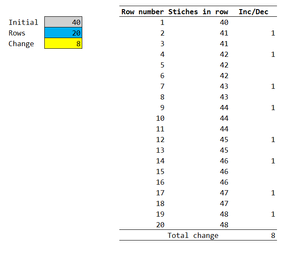
An approach I would suggest is to distribute the change uniformly between rows 0 and 21 (ensuring that the region outside the reduction zone has the exact number of stiches specified). Rounding the fractional parts to the nearest integer will give the number of stitches required for each row. Differencing the count of stitch will return increase/decrease for each row. I use 365 so the formulas may look unfamiliar but it should convey the idea. = LET( DIFFλ, LAMBDA(value, value - DROP(VSTACK(0, value),-1)), rowNum, SEQUENCE(1+Rows,,0), stiches, ROUND(rowNum * Change / Rows, 0), table, DROP(HSTACK(rowNum, initial+stiches, DIFFλ(stiches)),1), VSTACK(table, HSTACK("", "Total change", SUM(TAKE(table,,-1)))) )22Views0likes1CommentRe: The Diagonal Suite: Gentle thunking goes a long way!
I think your use of thunks may well be closer to the original intent than mine. Although you define the code to generate multiple arrays, you only evaluate the ones selected by the use case. I think such 'code insertion' was central to the concept of thunks (any functional programmers out there might like to comment). I have used thunks in a rather different manner. I actually use a LET variable to force the evaluation of the content before forming the thunk. My mindset is more one on "I may reference this data many times and wish to ensure that the processing is only performed once". I am, in effect, passing data by reference and avoid the prospect of disappearing down the rabbit hole performing recursive calculation as I go! I find it very difficult to determine which strategy should perform the better and suspect it is case-specific. The examples of anti-diagonal (weighted) summations I quoted, fit into a pattern of discrete convolutions. Ultimately one can resort to Fast Fourier Transforms but that is far removed from the benefits of thunking you set out to convey! BTW, I really enjoy your coding!31Views0likes1CommentRe: The Diagonal Suite: Gentle thunking goes a long way!
I finished up copy/pasting your text to the workbook module! I returned the reverse diagonals individually for summation (as used for accounts receivable or depreciation schedules). I hadn't realised GitHub can return binary files.83Views0likes4Comments
Recent Blog Articles
No content to show