User Profile

AppsPackG
Brass Contributor
Joined 3 years ago


User Widgets
Recent Discussions
Re: Windows Desktop (App) Runtime with latest MSIX Packaging Tool
Thanks for the clarification Fiza_Azmi, quite often I would remove the desktop shortcuts created by installers before completing the capture, however I can understand if these are removed at the package editor stage then this runtime would have been added in. I have submitted a comment on the blogpost, highlighting that the inclusion of the desktop7:shortcut results in the dependency for the runtime being flagged up as well for completeness.3.2KViews0likes0CommentsRe: PSF and desktop shortcuts created by Microsoft.WindowsAppRuntime opens wrong entry from config.json.
Which version of the MSIX Packaging Tool is this happening with? I noticed that 1.2023.1212 introduced the dependency of the Windows Desktop App Runtime requirement to a lot of applications which didn't need it before, and have also experienced some issues with the Packaging Tool not saving the accelerator PSF configuration or manual saving of the PSF not being retained after being saved by the tool.628Views0likes0CommentsRe: Unable to launch Microsoft MSIX Package Tool if disconnected from the internet
The download available for disconnected environments, has worked on it's own without the license file just by double clicking the bundle and allowing it to install. That said in order for it to work you still need to take ownership of the MSIXPackagingTool folders in C:\Program Files\WindowsApps before you can create a shortcut to the executable in that folder as the standard start menu shortcut is useless. However I have seen issues with the PackageAnalyser capability not working it just stays at the Installing MSIX package progress bar stage. Could this new functionality be reliant on Internet capability again @TIMOTHY MANGAN / Fiza_Azmi (MSFT)?1.9KViews0likes6CommentsRe: Packaging an Application with no installer?
In essence, I would consider following standard Windows application development guidelines and place the executable and other binaries in a newly created folder under C:\Program Files\**Application Name** and create a shortcut on the Start Menu pointing to this new file location. It will then be picked up by the MSIX Packaging Tool and placed in the default VFS folder which will eventually install it in to the expected Windows Apps Directory when installed. Might be worth using the new Package Analyzer functionality in the event that any fixups are suggested to support the application working correctly with the aid of PSF Fixups.1.4KViews0likes0CommentsRe: SAP Logon with MSIX User settings issues
Have you taken a look at the new Registry Legacy Fixup that has been included with MSIX Packaging Tool now? Tim Mangan did a nice write up of the proposal before it was introduced. https://techcommunity.microsoft.com/t5/msix/proposal-for-registrylegacyfixups/m-p/1427153489Views0likes0CommentsRe: Need Help in Applying File Redirection Fixup in MSIX Packaging Tool
Have you tried setting the entry point on your main executable for the shortcut as per the new MSIX Packaging Tool GUI allows, as I had a similar experience with wildcards as per your advanced installer example until I combined copying my user settings in VFS\Profile using a Start script.1.5KViews0likes1CommentRe: Need Help in Applying File Redirection Fixup in MSIX Packaging Tool
The new packaging tool has been setup to aid users create fixups related to specific entry points rather than wildcard executables, so suspect you would need to manage this directly by editing the config.json in the package editor after creating an initial fileredirection fixup. I also wonder whether you would need a Powershell Start Script to copy any captured VFS\Appdata to the MSIX Appdata folders.1.5KViews0likes0Comments- 1.3KViews0likes0Comments
Re: MSIX Shared Package Container for normal user
Just come across this concept although have have yet to come across a requirement for it. I take it we are referring to this article. https://learn.microsoft.com/en-us/windows/msix/manage/shared-package-container If that is the case, I agree with the comments so far with it needing to be configured to allow a user launching the application to be able to communicate with other user installed MSIX packages. It would also be worth noting that this sort of configuration feels like App-V virtual environments and there was an option in MECM to manage this by creating the relationships and it would process the xml configuration at the point of deployment. If this is intended to be an enterprise solution, it needs to be offereed in a way that it can be managed across the enterprise desktop estate.2KViews1like7CommentsRe: User can not create Desktop shortcut
It seems like the latest release of MSIX Packaging Tool 1.2023.1005.0 caters for creating a desktop shortcut if you include a pre-requisite in your package although i've not tested it yet. That said if that is the intended solution it will need configuration on every application to allow a user to create this for themselves again with the new MSIX package.2.3KViews1like1CommentPSF Config generation / validation
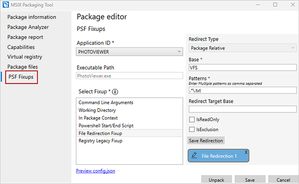
Further to the latest release of the MSIX Packaging Tool, it highlights the advantages of configuring the PSF fixups through the GUI now which is great. Can someone clarify the type of pattern that is being used is then placed in the config.json file. Is this a json specific type of regex which I need to brush up on. I came across this article https://learn.microsoft.com/en-us/windows/msix/psf/psf-integration-with-mpt that highlights the automation of creating the config.json files but doesn't give any guidance on what the pattern should be or provide a way of validating it with examples of how a file being re-directed would be matched. I appreciate it gives a preview option for the config.json but it doesn't parse the file like you see when manifest edits are being made. If the patterns could be validated using something like https://regexr.com/3opa6 then it would allow adoption of the PSF for migrations easier.806Views0likes2CommentsRe: File redirection question
martijnk79 might be worth checking out the latest release of MSIX Packaging Tool 1.2023.1005.0 as the GUI is quite useful now for the fixups. I had a similar query regarding the config.json patterns and currently experimenting with the syntax. It seems that it follows a json regex format which could be checked using the checker https://regexr.com/3opa6.1.8KViews1like1Comment
Recent Blog Articles
No content to show