User Profile

Trutz_Stephani
Iron Contributor
Joined 10 years ago


User Widgets
Recent Discussions
Re: Reporting on Project Online (PWA) Timesheets
Hi JitiMinhas2810 The out-of-the-box reports simply don't include the tables. You can download the PBIX file here: https://github.com/OfficeDev/Project-Power-BI-Templates/raw/master/Project%20Online/Microsoft%20Project%20Online%20Power%20BI%20Content%20Pack.pbit and adapt the data model to include the missing data.9.5KViews0likes1CommentHow to show the correct icons in O365 home for model-driven Power Apps (business apps)?
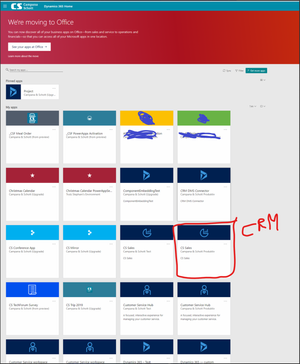
When navigating to home.dynamics.com there is a big reminder on top that Microsoft is putting all apps in one central location in the O365 portal. This new view is currently only discoverable via the deep-link from the Dynamics portal: https://www.office.com/apps?deepLink=business-apps&auth=2 On the page itself there is a long app list and all the icons available in the Dynamics portal have disappeared for model-driven Power Apps. Only those for canvas Power Apps stay. How can all icons be brought over? It would help the organization to identify the correct app via the icon, especially in the O365 App launcher pane.1.3KViews1like3CommentsRe: Project workflows: How the "Send an HTTP request to SharePoint" connector can help you
Hi Doc0014 It's probably easier to retrieve custom field values using the OData endpoint <PWA-URL>/_api/ProjectData, e.g. <PWA-URL>/_api/ProjectData/Projects for project custom fields. This will provide the published values except for multiline text fields, the HTML formatting will be stripped. Using the REST-Endpoint you should use the following URL: <PWA URL>/_api/ProjectServer/Projects(‘<Project GUID>‘)/IncludeCustomFields This will bring the custom fields labelled by their internal id and for multiline text fields including the HTML-Formatting.6KViews0likes1CommentRe: Teams integration: Hiding the O365 header in project roadmaps
michelbehr I see in your first screenshot that the embedding for the project works in the Dynamics app. Strange, that then the URL parameter doesn't work when embedding the normal project page in your Teams as a website. I think you should open a ticket to get this solved.2.5KViews0likes1CommentRe: Teams integration: Hiding the O365 header in project roadmaps
michelbehr when you click on the "Tasks" Tab in the Dynamics app, does it show you the embedded tasks? That's what I wanted to check as your original embed URL is the same that is used by that tab. As Paul noted, embedding the whole application doesn't work.2.5KViews0likes3CommentsRe: Teams integration: Hiding the O365 header in project roadmaps
Hi michelbehr, I just tested it again with a website tab in our tenant in a private channel and a normal one and it worked without an issue. Maybe it is something to open a ticket for. Does the embedding work when you open the project via the default Power App "Projects" when navigating to home.dynamics.com?2.6KViews0likes7CommentsRe: Teams integration: Hiding the O365 header in project roadmaps
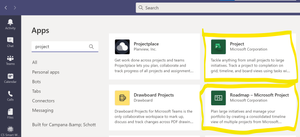
Hi michelbehr, Adding the parameter with a & character after the guid of the project should be all that's needed. Be aware that you no longer need the workaround as Microsoft released 2 apps to solve the integration. Roadmaps and Project app for Teams integration: Just add the apps to your teams as tabs and then select a project that you want to integrate.2.6KViews0likes9CommentsRe: Teams integration: Hiding the O365 header in project roadmaps
Hi locious , Yes that worked for me. Example: https://project.microsoft.com/en-US/#/taskgrid?projectId=3d9caf9c-1cd0-e911-a837-000d3ab4e0c4&dynamicsUI=true The O365 bars and only hidden when embedded in Teams or a model-driven app. If you use the URL directly in the browser, the sidebars and header appear nonetheless.2.8KViews0likes14CommentsRe: Looking for to establish Planner connection with PowerBI
Hi soorajmandhan, There is a ready-made Power Automate template, you could use: https://flow.microsoft.com/en-us/galleries/public/templates/1879528b45314f74bed7639405a8c1be/export-microsoft-planner-tasks-to-a-sql-database/ Kind regards, Trutz7.4KViews1like1CommentRe: what is the best app to be integrated with Planner and have timeline ?
Hi msabaan, You can also use Project for the Web (Project P1 Plan): https://www.microsoft.com/en-us/videoplayer/embed/RE43Vjx?pid=ocpVideo0-innerdiv-oneplayer&postJsllMsg=true&maskLevel=20&market=en-us Also MS is planning to add the option to add tasks from Planner to a Roadmap (currently supports Project and Azure DevOps, Project P3 Plan): https://www.microsoft.com/en-us/videoplayer/embed/RE2McvC?pid=ocpVideo0-innerdiv-oneplayer&postJsllMsg=true&maskLevel=20&market=en-us There is an item on the MS release roadmap, that provides read-only access for users with an existing E5 license, so only the creator then needs the P1 or P3 subscription depending on the product, you'd like to use.3KViews0likes0CommentsRe: Where do projects live that are created in Project Home?
Hi HelgeDV Project for the web data just like Roadmaps data resides in the Common Data Service default environment. Project Online data resides in the respective SharePoint site. Moving data from one to the other is a manual process (do one or the other) that can be automated to a certain degree using Power Automate or other integration tools.1.1KViews1like0CommentsTeams integration: Hiding the O365 header in project roadmaps
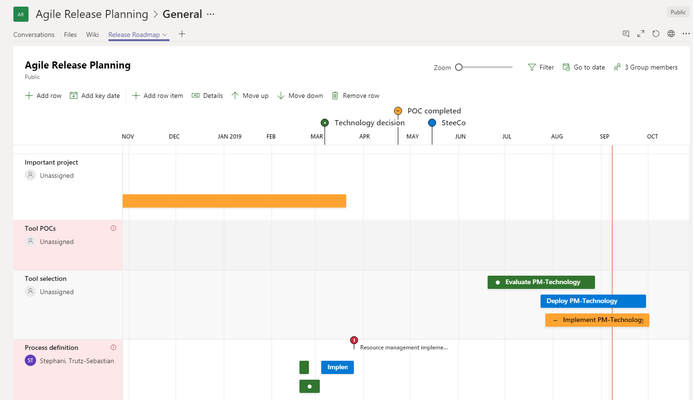
It is possible to implement a project roadmap in a Teams tab to simplify communication. Simply open the roadmap, then copy the URL from the address bar and add it as a website tab in Teams. By adding "&dynamicsUI=true" to the URL, you can even hide the O365 header.3.3KViews0likes18CommentsRe: Planner Team looking for feedback: Planner & Project Roadmap Integration
Great idea Joanna Parkhurst! I think it would make sense to be able to pickup buckets and labels as roadmap row items instead of individual cards to aggregate start and finish information to a higher level. Also it can be helpful to have just the earliest start and latest finish of a plan as a single item in a roadmap row. A great option would be if the row item status could be automatically calculated from the linked planner items. Kind regards, Trutz1.7KViews0likes0CommentsGraph data connect in preview: help me upvote that planner becomes part of it to simplify reporting
Hi all, The Office Graph people started to provide a data connect endpoint for the Office Graph in preview: https://docs.microsoft.com/en-us/graph/data-connect-concept-overview Currently the endpoint does not include Planner data, but you can help me upvote the user voice entry: https://microsoftgraph.uservoice.com/forums/920506-microsoft-graph-feature-requests/suggestions/37671862-planner-data-in-graph-data-connect In the end that should help to simplify reporting.839Views0likes0Comments

Recent Blog Articles
No content to show