User Profile

Andres-Bohren
Iron Contributor
Joined 8 years ago


User Widgets
Recent Discussions
Re: Array and array member methods
HI ahinterl Let's check without an Array class MyClass { } class MyClass1 : MyClass { [void] OutMsg([string] $Str) { Write-Host -Object "MyClass1: $Str" } } [MyClass[]] $DemoClass = [MyClass1]::new() $DemoClass | gm TypeName: MyClass1 Name MemberType Definition ---- ---------- ---------- Equals Method bool Equals(System.Object obj) GetHashCode Method int GetHashCode() GetType Method type GetType() OutMsg Method void OutMsg(string Str) ToString Method string ToString() If it is an Array you have to select the Item (or i think of a Line in a Spreadsheet) with [item] class MyClass { } class MyClass1 : MyClass { [void] OutMsg([string] $Str) { Write-Host -Object "MyClass1: $Str" } } class MyClass2 : MyClass { [void] OutMsg([string] $Str) { Write-Host -Object "MyClass2: $Str" } } [MyClass[]] $ClassArray = @([MyClass1]::new(),[MyClass1]::new()) $ClassArray[0] | gm TypeName: MyClass1 Name MemberType Definition ---- ---------- ---------- Equals Method bool Equals(System.Object obj) GetHashCode Method int GetHashCode() GetType Method type GetType() OutMsg Method void OutMsg(string Str) ToString Method string ToString() It's all there :) Kind Regards Andres8Views0likes0CommentsRe: Differences with X509Certificate2 between Powershell and PWSH Core (Windows)
Hi Stover Can you check this Code $Cert = Get-ChildItem Cert:\LocalMachine\My\ | where {$_.Thumbprint -eq "99A90D03DDAC94080B2B94B4262A850B41C8F030"} $Cert | select subject,NotBefore, notafter, Issuer, Thumbprint,HasPrivateKey, @{name='Subject Alternative Name';expression={($_.Extensions | Where-Object {$_.Oid.FriendlyName -eq "Subject Alternative Name"}).format($true)}} Kind Regards Andres126Views0likes1CommentRe: Connecting to multiple Microsoft services with the same session
Hi underQualifried Maybe you want to incorporate the PowerShell Module M365PSProfile that keeps the M365 PowerShell Modules up to date https://www.powershellgallery.com/packages/M365PSprofile/0.9.0 https://github.com/fabrisodotps1/M365PSProfile Kind Regards Andres77Views0likes0CommentsRe: PowerShell Script to Follow a SharePoint Site for a User
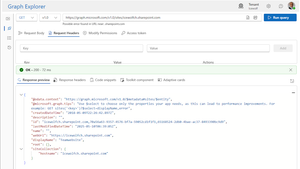
Hi kcelmer I found an error in the code The Graph Endpoint sites only returns the "Team site (classic experience)" https://graph.microsoft.com/v1.0/sites/<tenant>.sharepoint.com If you use the following command you get the Websites with the ID's Get-MgSite | where {$_.DisplayName -match "demo"} Get-MgSite | where {$_.DisplayName -eq "IcewolfDemo"} ############################################################################### # Connect with Entra Application ############################################################################### # Application Permissions # - Sites.ReadWrite.All # - User.ReadBasic.All ############################################################################### $AppID = "2f79c9c9-4024-4d46-a06f-67c1f2d92b02" $TenantID = "icewolfch.onmicrosoft.com" $CertThumbprint = "A3A07A3C2C109303CCCB011B10141A020C8AFDA3" Connect-MgGraph -AppId $AppID -TenantId $TenantID -CertificateThumbprint $CertThumbprint -NoWelcome #Get User $UPN = "email address removed for privacy reasons" $User = Get-MgUser -UserId $UPN Write-Host "UserID: $($user.id)" -ForegroundColor Cyan $SiteID = "icewolfch.sharepoint.com,e5167e43-7495-4611-b74c-bbf2ffd85ce5,0c772746-d2d9-4c13-8176-bd41df1b7a6e" #IcewolfDemo #Create Body for Add/Remove $params = @{ value = @( @{ id = $SiteID } ) } #Add Follower Write-Host "Add Follower to Site: $($Site.Id)" -ForegroundColor Cyan Add-MgUserFollowedSite -UserId $user.Id -BodyParameter $params #Remove Follower #Write-Host "Remove Follower to Site: $($Site.Id)" -ForegroundColor Cyan #Remove-MgUserFollowedSite -UserId $user.Id -BodyParameter $params The Graph Query on the User is updated https://graph.microsoft.com/v1.0/users/<userprincipalname>/followedSites And the Followed Sites in SharePoint is reflecting that (takes a few Minutes until that's visible here) So yes, it works but you have to figure out the SiteID and use that as a Parameter. Kind Regards Andres2Views1like1CommentRe: PowerShell Script to Follow a SharePoint Site for a User
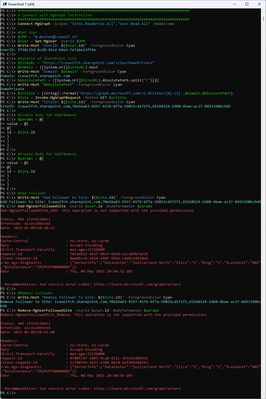
Hi kcelmer I did play around a little bit with Interactive Permissions (like in your example). I was not able to add or remove a Follower (other than my own user) ############################################################################### # Connect with MgGraph Interactive ############################################################################### Connect-MgGraph -Scopes "Sites.ReadWrite.All","User.Read.All" -NoWelcome #Get User $UPN = "email address removed for privacy reasons" $User = Get-MgUser -UserId $UPN Write-Host "UserID: $($user.id)" -ForegroundColor Cyan #Details of SharePoint Site $SiteURL = "https://icewolfch.sharepoint.com/sites/DemoPrivate" $Domain = ([System.Uri]$SiteURL).Host Write-Host "Domain: $Domain" -ForegroundColor Cyan $AbsolutePath = ([System.Uri]$SiteURL).AbsolutePath.split("/")[2] Write-Host "$AbsolutePath" -ForegroundColor Cyan $uriSite = [string]::Format('https://graph.microsoft.com/v1.0/sites/{0}:{1}',$Domain,$AbsolutePath) $Site = Invoke-MgGraphRequest -Method GET $uriSite Write-Host "SiteID: $($site.id)" -ForegroundColor Cyan #Create Body for Add/Remove $params = @{ value = @( @{ id = $Site.ID } ) } #Create Body for Add/Remove $params = @{ value = @( @{ id = $Site.ID } ) } #Add Follower Write-Host "Add Follower to Site: $($Site.Id)" -ForegroundColor Cyan Add-MgUserFollowedSite -UserId $user.Id -BodyParameter $params #Remove Follower Write-Host "Remove Follower to Site: $($Site.Id)" -ForegroundColor Cyan Remove-MgUserFollowedSite -UserId $user.Id -BodyParameter $params Tried with an Entra App and Certificate for Authentication. Be aware that List followed sites is not Supported with Application Permissions https://learn.microsoft.com/en-us/graph/api/sites-list-followed?view=graph-rest-1.0&tabs=http ############################################################################### # Connect with Entra Application ############################################################################### # Application Permissions # - Sites.ReadWrite.All # - User.ReadBasic.All ############################################################################### $AppID = "2f79c9c9-4024-4d46-a06f-67c1f2d92b02" $TenantID = "icewolfch.onmicrosoft.com" $CertThumbprint = "A3A07A3C2C109303CCCB011B10141A020C8AFDA3" Connect-MgGraph -AppId $AppID -TenantId $TenantID -CertificateThumbprint $CertThumbprint -NoWelcome #Get User $UPN = "email address removed for privacy reasons" $User = Get-MgUser -UserId $UPN Write-Host "UserID: $($user.id)" -ForegroundColor Cyan #Details of SharePoint Site $SiteURL = "https://icewolfch.sharepoint.com/sites/DemoPrivate" $Domain = ([System.Uri]$SiteURL).Host Write-Host "Domain: $Domain" -ForegroundColor Cyan $AbsolutePath = ([System.Uri]$SiteURL).AbsolutePath.split("/")[2] Write-Host "$AbsolutePath" -ForegroundColor Cyan $uriSite = [string]::Format('https://graph.microsoft.com/v1.0/sites/{0}:{1}',$Domain,$AbsolutePath) $Site = Invoke-MgGraphRequest -Method GET $uriSite Write-Host "SiteID: $($site.id)" -ForegroundColor Cyan #Create Body for Add/Remove $params = @{ value = @( @{ id = $Site.ID } ) } #Add Follower Write-Host "Add Follower to Site: $($Site.Id)" -ForegroundColor Cyan Add-MgUserFollowedSite -UserId $user.Id -BodyParameter $params #Remove Follower Write-Host "Remove Follower to Site: $($Site.Id)" -ForegroundColor Cyan Remove-MgUserFollowedSite -UserId $user.Id -BodyParameter $params Hope that helps. Kind Regards Andres1View2likes3CommentsRe: need to create a PTR record via PS | Need your help !
Hi Arlecchino You check if the Zone exists, but do not acutally create one if it does not exist... # Check if reverse zone exists $zoneExists = Get-DnsServerZone -Name $reverseZone -ComputerName $DnsServer -ErrorAction SilentlyContinue if (-not $zoneExists) { throw "Reverse zone $reverseZone does not exist on server $DnsServer" }91Views0likes1CommentRe: Entra PIM Role Activation
Hi cvaxel Just use the Microsoft.Graph PowerShell Modules Source: https://learn.microsoft.com/en-us/answers/questions/1879083/programmatically-activate-my-entra-id-assigned-rol Kind Regards Andres Connect-MgGraph -Scopes "RoleAssignmentSchedule.ReadWrite.Directory" -NoWelcome $context = Get-MgContext $currentUser = (Get-MgUser -UserId $context.Account).Id # Get all available roles $myRoles = Get-MgRoleManagementDirectoryRoleEligibilitySchedule -ExpandProperty RoleDefinition -All -Filter "principalId eq '$currentuser'" # Get Global Reader $myRole = $myroles | Where-Object {$_.RoleDefinition.DisplayName -eq "Global Reader"} # Setup parameters for activation $params = @{ Action = "selfActivate" PrincipalId = $myRole.PrincipalId RoleDefinitionId = $myRole.RoleDefinitionId DirectoryScopeId = $myRole.DirectoryScopeId Justification = "Needed for work" ScheduleInfo = @{ StartDateTime = Get-Date Expiration = @{ Type = "AfterDuration" Duration = "PT8H" } } } # Activate the role New-MgRoleManagementDirectoryRoleAssignmentScheduleRequest -BodyParameter $params42Views0likes0CommentsRe: Decommissioning Last Hybrid Exchange Server – All Mailboxes in Cloud, Still Using AAD Connect
Hi Moustafa-Sherif With Exchange 2019 CU12 you can use Recipient Management and don't need Exchange Server anymore https://learn.microsoft.com/en-us/exchange/manage-hybrid-exchange-recipients-with-management-tools220Views0likes1CommentRe: Assigning a Manager with PowerShell Graph – Manager Not Found
Hi U375700 The Output shows that the command is unknown. Have a look at this one: Set-MgUserManagerByRef https://learn.microsoft.com/en-us/powershell/module/microsoft.graph.users/set-mgusermanagerbyref?view=graph-powershell-1.0 Kind Regards Andres100Views0likes1CommentRe: Decommissioning Last Hybrid Exchange Server – All Mailboxes in Cloud, Still Using AAD Connect
Hi AshJor >Do we have to just turn off the last physical server and not uninstall exchange server 2019 ? Yes exactly https://blog.icewolf.ch/archive/2022/04/27/install-and-use-exchange-2019-cu12-recipient-management-powershell/ >Any gotchas or issues managing recipients via the new Exchange Management Tools post-decommission? Make sure, your other systems (IAM, Automation, Ticketing Tool, etc) are able to work with the Recipient Management. You can't use a Remote PowerShell to connect to Exchange anymore. You need to be able load the Commandlets https://blog.icewolf.ch/archive/2022/11/16/how-iam-systems-can-use-exchange-recipientmanagement-pssnapin/ Kind Regards Andres163Views0likes1CommentRe: We have a hybrid setup with on prem exchange server and O365 exchange integration.
Hi Gobarr , Probably the OU "disabled accounts" is not synced by Entra connect sync or Cloud Sync to Entra ID. If there is no User, there is no way to attach the Exchange Attributes to a User and therefore there is no Mailbox. Maybe also have a look at the Holds instead of converting the Mailbox https://learn.microsoft.com/en-us/exchange/policy-and-compliance/holds/holds?view=exchserver-2019 Kind Regards Andres114Views1like0Comments- 62Views0likes0Comments
Re: Removing Exchange on-prem
hi dbrenserv2024 I've done that in the past. It's not about removing Exchange - it's about converting to Cloud Only and removing the OnPrem Infrastructure. https://blog.icewolf.ch/archive/2021/05/22/decomission-exchange-hybrid-and-move-to-cloud-only-part-1/ https://blog.icewolf.ch/archive/2021/05/31/decomission-exchange-hybrid-and-move-to-cloud-only-part-2/ Kind Regards Andres79Views1like1CommentRe: Two Exchange servers in one domain
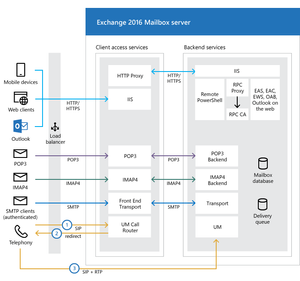
Hi sie65 Clients connect to the Client Access Services. It resolves on what Database the Mailbox is and what Server is responsible for that Mailbox Database and proxies the connection to the Backend Services. https://learn.microsoft.com/en-us/exchange/architecture/architecture?view=exchserver-2019 Kind Regards Andres71Views0likes2CommentsRe: Limit unauthenticated mail
Hi Gly >I could create a connector that contains the IP-ranges of our empoyee networks, but that seems a bit backwards What would be the diffrence? You probably have disabled Mailflow from the Internet to Exchange. So already today only Internal Applications can send unauthenticated Mails. What i would recommend: Analyze your SMTP Protocol Log. Talk to the Appliation Owners to use SMTP Authentication For those Applications that do not support SMTP Authenication, use a special Relay Receive Connector and add only the IP's (Not IP Ranges) for example: relay.domain.com (and use a matching Certificate) so the Clients can use TLS. https://practical365.com/exchange-2019-smtp-relay-services/ Last remove 'anonymous authentication' from the 'Default Frontend' Receive Connector. Kind Regards Andres714Views1like1CommentRe: Few questions about Exchange Online PowerShell module
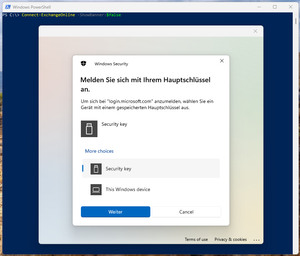
Hi Pawel Jarosz Q: My question is as I've dag a little bit in the Internet - is it even possible to log in to Exchange PowerShell using FIDO key? Yes that's possible. What Version of PowerShell are you using? (Example below is PowerShell 5.1) What Version of the ExchangeOnlineManagement PowerShell Module are you using? Recommend you to use the latest Version https://www.powershellgallery.com/packages/ExchangeOnlineManagement/3.7.1 Q: Second is question is, is there a way to set up this setting using graph API module? No, Exchange Online Management is using the ExchangeOnlineManagement PowerShell Module. No Graph Administration possible. Q: And final question, my colleague told me that Exchange Online PS module is going to be decom this year - does anyone has any news on this? https://techcommunity.microsoft.com/blog/exchange/deprecation-of-remote-powershell-in-exchange-online-%e2%80%93-re-enabling-or-extending-r/3779692 Q: The app name in the error is "Microsoft Exchange REST API Based Powershell" You are already using the new one. Kind Regards55Views0likes0Comments
Recent Blog Articles
No content to show