User Profile

ATWork1075
Copper Contributor
Joined 3 years ago


User Widgets
Recent Discussions
Re: Making cells/columns inaccessible until a certain amount of time has passed since a specific date?
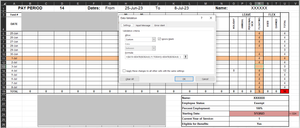
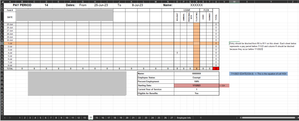
SergeiBaklan Thank you. Unfortunately I am still not achieving what I am looking for. As you can see, all cells except for R9 and R13 allow for values to be entered into the cells.1.6KViews0likes1CommentRe: Making cells/columns inaccessible until a certain amount of time has passed since a specific date?
Thank you, this is very close! The formula needed to be changed to say > rather than <, which created the conditions I was looking for. Only issue is that the A column value has to be selected in the equation, so if I apply this =$A11>EDATE($O$24,6) to the Data Validation, then the command is not based on whether the user is accessing the document 6 months from the date in O24 at the time of access.1.7KViews0likes3CommentsRe: Making cells/columns inaccessible until a certain amount of time has passed since a specific date?
SergeiBaklan Thank you, this worked partially. The validation needs to happen across multiple sheets (pay periods), and automatically prevent the user from entering data in those cells till the date identified by the formula has been reached in real time. So if the equation is =TODAY()>EDATE(C5, 6) with C5=1/1/2023 and the answer to EDATE(C5,6) being 7/1/2023, I want excel to recognize that the date 7/1/2023 has been reached in real time and disable the function for the remaining cells. Is this possible?1.7KViews0likes7CommentsMaking cells/columns inaccessible until a certain amount of time has passed since a specific date?
I want to edit a timesheet so that a employee cannot edit specific cells/columns till 6 months past a certain date has passed. I have attempted with conditional formatting and data validation using an =AND formula (=AND('Employee Info'!$C$5<>"",'Employee Info'!$C$5>='Employee Info'!$C$10)), but neither has worked. Will this require coding? Thanks!1.9KViews0likes9Comments
Recent Blog Articles
No content to show