User Profile

Maciej_Kopczynski
Brass Contributor
Joined 3 years ago


User Widgets
Recent Discussions
Re: Excel Array Problem
gvera1855 It would be much easier to help you if you had uploaded a sample file. Please do so so that we can see the data layout and what is what. From what I can see there is 100% a dimension problem. You are trying to input "" when a cell in T4# array is empty and 2 values from the sortby(...) function when it is not.869Views0likes2CommentsRe: Excel short date - month and year change only
Hi! There are many ways you can try, but assuming you want your year to be 2024 and month april for all your dates just try this formula: =DATE(2024, 4, DAY(D10)) My formula is in E10 and references the date in D10. Adjust the referencing and drag and drop! Leap years won't be a problem because 2024 is fortunately also a leap year so there won't be errors for 29.02 either.600Views0likes0CommentsRe: Box and whisker plot issues
Hi! Unfortunately, your source data is in wrong format. The Box & whiskers plot in Excel needs raw data - not aggregated Quartiles, means etc. You must give all data points to get the correct output. Excel will calculate all metrics itself. I hope it helps!4.4KViews0likes0CommentsRe: I want conditional formatting to update/refresh automatically
JO_MERCER, You are probably using TODAY() to get the current date. TODAY() is a volatile function. It means that it recalculates whenever the spreadsheet recalculates. Reopening the file triggers the recalculation so the TODAY() function and conditional formatting updates. You could also use a keyboard shortcut for manual recalculation - F9 or Fn + F9. If you want it to be done 100% automatically then it is possible with help of macros. I was not sure how your layout looks like, so I just drafted my version and added a button that lets you recalculate the whole workbook with a click. See the file attached.4KViews0likes0CommentsRe: How to stay on the Home page instead of being kicked off and back to File
Stashgal_2024 , Well the behaviour you described is really weird, unless I do not fully understand what your issue is. You might as well share some screenshots that would showcase what exactly happens. Also what Excel version are you using? Try restarting the program + see if this behaviour is the same for other Excel files too.616Views0likes0CommentsRe: Is it possible to use a cell value for a workbook reference?
Hi! You could achieve it using Power Query as HansVogelaar mentioned. The solution would vary depending on where your files are stored because of the path - locally on your C drive, in Sharepoint or OneDrive. You would have to setup a table with path to the file where your data resides that we would use as parameter in our query. It should be pretty straightforward to build. This workaround would require occasional query refreshes (as often as your data changes in the source file). If you want to try this method and need assistance, let me know.709Views0likes0CommentsRe: MIN() function not working on data returned from FILTER()
Hi Mark_Stoneking, I am not sure if this is what you are trying to achieve. Give it a look. See the file attached. I do not know why MIN doesn't work for your spilled FILTER() range. Maybe you forgot about the "#" symbol in the reference. If this doesn't answer your question please do share a file and I will investigate further. Regards2.5KViews0likes2CommentsRe: How do I conditional format a column if certain value is present in a different column
ellaumbrella Let me clarify your doubts regarding table structural references inside conditional formatting dialog box. It might not seem like they work because you do not get to see Scouts[Assignment] after selecting the whole Assignment column from the actual table. The thing is it only doesn't display the name itself. It shows regular ranges reference but it works like a structural reference - meaning when your table expand the conditional formatting will folow and also expand to next cells. It is simply the way dialog boxes work in Excel - they are a bit buggy and hard to work with. I do not know if this is intended by Microsoft but they seem to be slowly working on updating the funcionalities of dialog boxes. While the solution suggested by Chat GPT works fine, it could be also written like this: =COUNTIF($AJ$2:$AJ$34, E$1)>=1 While writing a custom formatting rule you input a formula as if you wanted to write it for the first cell and then drag it down or right. Kind regards401Views1like0CommentsRe: Choosing best function
TThom3000 I'm afraid it is more of a model question rather than a simple formula. The problem is not a one formula thing. I assume you want to calculate average gap (in days) between consecutive orders of the same item. In this case you will have to get a unique list of items. Then for each item you need to list consecutive sale dates and calculate the difference between each. After that apply average on top of your calculated differences. Some functions you could use: UNIQUE(), AVERAGE(), SUM(), SUMIF(), SUMIFS(). I would also advise you to learn how to use pivot tables as they can become really handy for this and similiar scenarios.617Views0likes1CommentRe: Unable to use Recommended charts option
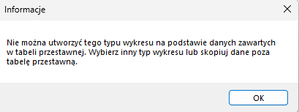
luiegiii I haven't heard anything about such changes. I can't recall ever experiencing this issue but I also do not do a lot of pivot charts. As of now I get an error message (The picture shows polish version - sorry for that) saying that the selected chart type isn't available for the data selected in the pivot table. These "newer" charts introduced after 2016 are not as customizable as "old-fashioned" charts. Nevertheless, I'm glad you could handle it! Have a great weekend!3.9KViews0likes0CommentsRe: Why does my excel look different?
There was a time I was also able to get "The newer look" for my Office applications. It was a functionality available under "What's new?" in Word/PowerPoint/Excel. I managed to have rounded edges on Windows 10. My guess is that Microsoft wanted to test the waters and encourage Windows 10 users to switching to W11. Unfortunately, this feature disappeared later.2.5KViews0likes0CommentsRe: Unable to use Recommended charts option
It is not possible to create a histogram/Pareto chart (and all the "newer" chart types) based off a pivot table. Windows versions do not allow it too. However, you could use a workaround by simply referencing your pivot table data in a regular cell range. Then use the new cell range as the source for your histogram. Or try to construct a column chart and shrink the gap width so that it looks like a histogram.5KViews0likes2CommentsRe: LINEST function
Hi Szymeqpl_, Always check if the data has linear shape on a scatter plot before jumping to linear regression. In Your case it has, so we can calculate the coefficient and intercept values. See attached the file containing three ways You can calculate a and b. After you have it interpolation/extrapolation shouldn't be a problem.815Views1like0Comments
Recent Blog Articles
No content to show