User Profile

keith2235
Copper Contributor
Joined 3 years ago


User Widgets
Recent Discussions
Re: Privacy option infinite loop
Thanks for your response and apologies for the delayed reply, I've been away. I never got a chance to try out your workaround, because for me, the problem seems to have gone away! I have not knowingly changed any settings. I did however run Windows update a few days ago.3.5KViews0likes0CommentsRe: Privacy option infinite loop
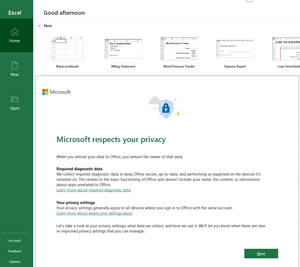
Kidd_Ip Thanks for that. The trouble is that when I open Excel, the very first thing that pops up is the "Microsoft Respects Your Privacy" popup: I can't click on options or anything else at all, until I have completed the Privacy dialogue. At the and of the dialogue, I'm told that a restart is required. If I ignore that & try to go through the options that you suggest, when I get to the part when I click on "Privacy settings...", I just get a pop up stating that a restart is required! So I can't actually get into the privacy options to change them!3.4KViews0likes0CommentsPrivacy option infinite loop
I have a problem that has just started with all Office 365 Apps. 1. I start the app, e.g. Outlook. 2. A privacy popup appears asking me if I want to send optional data or personalise my experience. 3. I select no to both options & click next 4. I get a message saying that I need to restart Office to apply the Privacy changes? What changes? 5. So I close Outlook. No other Office apps are running. Go back to step 1! This goes on forever. I just want to turn these option off. The fact that Office needs a restart suggests to me that these options are on by default & currently I cannot actually turn them off!4.3KViews0likes5Comments
Recent Blog Articles
No content to show