User Profile

Laurie_Aldam
Brass Contributor
Joined 3 years ago


User Widgets
Recent Discussions
Re: Conditional Access and -Online Device registration error
We are experiencing the same issue and have never had problems harvesting hardware hashes before. Our CA policy requires compliance for Office 365 SharePoint Online - 00000003-0000-0ff1-ce00-000000000000 This policy now seems to categorize Microsoft Graph Command Line Tools as part of the Office 365 SharePoint Online application. After reviewing the documentation, I concluded it doesn’t apply to us since our compliance policies target users, not devices. I’ll try explicitly excluding Microsoft Intune Enrollment and Microsoft Intune and will report back. Update: I've tried excluding Microsoft Graph Command Line Tools, Microsoft Intune Enrollment and Microsoft Intune from the CA policy with no success.65Views0likes0CommentsWindows Hello for Business 0x80090010 NTE_PERM
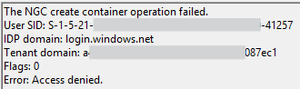
Hi all, I'm encountering an issue with Windows Hello for Business on the latest version of Windows (July 2025 update). The setup process fails during initialisation, and no biometric or PIN options are being provisioned for the user. Environment: Windows version: 11 24H2 Enterprise (latest update) Deployment mode: Hybrid Cloud Trust Hybrid joined devices Symptoms: Users are prompted to set up WHfB but the process fails at the last step with error 0x80090010 Users who already have WHfB authentication methods created can successfully login Event ID 311 & 303 in the User Device Registration logs Screenshots: Troubleshooting so far: Unjoined and rejoined to Entra ID Granted modify permissions on folder in which NGC container would be created Rolled back to June 2025 update (this worked) So it seems like this is caused or related to the latest Windows Update, which is rather unfortunate for us as we are just beginning to rollout WHfB for our organisation. I'm posting here to raise awareness of the issue, if there is a more appropriate place to post then please suggest.Azure Update Manager shows machines up to date, Server Manager and settings UI does not
Our machines (Arc-enabled and VMs) are updated with Azure Update Manager in our environment. The Azure portal shows that the machines are up to date, but Server Manager and the settings UI in the guest OS indicate that they have not checked for updates in months. Windows Admin Centre also confirms that the machines are up to date, and I have verified this with the Get-Hotfix PowerShell Cmdlet and the event logs. Has anyone else experienced the same issue? Thanks357Views0likes0Comments
Recent Blog Articles
No content to show