User Profile

BA_Max
Iron Contributor
Joined 3 years ago


User Widgets
Recent Discussions
Re: Work out when 2 different priorities each with different baseline points, will match up
meera_lynn Something like this? I think having a table to compare is neither here or there - it'd probably be easier using a dropdown (included) or using the same formula you could do a lookup table / function for each person on hold to consider how many "points" they have. I do think that the x10 aspect of points is kind of arbitrary though, it might be worth doing some research into how much extra weight you apply per tier. Edit: I provided a table because I misread the question, whoops. I'm pretty sure your table is so simple it'd be a case of "have they been on hold for 100x less" for high to normal, etc.239Views0likes0CommentsRe: conditional formula excel
bbsin 1) You can use MONTH within conditional formatting - i.e., MONTH(A1) = 2 2) This would be easier done if you just used full dates within the top row rather than "Jan 24". You can use formatting to make it appear as Jan 24 after the fact. Doing it this way, you can simply do EDATE and MOD to check if the multiple is of 12 then minus one from the other and round down to see if it's 60. =( (MOD(EDATE(A1,B1),12) = 0) * ((B1 - A1) > 60) ) I believe something like that should work but I've not tested it - hopefully the idea carries in the formula.410Views0likes0CommentsRe: Missing Instruction/Error in Automation Script
jsears775 Try removing some of the double quotes: "=OR(RIGHT(A1,1)=\"\"2\"\",RIGHT(A1,1)=\"\"7\"\")" "=OR(RIGHT(A1,1)=\"2\",RIGHT(A1,1)=\"7\")" I'm also not entirely sure, but couldn't you wrap in single quotes to make it easier to read? conditionalFormatting.getCustom().getRule().setFormula('=OR(RIGHT(A1,1)="2",RIGHT(A1,1)="7")'); What line is line 58 - it'd probably help if you posted the entire code.790Views0likes1CommentFiguring out Excel Crash reason
Hi I've posted a similar thing on the answers.microsoft but realised I couldn't upload a spreadsheet example. My issue is that a specific formula seems to be causing a crash that didn't prior to the most recent update: =SUMPRODUCT(BYROW(B4:B8,LAMBDA(unique_list,FILTER(F4:F21,G4:G21=unique_list))),C4:C8) Pasting the above formula into a cell always results in a crash first time. I've tried splitting this up into SUMPRODUCT and the LAMBDA portion, which seems to result in a crash maybe 50% of the time (or more, unsure what is triggering it). The attached sheet is set up with the broken formula in cell B2 and the crash can be triggered by editing B2 Formula then hitting enter but this doens't always crash. I've found sometimes if you swap the lookup letter area (i.e., change a G to a Z) then it can crash too, but unsure if there's a correlation between the letters and crashing (probably not). Hope someone more versed in crashes can figure this one out! I'm assuming a future update will just have to patch this and I'll have to figure out an alternative formula for the meantime. Please note that the error / crash does not occur on Excel for Web if you need to open the sheet and it won't open without crashing for you. Thanks M818Views0likes2CommentsRe: Formula Help
Rich_950 In cells D1 and E1 I've included the values "11" and "Andrew Jones" which are variable cells - I'd personally opt for a dropdown menu using UNIQUE but I'll answer your question first. I've also assumed these are in date order? But I'd recommend you add a date column and modify the formula to filter based on the top 3 etc. =SUM(IF(TAKE(FILTER(A1:A14,B1:B14=E1),3)<D1,1,0)) One issue with your example is though that it's not clear if you want the top or bottom 3 - the above example assumes that you want the top 3 and that new entries will be at the top of the list. Your example would result in 3 for Andrew Jones and 1 for Charles Bridge regardless of whether you want to take from the top or bottom becuase there are only 3 entries for Charles & all entries for Andrew are below 11. I'd probably just sortby the row number and reverse the data in the formula if you needed it to take from the bottom.660Views0likes1CommentRe: Copilot Notebook feature
Andre_Caron you've listed some negatives there (the having to pick between work or web) but when I was using - it in the limited time it showed up on the devices in our workplace - we actually didn't have this option, it just functioned very much like the Bing.com chat (now copilot). Could it be that you only have Web available because you're not signed into a work account? I would have thought it was Bing Enterprise if you were on work.50KViews0likes1CommentRe: Copilot : Minimum Licences ?
LUDOVIK DOPIERALA We've just been passed the same information: It would be truly disappointing if Microsoft decided to cut out their "smaller" customers that don't need 300+ licenses at £10,000 - £16,000 per month (E3 / E5 @ 300 each) + an additional £9,000 for the £30pm per user copilot cost. A minimum buy in cost of "general release" of £208,000 per annum is ridiculous.21KViews1like6CommentsRe: Does anyone have any idea of when we will be able to start using Copilot?
WCasey "Copilot for Windows" is not the same as "Copilot for Micosoft 365". The latter is the paid service @ £30 per month per user which will be available on 01/11/2023 to Enterprise users. Copilot for Windows is effectively an intergrated version of Bing Chat with a few extra features (it can turn on dark mode and a few other settings etc.). Copilot for Microsoft 365 is a new AI service which will help you be more efficient with work.2.9KViews2likes1CommentRe: Reformatting and change the order of date
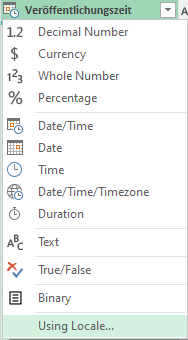
LarissaM711 as this is a Locale issue, you need to process the date/time as a US type date (that's what it looks like). Try adding this step in after the initial loading of the data into Power Query: = Table.TransformColumnTypes(#"Changed Type", {{"Veröffentlichungszeit", type datetime}}, "en-US") This can be done through the editor by clicking the following: (using Locale) Date/Time & English (US) Hope that helps!1.3KViews0likes1CommentRe: Reformatting and change the order of date
First of all I would suggest importing your csv into Excel via Power Query - opening a csv directly in Excel will try and automatically convert any text dates into actual date fields which can not have a desired outcome. I think your issue is that 07/14/2023 is being treated as text which is likely due to yur regional settings. If you're operating on a desktop, this needs to be done at the PC level (search regional settings in the start menu). If you're on Excel for web, click File > Options > Regional Format Settings and make sure this matches what you're expecting (Excel for web). A workaround is to change the csv to a txt which will prevent Excel from automatically trying to parse the dates - you can manually split the file then.1.4KViews0likes3CommentsRe: Bing Chat Enterprise (with Copilot) not using 'external' web data?
knutsalv based on their most recent AMA, there were a few Q/As relating to this: Bing Chat Enterprise doesn't have access to your files, emails, or work data in Microsoft 365 - unless you copy this information into the chat. Otherwise it only has access to information from the public web or that appears in your Edge browser (if you've granted the Edge sidebar permission to use page context). If the customer has M365 Copilot, they will have all the capabilities of Bing Chat Enterprise. Are you currently using both Bing Chat Enterprise along with Copilot on the EAP? Microsoft hasn't reported any kind of limitation involving both of these so it doesn't sound like it's working as intended!3.9KViews1like6CommentsRe: Getting help from Copilot what I can ask / prompt Copilot - opinions?
Tomislav Karafilov This was asked in their most recent AMA: Q: Is there a formal Microsoft Copilot training site (or a "prompt ideas" function integrated w/ Copilot) to ensure we don't spend a fortune on Copilot only for employees to ignore it? A: Hey Cody, we'll be releasing user guides in the future that can help with user onboarding, including prompt ideas.3.9KViews2likes0CommentsRe: Is Power BI Copilot Functionality included in M365 Copilot?
Althought I don't think it's been fully confirmed, there were have been different Copilot licenses mentioned across the various communications we've had. Copilot for Microsoft 365 Copilot for Business Dynamics 365 Copilot for Power Platforms I'd assume Power BI mainly falls under Power Platforms.3.4KViews0likes0CommentsRe: Microsoft Copilot License Requirements
At the bottom of that link, just check the footnotes. Footnotes: [1] For small and medium business (SMB) customers, Microsoft 365 Business Standard or Business Premium will be eligible base licenses. So it seems you will be able to add Copilot to both Business Premium or Business Standard so long as you fall under their definiton of "Small or Medium Business" --> defined as businesses with less than 500 employees or having up to 250 PCs.50KViews2likes0Comments


Recent Blog Articles
No content to show