User Profile

BhoomeshJoshi
Brass Contributor
Joined 3 years ago


User Widgets
Recent Discussions
My SharePoint page is loading in Teams from the browser, but not loading in the Teams desktop app
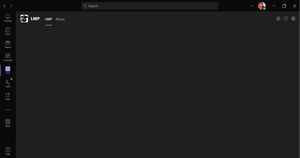
Hello All, I have created a Teams app and added a SharePoint page as a Teams personal tab. I have referred to the links below for the same. https://www.c-sharpcorner.com/article/sharepoint-site-as-static-app-in-ms-teams/ https://aakashbhardwaj619.github.io/2020/01/16/Add-SharePoint-Site-To-Teams-Personal-App.html My SharePoint page is loading in Teams from the browser, but not loading in the Teams desktop app. Please refer to the screenshot below. Thanks251Views0likes6CommentsAutomation Testing with SPFx React in SharePoint Online
Hello Everyone, I have created an SPFx solution for SharePoint Online. I have use React under the SPFx project. I need to implement Automation Testing for my SPFx React project. I have checked the automation frameworks that work with SPfx with React and SharePoint Online. I found 3 frameworks Selenium, Cypress, and Playwright. Can anyone suggest to me which one is the better tool for Automation with SPFx React in SharePoint Online? Thanks in Advance.526Views0likes0CommentsHow to exclude specific SharePoint list from Search
Hello Everyone, I am using SharePoint online modern team site. I have created lists and libraries under that site. When anyone searches from the SharePoint search bar from the SharePoint ribbon it returns SharePoint lists and libraries data. I need to exclude specific list items from the search. The search results should not return the data from the specific list. I have tied as mentioned in the below link but it is not working as expected. https://support.microsoft.com/en-us/office/enable-content-to-be-searchable-d7ba92db-8618-43fe-87ee-adf03d973062#__toc355013925 Does it take some time to crawl? Is there any other way to achieve the same? Thanks523Views0likes1CommentRe: SharePoint page is not load in Teams personal app.
Nivedipa-MSFT Thanks for the update. I have added the below code in my app. Hope that is fine. "resource": "https://sharepointonlineempower.sharepoint.com/" But the app still does not load under the Teams App Can you please let me your feedback on the same? Thanks2.8KViews0likes5CommentsSharePoint page is not loading in personal tab of app under MS Teams
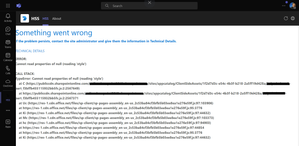
Hello All, I have created a Teams app and added a SharePoint page as a Teams personal tab. I have referred to the below links for the same, https://aakashbhardwaj619.github.io/2020/01/16/Add-SharePoint-Site-To-Teams-Personal-App.html https://www.c-sharpcorner.com/article/sharepoint-site-as-static-app-in-ms-teams/ My SharePoint page is throwing an error in the Teams app. Please refer to the below screenshot, Can anyone help me with the same? Thanks432Views0likes0CommentsSPFx project with multiple web parts is not working locally using gulp serve
Hello Everyone, I have created a SharePoint Framework with a React project. I have created different 14-15 web parts under that project. Now, I need to run that project locally on the workbench. When I execute "gulp serve" command in the VS Code terminal the local workbench is open but sometimes web parts are missing under that and sometimes the local workbench is stuck. The local workbench is not working due to many web parts. So, whenever I develop new functionality. For testing the same, I need to generate the package using "gulp bundle --ship" and "gulp package-solution --ship" commands and then deploy the package to the site. Can anyone have any suggestions for the same? Thanks in Advance.587Views0likes0CommentsSharePoint Online User Information list Email column returns blank value
Hello Everyone, I have created an unlicensed user in Microsoft 365. I have shared the SharePoint site with that user. When I tried to get data from the User Information List I did not find the Email of that unlicensed user. Also, I have checked "Work email" under SharePoint User Profiles but it is blank. Why does the user "Work email" field return a blank value? Thanks774Views0likes2CommentsWill SharePoint Online Classic Team Site Content Editor WebPart Discontinued?
Hello All, Microsoft has announced some of the features will be discontinued in the future. Below is one of the example I have created a SharePoint online classic team site. I have created many subsites under that team site. I have added a content editor web part in all of those sites for customization. I have tried to check if the classic will discontinued or not. So, I found " We're not deprecating the "classic" experience; both "classic" and "modern" will coexist." from Microsoft's Official site. Please https://learn.microsoft.com/en-us/sharepoint/dev/solution-guidance/modern-experience-customizations to check the official link from Microsoft. Do I need to change everything to a modern experience or does Microsoft keep the classic experience and the Content Editor web part for SharePoint online? Thanks2KViews0likes5CommentsSPFx Teams app working locally but not working after being installed in Teams
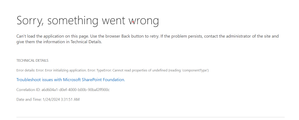
I have created the SharePoint Framework app for Microsoft Teams. When I run the app locally, It is working as expected. But when I generated a package for Teams using Teams Toolkit from VS Code and deployed the same package in Teams. It threw the below error. Can anyone help me with the same? Thanks372Views0likes0CommentsHow to create custom section layout options for SharePoint online modern site pages?
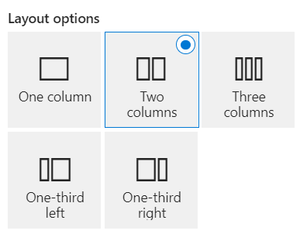
Hello Everyone, SharePoint provides default layout options below as mentioned in the screenshot. How can we create custom section layout options as per our needs? If there are any ways to create custom section layout options then please let me know your thoughts on the same. Can anyone help me with the same? ThanksRe: Microsoft Teams tab using SharePoint Framework always interact with SharePoint Online root site
Meghana-MSFT - Thanks for the quick response. With the above approach, I need to hard-code the SharePoint Site URL. Is there any other way to achieve the same without adding any fixed URL? Because there are multiple users who are using my SPFx web part. If I hard code the URL then it will be for a specific site only. So, I need som dynamic way to set the URL based on the user site. Thanks604Views0likes1CommentMicrosoft Teams tab using SharePoint Framework always interact with SharePoint Online root site
Hello Everyone, I need to create an SPFx web part that supports SharePoint Online as well as Teams So, I have created the SPFx web part to generate the app package, and added that app package to SharePoint online as suggested below links, https://learn.microsoft.com/en-us/samples/officedev/microsoft-teams-samples/officedev-microsoft-teams-samples-tab-channel-group-spfx/ https://siddharthvaghasia.com/2019/06/09/adding-spfx-webpart-to-microsoft-team-tab/ The SPFx Teams Tab deployed successfully in the Team, But the associated lists are created under the root site. Can I change the destination of the list from the root site to another site? ThanksHow to update existing SharePoint App from App Store?
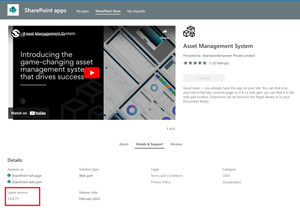
I am using SharePoint Online. I have installed one app from the SharePoint App Store. After some days publisher launched a new version of that app, but I am unable to update that app with the new version. Updated version in the SharePoint store Installed version in the SharePoint site Also, I have found below links, https://stackoverflow.com/questions/75319186/how-can-i-update-my-app-on-sharepoint-store-as-well-as-in-my-website https://stackoverflow.com/questions/76629599/how-to-update-existing-sharepoint-app-from-app-store But there is no Update or Get It button to update the SharePoint app from the store in my SharePoint site. How can I update the SharePoint app with the new version that is available on the SharePoint store on my SharePoint site? Thanks1.2KViews1like1Comment

Recent Blog Articles
No content to show