User Profile

CrazyKZ
Copper Contributor
Joined 3 years ago


User Widgets
Recent Discussions
Re: Can't open Excel files from Sharepoint
Dave_Zwyssig2245 Two interesting articles regarding MS 365: https://support.microsoft.com/en-us/office/how-do-i-turn-on-autosave-dbd19b49-ff3a-48f5-8294-671e33a6712c https://learn.microsoft.com/en-us/officeupdates/update-history-microsoft365-apps-by-date So far so good when I use the open method from within Excel and not using the File Explorer. I have to open Excel, point to the MS site, then the Sharepoint drive, then scroll to the file to open. Way slower, but at least it works now. 🙂2.1KViews0likes0CommentsCan't open Excel files from Sharepoint
I can't open any Excel files form Sharepoint. I can see the files and even open them locally, but they won't open from Sharepoint. I ran a full Office online repair but that didn't help. I have no add-ins. My Trust Center in Excel indicates the path of the drive. I've rebooted multiple times. No updates to Windows nor Office are needed. Some files can be opened, others can't. The main issue is running my macro from a file that is on Sharepoint that reads from a Sharepoint file in the same directory. It says that it can't open it. Then when I go point to it and try to open it, it also says that it can't open the file. It seems that the culprit might be one or several MS updates that happened recently. Is there a known issue related to Sharepoint and macro's running on a network drive? This is happening with two PC's in two different locations, both logged in with my Microsoft account. I uninstalled two MS updates this morning, but that didn't fix the problem. I can save a file to Sharepoint and even see it, but when I try to open it it says "I'm sorry, we couldn't open xyz file."2.4KViews0likes4CommentsRe: Outlook email account Disconnected
FcoManigrasso I am so relived that I got the accounts going again! Thanks for your help! Well, I wish that that was true about the contacts, but that doesn't happen. When I click on a new email starting from any one of the emails, it tries to pull from a list from one of the email addresses, but that list doesn't have any contacts at all. I have to click on the list to choose the "contacts" list. Perhaps the contacts aren't stored in the correct place in Outlook. When I click on the My Contacts from the left-hand menu, it shows 3 different choices. I can move them all from one to the other, but it still isn't going to the place that is automatically pulled up from starting an email. Can you help me with this?230KViews0likes3CommentsRe: Outlook email account Disconnected
FcoManigrasso Thanks for the clarification on the Control Panel. I wasn't aware of the differences. 🙂 I had to redirect the actual pst file and open it vs. the email account pst file. From there I was able to export a backup pst file and import it into the now working profile. Phew! The only issue I'm having now is the address book. How do I change the default address book to use when opening a new email? I can pull it up and use it, but each time I have to choose where it is.230KViews0likes5CommentsRe: Outlook email account Disconnected
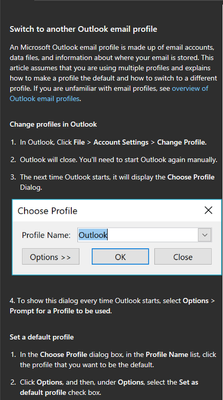
FcoManigrasso I need to get my address book and calendar back, but now I can't even open up the previous profile except for about 15 seconds, then it closes Outlook. 😞 What can I do? I'm at a loss. Are the Outlook profiles saved somewhere that I can pull a back up or something?230KViews0likes7CommentsRe: Outlook email account Disconnected
FcoManigrasso I did create a separate profile and that one email did work. 🙂 So, if I want to keep using the new (fixed) profile I'll need to set up all of my other email accounts (3 others) and also import contacts and calendar. Are there any helpful links of how to do that too?231KViews0likes13CommentsRe: Outlook email account Disconnected
FcoManigrasso And I saw while researching the help section of Outlook, that it said "Note: While a profile can include multiple internet-type accounts, it can include only one Exchange account." The email accounts I have are both part of the same domain name and are somehow apparently linked since I can't even delete the one that's not working without removing the main email account.230KViews0likes0CommentsRe: Outlook email account Disconnected
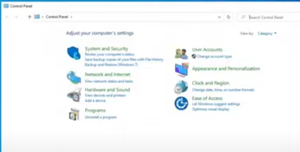
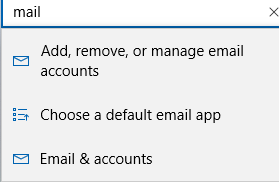
FcoManigrasso I actually saw that video. My Windows control panel doesn't look like that. Here is his control panel. Here is what my Control Panel looks like: When I type in Mail from the search section of the Control Panel, below is what shows up:230KViews0likes0CommentsRe: Outlook email account Disconnected
FcoManigrasso When I go to the Control Panel in Windows, it looks totally different than all other mentions of how to change the profile. When I click on Manage the email from the control panel, it makes me login to that account then brings me here: https://myaccount.microsoft.com/ I don't see anything about email profiles. 😞230KViews0likes4CommentsRe: Outlook email account Disconnected
FcoManigrasso Thank you for your response. In Windows 10 my mail section doesn't look like the link you suggested. It looks like the below. Under the first list, it gives me a list of accounts used by other apps and lists each of my emails. if I click on one of them, it goes to "manage." And that just logs me into that email account.242KViews0likes20CommentsOutlook email account Disconnected
About two days ago, one of my email accounts in Outlook stopped working. It's now saying "disconnected" in the lower info section. I can get the email on my phone and the web, but not in Outlook anymore. I've tried toggling the "Work offline" button but it still doesn't come on. When I toggle it, it will say "trying to connect." But it never does. It's trying to connect to Microsoft Exchange. I have another account that is the main email I use. I tried to delete the one that's not working, but it said that I would have to delete the main email account. I don't want to do that. Any thoughts?Solved280KViews0likes28CommentsRe: Excel not responding for 30 seconds
tanayprasad What's interesting is that it is now working. I'm not sure which task fixed it. I had previously ran the Office repair and it didn't find anything wrong. I ran the System File Checker tool and it indicated that there were errors that it did fix in Windows. I also now have two Accounts as logged in for Office 365. I have my work email and also my personal email at the same time now. My Outlook was giving me popups asking for my personal Office email password. The Office 365 account is a paid version through work, so I know I need that login. I'm afraid to remove my personal login knowing that it now works.27KViews0likes0CommentsRe: Excel not responding for 30 seconds
The following hasn't worked yet: I changed the default printer. The hardware graphics acceleration was already off. Safemode opens fine with no problems. Updates had already been made. Repair didn't repair anything. There are no Add-ins enabled What are the MS Actions Pane and Pane 3? Those are showing attached. Migrating to a new user profile would be a LOT of work. I'm not sure what I'm looking for with the event viewer.29KViews0likes0CommentsExcel not responding for 30 seconds
My Excel shows on the top bar as (not responding) when simply opening Excel, not even a file or worksheet. Then after 30 seconds it is fine until I close it and have to re-open it again. My Com Add-ins section has nothing loading at all. I've run the Microsoft Support and Recovery Assistant and even the repair Office/Excel function and it didn't find any issues. I have rebooted several times and Windows 10 and Office 365 is all up-to-date. And I tried disabling my AV software. So far, nothing has helped. Please help.30KViews0likes5Comments
Recent Blog Articles
No content to show