User Profile

TheSeal
Copper Contributor
Joined 3 years ago


User Widgets
Recent Discussions
Relationship error when field placed in value but not label
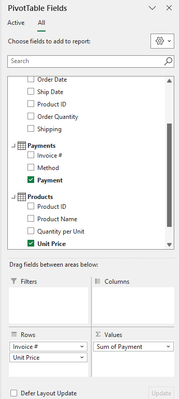
I have four tables linked via three relationships. Any combination of fields from the Orders and Payments tables placed in the pivot table is fine. Placing any field from Customers or Products in values produces a relationship error. My original quest was to create a measure to multiply quantity from the Orders table by Unit Price from the Products table plus Shipping from the Orders table. In the process of experimenting to solve the problem, I discovered the same problem with the fields from the Customers table. I have CLEANed and TRIMmed the data. I even resorted to pasting all the data as values into a new workbook and starting over. Data types on the unique identifiers match. For the Product ID shown in the screenshots both are whole number. I am well aware I can accomplish my original purpose in a few other ways. I was trying to learn something doing it this way. My goal in posting here is to understand the underlying problem, thereby growing my understanding of PowerPivot. Why do fields from two of the tables in the Data Model produce relationship errors when placed in values? Thank you.37Views0likes1Comment- 15Views0likes0Comments
Practical use of row_delimiter with TEXTSPLIT
Let me be clear, I am not asking HOW to use the row_delimiter part of the TEXTSPLIT argument, I am asking WHY. Any use case I have come up with so far would be better addressed by Power Query. Even if there is a reasonable example, it still seems like it would have to be looped using VBA. Is material out there on what the developers had in mind for using it? If anyone knows, please share or share any example you have. (I'm in pretty much the same place with the ignore_empty and pad_with parts of the argument as well.) Thanks!148Views1like6Comments
Recent Blog Articles
No content to show