User Profile

The737
Brass Contributor
Joined 3 years ago


User Widgets
Recent Discussions
Controlled Folder Access configured in Intune not being enforced on W10
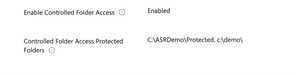
Hi All. I am working on enabling CFA on some machines and started with some test VMs at first. I created the ASR rule, enabled Controlled Folder Access and assigned it to a group to which my test VMs are members of. When checking in PowerShell, CFA is enabled on the machine: I am then using the test ransomware from the Defender https://demo.wd.microsoft.com/?ocid=cx-wddocs-testground that encrypts files in C:\Demo. The issue I'm facing is that the ransomware encrypts the files, even though CFA is enabled. What am I doing wrong? Thanks.1.2KViews0likes6CommentsRe: Controlled Folder Access configured in Intune not being enforced on W10
am1357, coming back to the thread after a longer break. I can't remove PowerShell from the allowed applications list. Tried both the PowerShell and the path to the encryptor from the playground. I get the same error. Any help would be appreciated.851Views0likes2CommentsRe: Controlled Folder Access configured in Intune not being enforced on W10
am1357, thank you for the answer. Do I need to remove PS as a protected application at a device level or can I do it from Intune? It shouldn't have any other negative effects on running PS I guess, right?1KViews0likes4CommentsRe: Blocking file uploads to all sites, unless safelisted
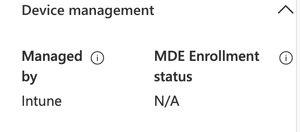
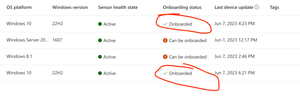
miller34mike , nope, the upload isn't even visible in the Activity Explorer. In terms of the extensions, I entered them with the "." yet it got removed. Interesting thing though... if I go on the onboarded devices page and look at the overview of the machine, the MDE Enrolment status is N/A. This gives me something to dig into....19KViews0likes7CommentsRe: Blocking file uploads to all sites, unless safelisted
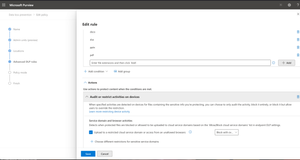
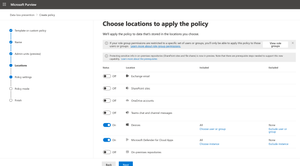
miller34mike, I tried creating a custom DLP policy under https://compliance.microsoft.com. Scoped it to devices and MCAS, yet I can't see any action that allows me to block the upload to the web page. What am I doing wrong?20KViews0likes24CommentsBlocking file uploads to specific URLs
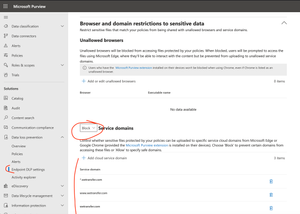
Hi. I am trying to prevent uploading of files (regardless if they're protected or not) to specific websites, like wetransfer.com. Can this be done in Defender for Endpoint or Defender for Cloud Apps? I added the domains in the Service Domains section in block mode in the Endpoint DLP settings, but I can still upload files to those restricted websites. Any help would be appreciated.


Recent Blog Articles
No content to show