User Profile

Anuradha_S
MVP
Joined 3 years ago


User Widgets
Recent Discussions
Not able to Connect to AVD VM which is joined to Onprem AD
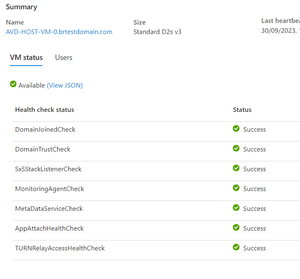
Hi, Issue I have AVD Environment having 3 Host VM's 2 VM - joined Azure AD 1 VM - joined Onprem AD Azure AD Joined VM's works without any issue. but when i try to access 1 VM in Onprem AD trough the AVD Web client, i am getting this error "We couldn't connect to the gateway because of an error. If this keeps happening, ask your admin or tech support for help." I need to clarify below 01. Can I connect AVD Host which is joined to Onprem AD that is not Sync to Azure AD appreciate your help to clarify above and if the answer is yes please tell me how i can configure that Thanks2.5KViews0likes4CommentsRe: On Prem Servers to Azure Cloud
Hi ashk17, Are you planing to migrate DC to Azure? if so the option is Redeploy, and also note azure ad is not same as On prem (Windows server Domain controller), if you use group policies, DNS, etc you still need to use Onprem DC or if not you need to use other azure services availble to full fill these requirements.2KViews0likes0CommentsRe: Move Azure resources from Tenant x to Tenant Y
to move VM's from one tenant to another tenant, you can use azure storage explorer what you have to do is 01. Get the snapshot or Backup of the VM or Disk (This is for safe) 02. Stop the VM 03. To get started we need to launch the Storage Explorer and Add accounts from both Tenants which has permissions in the Subscriptions under Accounts. 04. Browse the Source disk and Copy and Past in to the Target tenant Resource Group 05. Navigate to the Azure Portal > Resource Groups open the resource group where you have copied to disk to and click on the newly copied disk. 06. Create a VM using the Disk to move the storage account to another tenant you can use the same too which azure storage explorer get back to me if you need any help10KViews0likes0Comments
Recent Blog Articles
No content to show