User Profile

phwilson17
Copper Contributor
Joined 3 years ago


User Widgets
Recent Discussions
Re: 503 UnknownError for all /sites calls
The issue is still persisting and Microsoft Support has been no help. Their regular support channels bring me to people that say they are trained with the 365 apps and cannot help with actual Graph API calls. Attempting to make a request through the Azure Admin center prompts me to purchase a service subscription before being able to get any help. As said the call gives 503 error. I then went ahead and removed all the site permissions from my app registration and waited a day before trying again. Regardless of the permissions the app is given, so long as the token is valid I get a 503 error, so it is returning that before even validating app permissions. The only time I do not get a 503 error is when I purposefully provide an incorrect access token for example using graph_header = {"Authorization" : f"Bearer {graphAuth()[:-1]}"} In that case I get a 401 error which is expected since the token is invalid, but so long as it is a real token the request never checks permissions before giving me an UnknownError. I also did try creating a new app registration in Entra and making the request with that though the 503 error remained. Between the time the error has been happening, the inability to get direct Microsoft support, and the lack of information coming from the error, I am at a loss of how to proceed.59Views0likes0Comments503 UnknownError for all /sites calls
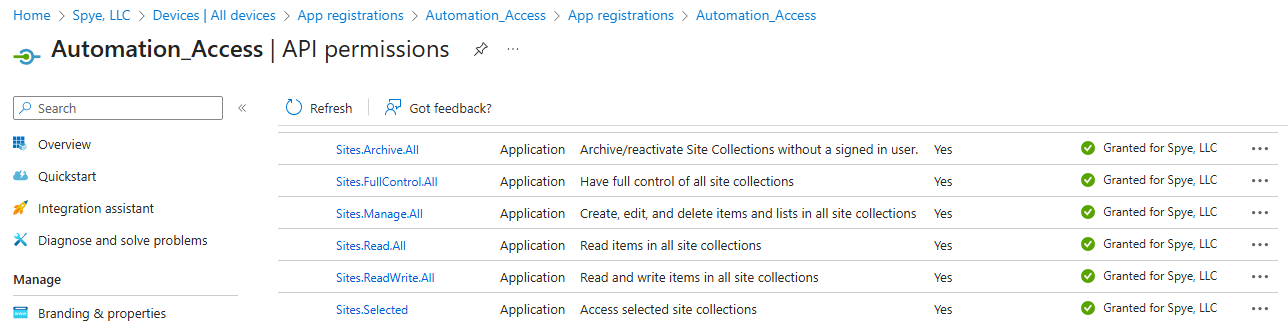
Every call I make to one of the /sites/ endpoints gives me a 503 UnknownError response. The prime example of this is the inability to do a GET request to /sites/root. I have ensured that my API has all six site permissions (set as application permissions) and have given Admin consent for the organization. I have even done further testing to see if this is an issue strictly with the /sites endpoint. If I leave all functions, headers, access token, etc. exactly the same and simply change the endpoint from /sites/root to /users or /groups, the call works exactly as intended. This 503 error has now been happening on every call to the /sites/ endpoints for multiple days and even going over the weekend. This tells me it is not simply throttling which some resources have said it would be. After working with Microsoft support they informed me their trained to help with the M365 apps so I have now been directed to posting on here. Any insight into possible fixes whether it is an issue with my code or with some form of admin permissions would be greatly appreciated. I have exhausted most resources and have found many possible solutions, though none have actually fixed the issue.174Views0likes2CommentsTrigger API from Received Email
My team receives automated lead emails (Different companies go to different team members) which use the same subject header and body html format. Each user has a rule setup in their Outlook to forward those automated lead emails to a shared address inbox. All of that works properly and the emails collect in the shared inbox. Every hour, an AWS schedule runs a Lambda function that gets which uses a variety of API calls to get the last hours worth of emails, parse the email body, then post to the CRM we use. Everything in the current setup works but we are hoping to change it so that rather than collecting the previous hours worth of emails in the shared inbox, each one will trigger the parsing and CRM post. Is it possible to call an AWS Lambda function upon receiving an email and pass the email information as a parameter? And/Or parse and post to the CRM after each email is received in the shared inbox? Any guidance would be appreciated!Close and Load Location Power Query
I am trying to import data to excel from a json file using power query. The data is accessed, formatted, and placed correctly but every time it places the resulting table in a new sheet. Is there a way to change it so the information is placed in the sheet that was open when I clicked Get Data(Power Query)? I have seen a lot of answers to similar problems by using "Close and Load to" by clicking on a dropdown menu from "Close and Load" however I have no such menu, just a simple button which opens the data in a new file rather than filling the sheet I wanted.7.7KViews0likes2Comments
Recent Blog Articles
No content to show