User Profile

MicrosoftSecurityandComplianceTeam
Iron Contributor
Joined 8 years ago


User Widgets
Recent Discussions
Step 4. Set conditional access policies: top 10 actions to secure your environment
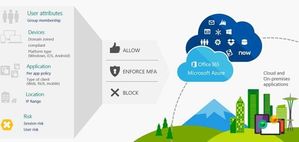
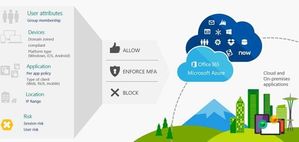
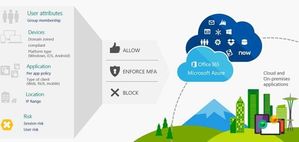
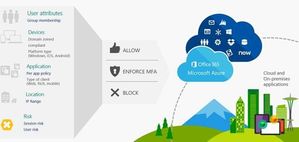
The “Top 10 actions to secure your environment” series outlines fundamental steps you can take with your investment in Microsoft 365 security solutions. In “Step 4. Set conditional access policies,” you’ll learn how to control access to your apps and corporate resources using conditional access policies, and how these policies can block legacy authentication methods and control access to SaaS apps. In today’s workplace, users can work from anywhere, on any device, whether they are using a company-provided laptop at the office, working from home, traveling for business, or using a personal mobile phone. And they expect to seamlessly access what they need to get work done. While the need for productivity may not change with circumstances, the level of risk of each sign-in does. It is critical to safeguard your identities, but it is not enough. You also need flexible security policies that are responsive to conditions. Azure AD https://nam06.safelinks.protection.outlook.com/?url=https%3A%2F%2Fdocs.microsoft.com%2Fen-us%2Fazure%2Factive-directory%2Fconditional-access%2Foverview&data=02%7C01%7Cv-mihols%40microsoft.com%7C0b591e0db3b5482ff74508d68ac89b2e%7C72f988bf86f141af91ab2d7cd011db47%7C1%7C0%7C636848991538620311&sdata=bvh81VpHJPVM%2FBzCsaKwKSY8oKCDmfFo4XaiTkVPMiA%3D&reserved=0 lets you apply security policies that are triggered automatically when certain conditions are met. You can block access if the data suggests the user has been compromised or if it’s highly unlikely that the user would sign in under those conditions. You can enforce additional authentication requirements when the system detects a medium risk based on the sign-in conditions. Learn more about all of this https://nam06.safelinks.protection.outlook.com/?url=https%3A%2F%2Fcloudblogs.microsoft.com%2Fmicrosoftsecure%2F2019%2F01%2F30%2Fstep-4-set-conditional-access-policies-top-10-actions-to-secure-your-environment%2F&data=02%7C01%7Cv-mihols%40microsoft.com%7C0b591e0db3b5482ff74508d68ac89b2e%7C72f988bf86f141af91ab2d7cd011db47%7C1%7C0%7C636848991538630305&sdata=VkSIB0P6J5Nm2NO7zVDJTe5JDNmaDw3orl5EgzT2dxY%3D&reserved=0.Step 5. Set up mobile device management: Top 10 actions to secure your environment
The “Top 10 actions to secure your environment” series outlines fundamental steps you can take with your investment in Microsoft 365 security solutions. In “Step 5. Set up mobile device management,” you’ll learn how to plan your Microsoft Intune deployment and set up Mobile Device Management (MDM) as part of your unified endpoint management (UEM) strategy. In https://cloudblogs.microsoft.com/microsoftsecure/2018/12/05/step-1-identify-users-top-10-actions-to-secure-your-environment/ of the series, we provided tips for securing identities with https://azure.microsoft.com/en-us/services/active-directory/. In the next two posts (Step 5 and Step 6), we introduce you to ContosoCars to illustrate how you can deploy https://www.microsoft.com/en-us/cloud-platform/microsoft-intune as part of your UEM strategy for securing company data on devices and applications. Learn more about all of this https://cloudblogs.microsoft.com/microsoftsecure/2019/02/14/step-5-set-up-mobile-device-management-top-10-actions-to-secure-your-environment/.712Views0likes0CommentsStep 4. Set conditional access policies: top 10 actions to secure your environment
The “Top 10 actions to secure your environment” series outlines fundamental steps you can take with your investment in Microsoft 365 security solutions. In “Step 4. Set conditional access policies,” you’ll learn how to control access to your apps and corporate resources using conditional access policies, and how these policies can block legacy authentication methods and control access to SaaS apps. In today’s workplace, users can work from anywhere, on any device, whether they are using a company-provided laptop at the office, working from home, traveling for business, or using a personal mobile phone. And they expect to seamlessly access what they need to get work done. While the need for productivity may not change with circumstances, the level of risk of each sign-in does. It is critical to safeguard your identities, but it is not enough. You also need flexible security policies that are responsive to conditions. Azure AD https://nam06.safelinks.protection.outlook.com/?url=https%3A%2F%2Fdocs.microsoft.com%2Fen-us%2Fazure%2Factive-directory%2Fconditional-access%2Foverview&data=02%7C01%7Cv-mihols%40microsoft.com%7C0b591e0db3b5482ff74508d68ac89b2e%7C72f988bf86f141af91ab2d7cd011db47%7C1%7C0%7C636848991538620311&sdata=bvh81VpHJPVM%2FBzCsaKwKSY8oKCDmfFo4XaiTkVPMiA%3D&reserved=0 lets you apply security policies that are triggered automatically when certain conditions are met. You can block access if the data suggests the user has been compromised or if it’s highly unlikely that the user would sign in under those conditions. You can enforce additional authentication requirements when the system detects a medium risk based on the sign-in conditions. Learn more about all of this https://nam06.safelinks.protection.outlook.com/?url=https%3A%2F%2Fcloudblogs.microsoft.com%2Fmicrosoftsecure%2F2019%2F01%2F30%2Fstep-4-set-conditional-access-policies-top-10-actions-to-secure-your-environment%2F&data=02%7C01%7Cv-mihols%40microsoft.com%7C0b591e0db3b5482ff74508d68ac89b2e%7C72f988bf86f141af91ab2d7cd011db47%7C1%7C0%7C636848991538630305&sdata=VkSIB0P6J5Nm2NO7zVDJTe5JDNmaDw3orl5EgzT2dxY%3D&reserved=0.907Views0likes1CommentStep 1. Identify users: top 10 actions to secure your environment
This series outlines the most fundamental steps you can take with your investment in Microsoft 365 security solutions. We’ll provide advice on activities such as setting up identity management through active directory, malware protection, and more. In this post, we explain how to create a single common identity across on-premises and cloud with hybrid authentication. Establishing a single, common identity for each user is the foundations step to your cybersecurity strategy. If you currently have an on-premises footprint, this means connecting your Azure Active Directory (Azure AD) to your on-premises resources. There are various requirements and circumstances that will influence the hybrid identity and authentication method that you choose, but whether you choose federation or cloud authentication, there are important security implications for each that you should consider. This blog walks you through our recommended security best practices for each hybrid identity method. Read the full article https://cloudblogs.microsoft.com/microsoftsecure/2018/12/05/step-1-identify-users-top-10-actions-to-secure-your-environment/.827Views0likes0CommentsStep 5. Set up mobile device management: Top 10 actions to secure your environment
The “Top 10 actions to secure your environment” series outlines fundamental steps you can take with your investment in Microsoft 365 security solutions. In “Step 5. Set up mobile device management,” you’ll learn how to plan your Microsoft Intune deployment and set up Mobile Device Management (MDM) as part of your unified endpoint management (UEM) strategy. In https://cloudblogs.microsoft.com/microsoftsecure/2018/12/05/step-1-identify-users-top-10-actions-to-secure-your-environment/ of the series, we provided tips for securing identities with https://azure.microsoft.com/en-us/services/active-directory/. In the next two posts (Step 5 and Step 6), we introduce you to ContosoCars to illustrate how you can deploy https://www.microsoft.com/en-us/cloud-platform/microsoft-intune as part of your UEM strategy for securing company data on devices and applications. Learn more about all of this https://cloudblogs.microsoft.com/microsoftsecure/2019/02/14/step-5-set-up-mobile-device-management-top-10-actions-to-secure-your-environment/.795Views0likes0CommentsStep 5. Set up mobile device management: Top 10 actions to secure your environment
The “Top 10 actions to secure your environment” series outlines fundamental steps you can take with your investment in Microsoft 365 security solutions. In “Step 5. Set up mobile device management,” you’ll learn how to plan your Microsoft Intune deployment and set up Mobile Device Management (MDM) as part of your unified endpoint management (UEM) strategy. In https://cloudblogs.microsoft.com/microsoftsecure/2018/12/05/step-1-identify-users-top-10-actions-to-secure-your-environment/ of the series, we provided tips for securing identities with https://azure.microsoft.com/en-us/services/active-directory/. In the next two posts (Step 5 and Step 6), we introduce you to ContosoCars to illustrate how you can deploy https://www.microsoft.com/en-us/cloud-platform/microsoft-intune as part of your UEM strategy for securing company data on devices and applications. Learn more about all of this https://cloudblogs.microsoft.com/microsoftsecure/2019/02/14/step-5-set-up-mobile-device-management-top-10-actions-to-secure-your-environment/.855Views0likes0CommentsStep 4. Set conditional access policies: top 10 actions to secure your environment
The “Top 10 actions to secure your environment” series outlines fundamental steps you can take with your investment in Microsoft 365 security solutions. In “Step 4. Set conditional access policies,” you’ll learn how to control access to your apps and corporate resources using conditional access policies, and how these policies can block legacy authentication methods and control access to SaaS apps. In today’s workplace, users can work from anywhere, on any device, whether they are using a company-provided laptop at the office, working from home, traveling for business, or using a personal mobile phone. And they expect to seamlessly access what they need to get work done. While the need for productivity may not change with circumstances, the level of risk of each sign-in does. It is critical to safeguard your identities, but it is not enough. You also need flexible security policies that are responsive to conditions. Azure AD https://nam06.safelinks.protection.outlook.com/?url=https%3A%2F%2Fdocs.microsoft.com%2Fen-us%2Fazure%2Factive-directory%2Fconditional-access%2Foverview&data=02%7C01%7Cv-mihols%40microsoft.com%7C0b591e0db3b5482ff74508d68ac89b2e%7C72f988bf86f141af91ab2d7cd011db47%7C1%7C0%7C636848991538620311&sdata=bvh81VpHJPVM%2FBzCsaKwKSY8oKCDmfFo4XaiTkVPMiA%3D&reserved=0 lets you apply security policies that are triggered automatically when certain conditions are met. You can block access if the data suggests the user has been compromised or if it’s highly unlikely that the user would sign in under those conditions. You can enforce additional authentication requirements when the system detects a medium risk based on the sign-in conditions. Learn more about all of this https://nam06.safelinks.protection.outlook.com/?url=https%3A%2F%2Fcloudblogs.microsoft.com%2Fmicrosoftsecure%2F2019%2F01%2F30%2Fstep-4-set-conditional-access-policies-top-10-actions-to-secure-your-environment%2F&data=02%7C01%7Cv-mihols%40microsoft.com%7C0b591e0db3b5482ff74508d68ac89b2e%7C72f988bf86f141af91ab2d7cd011db47%7C1%7C0%7C636848991538630305&sdata=VkSIB0P6J5Nm2NO7zVDJTe5JDNmaDw3orl5EgzT2dxY%3D&reserved=0.488Views0likes0CommentsStep4. Set conditional access policies: top 10 actions to secure your environment
The “Top 10 actions to secure your environment” series outlines fundamental steps you can take with your investment in Microsoft 365 security solutions. In “Step 4. Set conditional access policies,” you’ll learn how to control access to your apps and corporate resources using conditional access policies, and how these policies can block legacy authentication methods and control access to SaaS apps. In today’s workplace, users can work from anywhere, on any device, whether they are using a company-provided laptop at the office, working from home, traveling for business, or using a personal mobile phone. And they expect to seamlessly access what they need to get work done. While the need for productivity may not change with circumstances, the level of risk of each sign-in does. It is critical to safeguard your identities, but it is not enough. You also need flexible security policies that are responsive to conditions. Azure AD https://nam06.safelinks.protection.outlook.com/?url=https%3A%2F%2Fdocs.microsoft.com%2Fen-us%2Fazure%2Factive-directory%2Fconditional-access%2Foverview&data=02%7C01%7Cv-mihols%40microsoft.com%7C0b591e0db3b5482ff74508d68ac89b2e%7C72f988bf86f141af91ab2d7cd011db47%7C1%7C0%7C636848991538620311&sdata=bvh81VpHJPVM%2FBzCsaKwKSY8oKCDmfFo4XaiTkVPMiA%3D&reserved=0 lets you apply security policies that are triggered automatically when certain conditions are met. You can block access if the data suggests the user has been compromised or if it’s highly unlikely that the user would sign in under those conditions. You can enforce additional authentication requirements when the system detects a medium risk based on the sign-in conditions. Learn more about all of this https://nam06.safelinks.protection.outlook.com/?url=https%3A%2F%2Fcloudblogs.microsoft.com%2Fmicrosoftsecure%2F2019%2F01%2F30%2Fstep-4-set-conditional-access-policies-top-10-actions-to-secure-your-environment%2F&data=02%7C01%7Cv-mihols%40microsoft.com%7C0b591e0db3b5482ff74508d68ac89b2e%7C72f988bf86f141af91ab2d7cd011db47%7C1%7C0%7C636848991538630305&sdata=VkSIB0P6J5Nm2NO7zVDJTe5JDNmaDw3orl5EgzT2dxY%3D&reserved=0.1.6KViews3likes0CommentsStep 1. Identify users: top 10 actions to secure your environment
This series outlines the most fundamental steps you can take with your investment in Microsoft 365 security solutions. We’ll provide advice on activities such as setting up identity management through active directory, malware protection, and more. In this post, we explain how to create a single common identity across on-premises and cloud with hybrid authentication. Establishing a single, common identity for each user is the foundations step to your cybersecurity strategy. If you currently have an on-premises footprint, this means connecting your Azure Active Directory (Azure AD) to your on-premises resources. There are various requirements and circumstances that will influence the hybrid identity and authentication method that you choose, but whether you choose federation or cloud authentication, there are important security implications for each that you should consider. This blog walks you through our recommended security best practices for each hybrid identity method. Read the full article https://cloudblogs.microsoft.com/microsoftsecure/2018/12/05/step-1-identify-users-top-10-actions-to-secure-your-environment/.1.1KViews2likes2CommentsStep 1. Identify users: top 10 actions to secure your environment
This series outlines the most fundamental steps you can take with your investment in Microsoft 365 security solutions. We’ll provide advice on activities such as setting up identity management through active directory, malware protection, and more. In this post, we explain how to create a single common identity across on-premises and cloud with hybrid authentication. Establishing a single, common identity for each user is the foundations step to your cybersecurity strategy. If you currently have an on-premises footprint, this means connecting your Azure Active Directory (Azure AD) to your on-premises resources. There are various requirements and circumstances that will influence the hybrid identity and authentication method that you choose, but whether you choose federation or cloud authentication, there are important security implications for each that you should consider. This blog walks you through our recommended security best practices for each hybrid identity method. Read the full article https://cloudblogs.microsoft.com/microsoftsecure/2018/12/05/step-1-identify-users-top-10-actions-to-secure-your-environment/.1.1KViews0likes0Comments
Recent Blog Articles
Check out the latest Microsoft 365 Security solutions blog - Secure File Storage!
This blog explores how Microsoft 365 has simplified and secured the process of sharing files so that employees can easily gather data, expert opinions, edits, and responses—from only the right peopl...25KViews2likes0CommentsUsing encryption in Office 365 to help protect data and meet your compliance needs
First published on CloudBlogs on Apr 23, 2018 With digital data growing exponentially, and threats becoming more advanced, laws and regulations are evolving to protect individuals and their personal i...12KViews0likes0CommentsMicrosoft 365: A complete, secure solution that brings together Office 365 and EMS
First published on CloudBlogs on Feb 05, 2018 In this era of digital transformation, companies are reimagining how technology can help their people collaborate, communicate, and innovate more effectiv...11KViews0likes1Comment