User Profile

GouravIN
Brass Contributor
Joined 8 years ago


User Widgets
Recent Discussions
How to pass ARM Variable as parameter of PowerShell in ARM
Hi There, I am working on a ARM template and it is working fine however I want to pass ARM variable(s) should be passed in the argument rather hardcoding. Like same storage account name should be used in the arguments. I want to pass the same variable storage account name in the line number 192 -storageaccount Here is the ARM { "$schema": "https://schema.management.azure.com/schemas/2019-04-01/deploymentTemplate.json#", "contentVersion": "1.0.0.0", "parameters": { "functionAppName": { "type": "string", "defaultValue": "[format('func-{0}', uniqueString(resourceGroup().id))]", "metadata": { "description": "The name of the Azure Function app." } }, "storageAccountType": { "type": "string", "defaultValue": "Standard_LRS", "allowedValues": [ "Standard_LRS", "Standard_GRS", "Standard_RAGRS" ], "metadata": { "description": "Storage Account type" } }, "location": { "type": "string", "defaultValue": "[resourceGroup().location]", "metadata": { "description": "Location for all resources." } }, "functionWorkerRuntime": { "type": "string", "defaultValue": "node", "allowedValues": [ "dotnet", "node", "python", "java" ], "metadata": { "description": "The language worker runtime to load in the function app." } }, "functionPlanOS": { "type": "string", "defaultValue": "Windows", "allowedValues": [ "Windows", "Linux" ], "metadata": { "description": "Specifies the OS used for the Azure Function hosting plan." } }, "functionAppPlanSku": { "type": "string", "defaultValue": "S1", "allowedValues": [ "S1", "S2", "S3" ], "metadata": { "description": "Specifies the Azure Function hosting plan SKU." } }, "createfunctionkey": { "type": "string" }, "apimanagementkey": { "type": "securestring", "defaultValue": "[base64(newGuid())]" }, "linuxFxVersion": { "type": "string", "defaultValue": "", "metadata": { "description": "Only required for Linux app to represent runtime stack in the format of 'runtime|runtimeVersion'. For example: 'python|3.9'" } }, "useridentity": { "type": "string" }, "scriptname": { "type": "string" } }, "variables": { "hostingPlanName": "[parameters('functionAppName')]", "storageAccountName": "[concat(uniquestring(resourceGroup().id), 'azfunctions')]", "functionhostkey": "[parameters('apimanagementkey')]", "isReserved": "[if(equals(parameters('functionPlanOS'), 'Linux'), true(), false())]" }, "resources": [ { "type": "Microsoft.Storage/storageAccounts", "apiVersion": "2021-02-01", "name": "[variables('storageAccountName')]", "location": "[parameters('location')]", "sku": { "name": "[parameters('storageAccountType')]" }, "kind": "Storage" }, { "type": "Microsoft.Web/serverfarms", "apiVersion": "2021-02-01", "name": "[variables('hostingPlanName')]", "location": "[parameters('location')]", "sku": { "tier": "Standard", "name": "[parameters('functionAppPlanSku')]", "family": "S", "capacity": 1 }, "properties": { "reserved": "[variables('isReserved')]" } }, { "condition": "[equals(parameters('createfunctionkey'), 'yes')]", "type": "Microsoft.Web/sites/host/functionkeys", "apiVersion": "2020-06-01", "dependsOn": [ "[resourceId('Microsoft.Web/sites', parameters('functionAppName'))]" ], "name": "[concat(parameters('functionAppName'),'/default/apiManagementKey')]", "properties": { "name": "apiManagementKey", "value": "[variables('functionhostkey')]" } }, { "type": "Microsoft.Web/sites", "apiVersion": "2021-02-01", "name": "[parameters('functionAppName')]", "location": "[parameters('location')]", "kind": "[if(variables('isReserved'), 'functionapp,linux', 'functionapp')]", "dependsOn": [ "[resourceId('Microsoft.Web/serverfarms', variables('hostingPlanName'))]", "[resourceId('Microsoft.Storage/storageAccounts', variables('storageAccountName'))]" ], "properties": { "reserved": "[variables('isReserved')]", "serverFarmId": "[resourceId('Microsoft.Web/serverfarms', variables('hostingPlanName'))]", "siteConfig": { "alwaysOn": true, "linuxFxVersion": "[if(variables('isReserved'), parameters('linuxFxVersion'), json('null'))]", "appSettings": [ { "name": "AzureWebJobsStorage", "value": "[concat('DefaultEndpointsProtocol=https;AccountName=', variables('storageAccountName'), ';EndpointSuffix=', environment().suffixes.storage, ';AccountKey=',listKeys(resourceId('Microsoft.Storage/storageAccounts', variables('storageAccountName')), '2019-06-01').keys[0].value)]" }, { "name": "FUNCTIONS_EXTENSION_VERSION", "value": "~4" }, { "name": "FUNCTIONS_WORKER_RUNTIME", "value": "[parameters('functionWorkerRuntime')]" }, { "name": "WEBSITE_NODE_DEFAULT_VERSION", "value": "~14" }, { "name": "WEBSITE_RUN_FROM_PACKAGE", "value": "1" } ] } } }, { "type": "Microsoft.Resources/deploymentScripts", "name": "[parameters('scriptname')]", "apiVersion": "2020-10-01", "location": "[parameters('location')]", "kind": "AzurePowerShell", "identity": { "type": "UserAssigned", "userAssignedIdentities": { "[parameters('useridentity')]": { } } }, "properties": { "azPowerShellVersion": "3.0", "primaryScriptUri": "https://raw.githubusercontent.com/INGourav/Azure-Resources/master/KeyVaultSecretUsingSAS.ps1", "arguments": "-azsub 'Goukumar' -rg 'pstest' -keyvault 'pstestk' -storageaccount 'pstests' -secretname 'secretarm333'", "timeout": "PT30M", "forceUpdateTag": "utcNow()", "retentionInterval": "PT1H", "cleanupPreference": "OnSuccess" } } ] }Solved2.3KViews0likes1CommentPartial script not running while deployment
Hi All, I am deploying a windows VM in Azure using terraform and want to install some software while deployment so I thought about PS script extension. Things are working fine for me however ENV variables is not getting added though If I will run this script in the system after deployment then everything is right. Can anyone suggest me why only ENV variable is not getting set. you can read the script here, https://raw.githubusercontent.com/INGourav/Azure-Resources/master/azbastionsetup01.ps1 <# Script to install chocolatey on the windows system and install some apps that is needed for Azure Author : - Gourav Kumar Reach Me : - email address removed for privacy reasons Version : - 1.0.1 #> Set-ExecutionPolicy Bypass -Scope Process -Force; New-Item -Path 'C:\Temp\terraform_1.2.4_windows_amd64' -ItemType Directory # setting env vars $path = (Get-Item -Path Env:\Path).Value Start-Sleep -Seconds 5; $newpath = $path + 'C:\Temp\terraform_1.2.4_windows_amd64' Start-Sleep -Seconds 5; Set-Item -Path Env:\Path -Value $newpath # Installation of Terraform on the machine Invoke-WebRequest 'https://releases.hashicorp.com/terraform/1.2.4/terraform_1.2.4_windows_amd64.zip' -OutFile C:\temp\terraform_1.2.4_windows_amd64.zip -Verbose Start-Sleep -Seconds 5; Expand-Archive C:\temp\terraform_1.2.4_windows_amd64.zip C:\temp\terraform_1.2.4_windows_amd64 -Verbose -Force Start-Sleep -Seconds 5; [System.Net.ServicePointManager]::SecurityProtocol = [System.Net.ServicePointManager]::SecurityProtocol -bor 3072; Invoke-Expression ((New-Object System.Net.WebClient).DownloadString('https://community.chocolatey.org/install.ps1')) -Verbose Start-Sleep -Seconds 5; # Installation of apps (Pycharm, vscode, git, and drwaio) choco install pycharm -y --force; Start-Sleep -Seconds 5; choco install vscode -y --force; Start-Sleep -Seconds 5; choco install git -y --force; Start-Sleep -Seconds 5; choco install drawio -y --force; Start-Sleep -Seconds 5; The code that I am using to deploy resources is as follows, provider "azurerm" { features {} } data "azurerm_subnet" "vmsnet" { name = "vm_subnet" virtual_network_name = "az_test" resource_group_name = "poc" } resource "azurerm_resource_group" "vmrg" { name = "tfvmtestrg" location = "uk south" } resource "azurerm_network_interface" "az_vm_nic" { location = "uk south" name = "tfvmtestnic" resource_group_name = azurerm_resource_group.vmrg.name ip_configuration { name = "internal" private_ip_address_allocation = "Dynamic" subnet_id = data.azurerm_subnet.vmsnet.id } } resource "azurerm_windows_virtual_machine" "az_vm_win" { admin_password = "tfvmtestrgrtetghcgh" admin_username = "tfvmtestrg" location = "uk south" name = "tfvmtestvm" network_interface_ids = [azurerm_network_interface.az_vm_nic.id] resource_group_name = azurerm_resource_group.vmrg.name size = "Standard_D2s_v3" os_disk { caching = "ReadWrite" storage_account_type = "Standard_LRS" } source_image_reference { publisher = "MicrosoftWindowsServer" offer = "WindowsServer" sku = "2022-Datacenter" version = "latest" } } resource "azurerm_virtual_machine_extension" "vmext" { name = azurerm_windows_virtual_machine.az_vm_win.name virtual_machine_id = azurerm_windows_virtual_machine.az_vm_win.id publisher = "Microsoft.Compute" type = "CustomScriptExtension" type_handler_version = "1.10" ### THIS PART IS ALL NEEDED, INCLUDING THE WEIRD SETTINGS BIT. settings = <<SETTINGS { "commandToExecute": "powershell -ExecutionPolicy Unrestricted -File azbastionsetup01.ps1", "fileUris": ["https://raw.githubusercontent.com/INGourav/Azure-Resources/master/azbastionsetup01.ps1"] } SETTINGS }764Views1like1CommentNeed help with Custo
Hi All, I have a query that I am running to fetch some data factory logs however the output contains a whole lot of JSON values so can't display them on ALA output console. Hence I am extending them into an array and tried to display them one by one and it did work for me. However, the real problem is to print the other values (n number of) of this array. I am not sure if we can use any loop or something that can iterate until the last value of array and print this for me. The query looks like this..... ADFActivityRun | where PipelineName == "PL_Ingestion" | where Status == "Succeeded" and OperationName has "Configtablelookup" | extend d = parse_json(Output) | extend targetTableName = d.value[0].TargetTable, startTime = d.value[0].ExtractionStartDateTime, trigger = d.value[0].TriggerName, sourceTable = d.value[0].SourceTable | project targetTableName, startTime, PipelineName, trigger, sourceTable1.5KViews0likes2CommentsApplication Insights Data Query
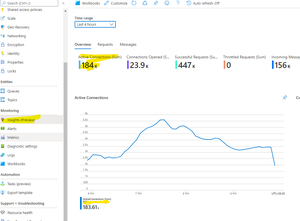
Hi There, I have a Service bus namespace that has spikes in ActiveConnections. Now I am sure which connection and from where these spikes are coming. That would so helpful if someone can shed light on the same, whether we can a query for the same or any other clue. Also, I am not sure which App Insights is using to generate this dashboard, how could I figure out the same.650Views0likes0CommentsALA agent issue
Hi All, I have connected two server in ALA and both are reflecting as connected but when I am trying to setup them under update management then I am getting below error. A module of type "Microsoft.EnterpriseManagement.HealthService.AzureAutomation.HybridAgent" reported an exception Microsoft.EnterpriseManagement.HealthService.ModuleException: Unable to Register Machine for Patch Management, Registration Failed with Exception System.InvalidOperationException: System.Net.Http.HttpRequestException: An error occurred while sending the request. ---> System.Net.WebException: Unable to connect to the remote server ---> System.Net.Sockets.SocketException: A connection attempt failed because the connected party did not properly respond after a period of time, or established connection failed because connected host has failed to respond 51.104.8.241:443 at System.Net.Sockets.Socket.InternalEndConnect(IAsyncResult asyncResult) at System.Net.Sockets.Socket.EndConnect(IAsyncResult asyncResult) at System.Net.ServicePoint.ConnectSocketInternal(Boolean connectFailure, Socket s4, Socket s6, Socket& socket, IPAddress& address, ConnectSocketState state, IAsyncResult asyncResult, Exception& exception) --- End of inner exception stack trace --- at System.Net.HttpWebRequest.EndGetRequestStream(IAsyncResult asyncResult, TransportContext& context) at System.Net.Http.HttpClientHandler.GetRequestStreamCallback(IAsyncResult ar) --- End of inner exception stack trace --- at System.Runtime.ExceptionServices.ExceptionDispatchInfo.Throw() at System.Runtime.CompilerServices.TaskAwaiter.HandleNonSuccessAndDebuggerNotification(Task task) at AgentService.HybridRegistration.PowerShell.WebClient.AgentServiceClient.<Put>d__30`2.MoveNext() --- End of stack trace from previous location where exception was thrown --- at System.Runtime.ExceptionServices.ExceptionDispatchInfo.Throw() at System.Runtime.CompilerServices.TaskAwaiter.HandleNonSuccessAndDebuggerNotification(Task task) at AgentService.HybridRegistration.PowerShell.WebClient.AgentServiceClient.<RegisterV2>d__18.MoveNext() --- End of stack trace from previous location where exception was thrown --- at System.Runtime.ExceptionServices.ExceptionDispatchInfo.Throw() at System.Runtime.CompilerServices.TaskAwaiter.HandleNonSuccessAndDebuggerNotification(Task task) at AgentService.OmsHybridRegistration.PowerShell.Commandlets.OmsHybridRunbookWorker.<RegisterWithService>d__62.MoveNext() at AgentService.OmsHybridRegistration.PowerShell.Commandlets.OmsHybridRunbookWorker.ExtractErrorMessageAndThrow(AggregateException exception) at AgentService.OmsHybridRegistration.PowerShell.Commandlets.OmsHybridRunbookWorker.RegisterGroupInDatabase() at AgentService.OmsHybridRegistration.PowerShell.Commandlets.OmsHybridRunbookWorker.Register() AgentServiceURI: https://XXXXXXXXXX8c42497cad0d.agentsvc.azure-automation.net/accounts/3XXXXXX-8c42497cad0d which was running as part of rule "Microsoft.IntelligencePacks.AzureAutomation.HybridAgent.Init" running for instance "" with id:"{AXXXXXXXXXXXX-8A6XXX2A26}" in management group "AOI-3XXXXXXXd6-46bc-a47e-8c4XXXd0d". There is no additional rule on NSGs and I did create a allow rule with source AzureMonitor and Destination Server Subnet as inbound and a outbound with Source Server subnet and destination AzureMonitor but no luck. Thanks in advance!1.5KViews0likes1CommentNeed Heartbeat Query
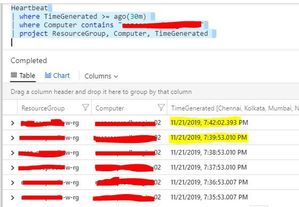
Hi Team, I am trying to write a KQL query to catch if any single heartbeat missed. Like we could see in my below screenshot, this server is sending heartbeat after every minute interval. And now there is gap in heartbeat when i stopped the scx service, so now i want to track if any single heartbeat will miss then i should have an alert notification.Solved30KViews1like10CommentsAgent is not getting right Counter
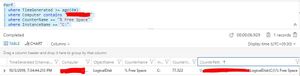
Hi Team and Experts, Today i have seen a weird issue in Log Analytics. When I am checking Free Space on Server using PowerShell or by logging into then getting its 97.98% free. But when i am checking the same using KQL in my Log Analytics the it is reflecting 77.322, Why this is happening. Because of this I am geeing false alert, Is it a bug or what?Solved1KViews0likes2CommentsHeratbeat alert missing
Hi Experts, I have a big concern after when a VM get rebooted and I haven't found any alert through ALA alert. Let me shed some background behind the scenes. Generally we have 60 heartbeat for every VMs but I have received 59 heartbeat for one VM and checked that was rebooted but I have not received any alert. Have a look on below data, where we could see in first column everything is fine but column 2 and 3 has one missing heartbeat. TimeGenerated TimeGenerated TimeGenerated 2019-09-27T10:00:39 2019-09-27T16:00:06 2019-09-27T17:00:01 2019-09-27T10:01:39 2019-09-27T16:01:06 2019-09-27T17:01:01 2019-09-27T10:02:39 2019-09-27T16:02:06 2019-09-27T17:02:01 2019-09-27T10:03:39 2019-09-27T16:03:06 2019-09-27T17:03:01 2019-09-27T10:04:39 2019-09-27T16:04:06 2019-09-27T17:04:06 2019-09-27T10:05:39 2019-09-27T16:05:06 2019-09-27T17:05:06 2019-09-27T10:06:39 2019-09-27T16:06:06 2019-09-27T17:06:06 2019-09-27T10:07:40 2019-09-27T16:07:06 2019-09-27T17:07:06 2019-09-27T10:08:40 2019-09-27T16:08:06 2019-09-27T17:08:11 2019-09-27T10:09:40 2019-09-27T16:09:06 2019-09-27T17:09:11 2019-09-27T10:10:40 2019-09-27T16:10:06 2019-09-27T17:10:11 2019-09-27T10:11:40 2019-09-27T16:11:06 2019-09-27T17:11:11 2019-09-27T10:12:40 2019-09-27T16:12:11 2019-09-27T17:12:16 2019-09-27T10:13:40 2019-09-27T16:13:11 2019-09-27T17:13:16 2019-09-27T10:14:40 2019-09-27T16:14:11 2019-09-27T17:14:16 2019-09-27T10:15:40 2019-09-27T16:15:11 2019-09-27T17:15:16 2019-09-27T10:16:40 2019-09-27T16:16:16 2019-09-27T17:16:21 2019-09-27T10:17:40 2019-09-27T16:17:16 2019-09-27T17:17:21 2019-09-27T10:18:40 2019-09-27T16:18:16 2019-09-27T17:18:21 2019-09-27T10:19:40 2019-09-27T16:19:16 2019-09-27T17:19:21 2019-09-27T10:20:40 2019-09-27T16:20:21 2019-09-27T17:20:26 2019-09-27T10:21:40 2019-09-27T16:21:21 2019-09-27T17:21:26 2019-09-27T10:22:40 2019-09-27T16:22:21 2019-09-27T17:22:26 2019-09-27T10:23:40 2019-09-27T16:23:21 2019-09-27T17:23:26 2019-09-27T10:24:40 2019-09-27T16:24:26 2019-09-27T17:24:31 2019-09-27T10:25:40 2019-09-27T16:25:26 2019-09-27T17:25:31 2019-09-27T10:26:40 2019-09-27T16:26:26 2019-09-27T17:26:31 2019-09-27T10:27:40 2019-09-27T16:27:26 2019-09-27T17:27:31 2019-09-27T10:28:40 2019-09-27T16:28:26 2019-09-27T17:28:36 2019-09-27T10:29:40 2019-09-27T16:29:26 2019-09-27T17:29:36 2019-09-27T10:30:40 2019-09-27T16:30:26 2019-09-27T17:30:36 2019-09-27T10:31:40 2019-09-27T16:31:26 2019-09-27T17:31:36 2019-09-27T10:32:40 2019-09-27T16:32:26 2019-09-27T17:32:41 2019-09-27T10:33:40 2019-09-27T16:33:26 2019-09-27T17:33:41 2019-09-27T10:34:40 2019-09-27T16:34:26 2019-09-27T17:34:41 2019-09-27T10:35:40 2019-09-27T16:35:31 2019-09-27T17:35:41 2019-09-27T10:36:40 2019-09-27T16:36:31 2019-09-27T17:36:46 2019-09-27T10:37:40 2019-09-27T16:37:31 2019-09-27T17:37:46 2019-09-27T10:38:40 2019-09-27T16:38:31 2019-09-27T17:38:46 2019-09-27T10:39:40 2019-09-27T16:39:36 2019-09-27T17:39:46 2019-09-27T10:40:40 2019-09-27T16:40:36 2019-09-27T17:40:51 2019-09-27T10:41:40 2019-09-27T16:41:36 2019-09-27T17:41:51 2019-09-27T10:42:40 2019-09-27T16:42:36 2019-09-27T17:42:51 2019-09-27T10:43:40 2019-09-27T16:43:41 2019-09-27T17:43:51 2019-09-27T10:44:40 2019-09-27T16:44:41 2019-09-27T17:44:56 2019-09-27T10:45:40 2019-09-27T16:45:41 2019-09-27T17:45:56 2019-09-27T10:46:40 2019-09-27T16:46:41 2019-09-27T17:46:56 2019-09-27T10:47:40 2019-09-27T16:47:46 2019-09-27T17:47:56 2019-09-27T10:48:40 2019-09-27T16:48:46 2019-09-27T17:48:56 2019-09-27T10:49:40 2019-09-27T16:49:46 2019-09-27T17:49:56 2019-09-27T10:50:40 2019-09-27T16:50:46 2019-09-27T17:50:56 2019-09-27T10:51:40 2019-09-27T16:51:51 2019-09-27T17:51:56 2019-09-27T10:52:40 2019-09-27T16:52:51 2019-09-27T17:52:56 2019-09-27T10:53:41 2019-09-27T16:53:51 2019-09-27T17:53:56 2019-09-27T10:54:41 2019-09-27T16:54:51 2019-09-27T17:54:56 2019-09-27T10:55:41 2019-09-27T16:55:56 Data for 55 is missing 2019-09-27T10:56:41 2019-09-27T16:56:56 2019-09-27T17:56:01 2019-09-27T10:57:41 2019-09-27T16:57:56 2019-09-27T17:57:01 2019-09-27T10:58:41 2019-09-27T16:58:56 2019-09-27T17:58:01 2019-09-27T10:59:41 Data for 59 is missing 2019-09-27T17:59:01 Used query to get this data: - Heartbeat | where TimeGenerated >= ago(48h) | where Computer contains "server name" | distinct TimeGenerated, Computer | sort by TimeGenerated asc And I am using below query and samples to trigger on heartbeat, please check and let me know what i need to modify to have an alert whenever any heartbeat gets missed. Query Using in Alert: - Heartbeat | summarize LastCall = max(TimeGenerated) by Computer | extend AggregatedValue = LastCall | where LastCall < ago(5m) Alert Logic Number of Result Greater Then 0 Evaluated based on Period 1440 Frequency 1440 Thanks for the help 🙂1.2KViews0likes2CommentsHeartbeat Missed but No Alert triggered
Hi Experts, I have a big concern after when a VM get rebooted and I haven't found any alert through ALA alert. Let me shed some background behind the scenes. Generally we have 60 heartbeat for every VMs but I have received 59 heartbeat for one VM and checked that was rebooted but I have not received any alert. Have a look on below data, where we could see in first column everything is fine but column 2 and 3 has one missing heartbeat. TimeGenerated TimeGenerated TimeGenerated 2019-09-27T10:00:39 2019-09-27T16:00:06 2019-09-27T17:00:01 2019-09-27T10:01:39 2019-09-27T16:01:06 2019-09-27T17:01:01 2019-09-27T10:02:39 2019-09-27T16:02:06 2019-09-27T17:02:01 2019-09-27T10:03:39 2019-09-27T16:03:06 2019-09-27T17:03:01 2019-09-27T10:04:39 2019-09-27T16:04:06 2019-09-27T17:04:06 2019-09-27T10:05:39 2019-09-27T16:05:06 2019-09-27T17:05:06 2019-09-27T10:06:39 2019-09-27T16:06:06 2019-09-27T17:06:06 2019-09-27T10:07:40 2019-09-27T16:07:06 2019-09-27T17:07:06 2019-09-27T10:08:40 2019-09-27T16:08:06 2019-09-27T17:08:11 2019-09-27T10:09:40 2019-09-27T16:09:06 2019-09-27T17:09:11 2019-09-27T10:10:40 2019-09-27T16:10:06 2019-09-27T17:10:11 2019-09-27T10:11:40 2019-09-27T16:11:06 2019-09-27T17:11:11 2019-09-27T10:12:40 2019-09-27T16:12:11 2019-09-27T17:12:16 2019-09-27T10:13:40 2019-09-27T16:13:11 2019-09-27T17:13:16 2019-09-27T10:14:40 2019-09-27T16:14:11 2019-09-27T17:14:16 2019-09-27T10:15:40 2019-09-27T16:15:11 2019-09-27T17:15:16 2019-09-27T10:16:40 2019-09-27T16:16:16 2019-09-27T17:16:21 2019-09-27T10:17:40 2019-09-27T16:17:16 2019-09-27T17:17:21 2019-09-27T10:18:40 2019-09-27T16:18:16 2019-09-27T17:18:21 2019-09-27T10:19:40 2019-09-27T16:19:16 2019-09-27T17:19:21 2019-09-27T10:20:40 2019-09-27T16:20:21 2019-09-27T17:20:26 2019-09-27T10:21:40 2019-09-27T16:21:21 2019-09-27T17:21:26 2019-09-27T10:22:40 2019-09-27T16:22:21 2019-09-27T17:22:26 2019-09-27T10:23:40 2019-09-27T16:23:21 2019-09-27T17:23:26 2019-09-27T10:24:40 2019-09-27T16:24:26 2019-09-27T17:24:31 2019-09-27T10:25:40 2019-09-27T16:25:26 2019-09-27T17:25:31 2019-09-27T10:26:40 2019-09-27T16:26:26 2019-09-27T17:26:31 2019-09-27T10:27:40 2019-09-27T16:27:26 2019-09-27T17:27:31 2019-09-27T10:28:40 2019-09-27T16:28:26 2019-09-27T17:28:36 2019-09-27T10:29:40 2019-09-27T16:29:26 2019-09-27T17:29:36 2019-09-27T10:30:40 2019-09-27T16:30:26 2019-09-27T17:30:36 2019-09-27T10:31:40 2019-09-27T16:31:26 2019-09-27T17:31:36 2019-09-27T10:32:40 2019-09-27T16:32:26 2019-09-27T17:32:41 2019-09-27T10:33:40 2019-09-27T16:33:26 2019-09-27T17:33:41 2019-09-27T10:34:40 2019-09-27T16:34:26 2019-09-27T17:34:41 2019-09-27T10:35:40 2019-09-27T16:35:31 2019-09-27T17:35:41 2019-09-27T10:36:40 2019-09-27T16:36:31 2019-09-27T17:36:46 2019-09-27T10:37:40 2019-09-27T16:37:31 2019-09-27T17:37:46 2019-09-27T10:38:40 2019-09-27T16:38:31 2019-09-27T17:38:46 2019-09-27T10:39:40 2019-09-27T16:39:36 2019-09-27T17:39:46 2019-09-27T10:40:40 2019-09-27T16:40:36 2019-09-27T17:40:51 2019-09-27T10:41:40 2019-09-27T16:41:36 2019-09-27T17:41:51 2019-09-27T10:42:40 2019-09-27T16:42:36 2019-09-27T17:42:51 2019-09-27T10:43:40 2019-09-27T16:43:41 2019-09-27T17:43:51 2019-09-27T10:44:40 2019-09-27T16:44:41 2019-09-27T17:44:56 2019-09-27T10:45:40 2019-09-27T16:45:41 2019-09-27T17:45:56 2019-09-27T10:46:40 2019-09-27T16:46:41 2019-09-27T17:46:56 2019-09-27T10:47:40 2019-09-27T16:47:46 2019-09-27T17:47:56 2019-09-27T10:48:40 2019-09-27T16:48:46 2019-09-27T17:48:56 2019-09-27T10:49:40 2019-09-27T16:49:46 2019-09-27T17:49:56 2019-09-27T10:50:40 2019-09-27T16:50:46 2019-09-27T17:50:56 2019-09-27T10:51:40 2019-09-27T16:51:51 2019-09-27T17:51:56 2019-09-27T10:52:40 2019-09-27T16:52:51 2019-09-27T17:52:56 2019-09-27T10:53:41 2019-09-27T16:53:51 2019-09-27T17:53:56 2019-09-27T10:54:41 2019-09-27T16:54:51 2019-09-27T17:54:56 2019-09-27T10:55:41 2019-09-27T16:55:56 Data for 55 is missing 2019-09-27T10:56:41 2019-09-27T16:56:56 2019-09-27T17:56:01 2019-09-27T10:57:41 2019-09-27T16:57:56 2019-09-27T17:57:01 2019-09-27T10:58:41 2019-09-27T16:58:56 2019-09-27T17:58:01 2019-09-27T10:59:41 Data for 59 is missing 2019-09-27T17:59:01 Used query to get this data: - Heartbeat | where TimeGenerated >= ago(48h) | where Computer contains "server name" | distinct TimeGenerated, Computer | sort by TimeGenerated asc And I am using below query and samples to trigger on heartbeat, please check and let me know what i need to modify to have an alert whenever any heartbeat gets missed. Query Using in Alert: - Heartbeat | summarize LastCall = max(TimeGenerated) by Computer | extend AggregatedValue = LastCall | where LastCall < ago(5m) Alert Logic Number of Result Greater Then 0 Evaluated based on Period 1440 Frequency 1440 Thanks for the help 🙂1.2KViews0likes0CommentsMonitoring Through Log Aanlytics
Hi All, I want to monitor all below given resources through Log Analytics. Storage account Event Hubs Namespace Load balancers Network interface Public IP address Application Gateway Automation Account Key vault Network security group Azure Database for MySQL server API Management service Azure Databricks Service Recovery Services vault ExpressRoute circuit Virtual network gateway Virtual network Azure Activity Checkpoint Firewall (NVA) VPNs Azure Native backup Azure & on-Prem Active Directory (DHCP, DNS). I have checked and found this could be possible through signal based alert (given by Microsoft metric). Now concern if I will use this option then i have to follow this same click-click pattern for each and every resource. Is there any way to achieve these task through script or KQL. Thanks in advance for the help 🙂Solved1.4KViews0likes2CommentsRender Piechart
Hi All, I want to create a pie chart that can populate the count of two types VMs that has either security or critical patch missing. Like : - I have 20 VM and 15 have Critical patch missing whereas 5 have security patch matching. So it will generate a pie chart with count of VM. I have scratched my head and tried to write Kusto for the same. But not sure how to count "true" in extended column. Or how to summarize it. Update | where TimeGenerated >= ago(1d) | where (Classification == "Security Updates" or Classification == "Critical Updates") | extend sec_server = (Classification == "Security Updates") | extend cri_server = (Classification == "Critical Updates") //| summarize count(Title) by Computer //| project TimeGenerated, Title, Classification, Computer, Resource, UpdateState, Product, KBID, RebootBehavior, ResourceGroup //| sort by count_Title desc //| take 10 //| render piechart Clarifying it more: - The number of servers that have one or more critical patches pending. So if there are 100 servers that each have at least one critical patch pending, I would like to see the number 100 represented in a pie chart or bar graph format. The actual number of critical patches pending is not the important number, the number of servers that are pending critical patches is the important number. 2. The same representation as above for pending security patches Thanks in advance for the help 🙂Solved16KViews0likes6CommentsCassandra DB monitoring
Hi Folks, I writing this to check whether we have an option available to monitor Cassandra DB through Log Analytics. Or I am also looking forward to checking if the shutdown of Linux boxes can monitor? I have configured heartbeat option but seems this is not feasible enough to meet the same requirement. Thanks in advance for suggestion and help 🙂664Views1like0CommentsARM Template for KQL Query Alert
Hi All, I want to configure Log Analytics alert using ARM templates so just following given link:-https://docs.microsoft.com/en-in/azure/azure-monitor/insights/solutions-resources-searches-alerts#sample But problem is, I am working on a requirement to create CPU, Memory and Disk alert. And for this I need to write 3 different ARM with different KQL. Could anyone please help me to edit this given template to achieve my requirement to generate all alert using single ARM. If I will create 3 different template then the major problem is I will have 3 solution under my Log Analytics as this template is creating solution for each alert. So just looking for a way to edit this template in such a way to configure multiple alert using single template. Looking forward from your side. Elaborating more about question:- Why I want to create multiple alert using one template:- • As it is creating solution for every alert so if I will use new template for every single alert then I will have lots of solution under Azure. • And creation of multiple template will create a mess too. Now suppose I need to create a new alert of Disk then I need to edit below fields in template (highlighted in Brown for Disk Alert). This will create a new solution for alert but I want to create multiple alerts under this one solution. "SolutionName": "SolutionTest2", "SolutionVersion": "1.0", "SolutionPublisher": "SolutionTesters", "ProductName": "SolutionTest2", "LogAnalyticsApiVersion": "2017-03-03-preview", "MySearch": { "displayName": "Disk over 70%", "query": 'Perf | where ObjectName=="LogicalDisk" and CounterName=="% Free Space" and CounterValue>70 ', "category": "Samples", "name": "Samples-Count of Disk Data" }, "MyAlert": { "Name": "[toLower(concat('myalert-',uniqueString(resourceGroup().id, deployment().name)))]", "DisplayName": "Disk over 70%", "Description": "Disk alert. Fires when 3 error records found over hour interval.", "Severity": "critical", "ThresholdOperator": "gt", "ThresholdValue": 70, "Schedule": { "Name": "[toLower(concat('myschedule-',uniqueString(resourceGroup().id, deployment().name)))]", "Interval": 15, "TimeSpan": 60 }, "MetricsTrigger": { "TriggerCondition": "Consecutive", "Operator": "gt", "Value": 3 }, "ThrottleMinutes": 60, "AzNsNotification": { "GroupIds": [ "[parameters('actiongroup')]" ], And I also got to know the API used in given link are deprecated however still working. So we need to create template https://docs.microsoft.com/en-us/azure/azure-resource-manager/resource-manager-tutorial-create-multiple-instances?tabs=azure-cli APIs.Solved4.1KViews0likes4CommentsNew V2 alert from PowerShell
Hi All, I want to create alert using PowerShell and could certainly do this however I have three questions: - 1- When I am using "Add-AzureRmMetricAlertRule" CMDlet to create alerts they are coming under classic alerts. Why? . And how I could create new alert using PowerShell not the classic ones. The script what I am using is as follows: - Add-AzureRmMetricAlertRule -Location "Canada East" -MetricName "Percentage CPU" -Name "GouravRHEL CPU" -Operator GreaterThan -Threshold 90 -ResourceGroup "GouravRHEL" -TargetResourceId "/subscriptions/XXXXXXXXXXXXXXXXXXXXX/resourceGroups/GouravRHEL/providers/Microsoft.Compute/virtualMachines/GouravRHEL" -TimeAggregationOperator Average -WindowSize "02:00:00" -Action $action -Description "This rule sends alert of CPU" 2- In action I am adding mail ids, so the second question is related to this only. How I could add action group during alert creation using powershell. 3- My third and last question is there any possible way to use KQL in place of metric name. As we have some custom alert that are use KQL query to check condition in place of metric name.Solved7.5KViews1like9CommentsHow to install oms extension on Linux VMs using CLI
Hi There, I want to install OMS extension on Linux VMs using Azure CLI and for this I am using below code. But not sure why there are two values with workspaceKey and omskey as well as workspaceId and omsid. are they referring any two different key and IDs? az vm extension set \ --resource-group myResourceGroup \ --vm-name myVM \ --name OmsAgentForLinux \ --publisher Microsoft.EnterpriseCloud.Monitoring \ --version 1.7 --protected-settings '{"workspaceKey": "omskey"}' \ --settings '{"workspaceId": "omsid"}'4.8KViews0likes6CommentsParse ; value from output
Hi All, I am creating a backup report using Log Analytics. But unfortunately I am not able to parse two column for my report and need help. The original column looks like BackupItemUniqueId_s: eastus;6XXXXXXXXXXXX481;iaasvmcontainerv2;prd-grb-0279-test-rg;servername ResourceId: /SUBSCRIPTIONS/B02896-94675-497R-B4CF-A7RTD6RDH7D/RESOURCEGROUPS/PRD-GRB-0279-TEST-RG/PROVIDERS/MICROSOFT.RECOVERYSERVICES/VAULTS/Vaultname I want to parse these lines output with only server and vault name (which are in bold), How can i do this. here is the query which I am using AzureDiagnostics | where TimeGenerated > ago(1d) | where Category == "AzureBackupReport" | where OperationName == "Job" | project TimeGenerated, BackupItemUniqueId_s, ResourceId, ResourceGroup, Level Thanks for the help 🙂Solved4KViews0likes7CommentsSave application for one server
Hi All, Just want to check if it is possible to store application logs for few servers only. There are 41 servers connected to my workspace and we have only 2 servers where few critical services are running on them. And I want to collect application logs for these 2 servers only but when i checked (Data-> Windows Event Logs) there i can only able to add Application. So just coming to you all, Is it possible to collect logs for few servers.Solved1.2KViews0likes1CommentAlert on Backup Jobs
Hi Team, I want to generate alert when backup job is running more than 3 hours. But not sure how to Create this but I am sure we can create this since when I are running below query. We have JobDurationInSecs_s (in seconds) in output. I tried to generate alert using below query but not able to run this. Pleas let me know how I can do this AzureDiagnostics | where Category == "AzureBackupReport" | where JobDurationInSecs_s >= 140000 Thanks in advance for the help 🙂Solved1.5KViews0likes3CommentsHow to send Data from Log Analytics to Qradar (or any app)
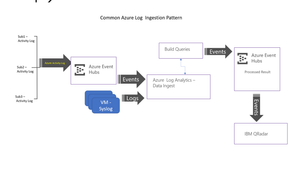
Hi Team, I am integrating Event Hub with Qradar with security purposes. I have created an Event Hub and streamed all the activity logs (for 10 subscription) into it. Now i want to stream Monitor and syslog and other data into event hub. Due to limitation of Event Hub i can not directly stream data into it. So my seniors proposed the below structure to send data from OMS to Event Hub. But i am not sure how i can build query for sending OMS data to Event HUB. I have gone through the below link, using this i can read event hub data using OMS. But i want to send OMS data into Event Hub. https://docs.microsoft.com/en-us/azure/log-analytics/log-analytics-activity-logs-subscriptionsSolved23KViews0likes5CommentsNeed Some enhancement in query
Hi Team, I am using below queries to check data of top 10 CPU, Memory and Disk information from OMS. let TopComputers = Perf | where ObjectName == 'Processor' and CounterName == '% Processor Time' and InstanceName == '_Total' | summarize AggregatedValue = avg(CounterValue) by Computer | sort by AggregatedValue desc | limit 10 | project Computer; Perf | where ObjectName == 'Processor' and CounterName == '% Processor Time' and InstanceName == '_Total' and Computer in (TopComputers) | summarize AggregatedValue = avg(CounterValue) by Computer, bin(TimeGenerated, 1h) | render timechart ----------------------------------------------------------------------------------------------------------------------------------------------------- let TopComputers = Perf | where ObjectName == 'LogicalDisk' and CounterName == '% Free Space' and InstanceName == 'C:' | summarize AggregatedValue = avg(CounterValue) by Computer | sort by AggregatedValue desc | limit 10 | project Computer; Perf | where ObjectName == 'LogicalDisk' and CounterName == '% Free Space' and InstanceName == 'C:' and Computer in (TopComputers) | summarize AggregatedValue = avg(CounterValue) by Computer, bin(TimeGenerated, 1h) | render timechart ----------------------------------------------------------------------------------------------------------------------------------------------------- let TopComputers = Perf | where ObjectName == 'Memory' and CounterName == 'Available MBytes' | summarize AggregatedValue = avg(CounterValue) by Computer | sort by AggregatedValue desc | limit 10 | project Computer; Perf | where ObjectName == 'Memory' and CounterName == 'Available MBytes' and Computer in (TopComputers) | summarize AggregatedValue = avg(CounterValue) by Computer, bin(TimeGenerated, 1h) | render timechart But when i am running this for last 6 hour 1 hour and so on, it will giving me one computer many time (as it giving me information on all samples). So is there any way i can get information once with a computer name. Like if i will run for 1 day it will give me output the current time counter or an average value. Please suggest on it, Because when i am giving this to any one who do not know about SCOM or OMS then first from his/her side is why servers names are two time. If i will say it is giving all samples then they asked run for one current sample. So can i modified in this way. Help would be highly appreciated.Solved2.2KViews0likes5Comments
Recent Blog Articles
No content to show