User Profile

jordancnolan
Copper Contributor
Joined 3 years ago


User Widgets
Recent Discussions
Link to open list item suddendly changed to another column
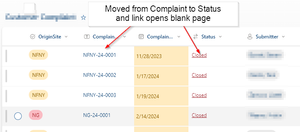
I am not sure when, but recently one of my Sharepoint Online lists has changed where the hyperlink to open the detailed form changed from the typical Title field to another field I called Status. The Status field is just a choice field with a short list of choices. Now when you click the Status field hyperlink, a new blank tab opens in the browser. However, I can still double click the list row and it will properly open the from. None of my team had Design access so I am thinking a recent Office 365 update caused the change. I am not sure if there is a way to change this back because I never tried to alter the default behavior. Here is what it now looks like (I renamed Title to Complaint ID when the list was origianlly created):59Views0likes0CommentsRe: Clear a variable when a custom SharePoint libary form closes
ganeshsanap Thanks for the tip, but OnEdit will not work for me because the user brings up the wrong record in the View. OnNew does not matter since it is bringing up a new record. The issue I am having with the OnView opiton is that the form does not really unload in the background unless I refresh the page. So if the user mistakenly clicks off the form to the list and clicks another item, they variable does not have the option to update.574Views0likes0CommentsClear a variable when a custom SharePoint libary form closes
I customized one of my lists forms with PowerApps. One of the things I wanted was for a user to be able to continue to work on the form when they pressed the Save button. This would cause the form to go back to record 1 in the list, but I got around that by setting a variable to capture the new record in a variable. Set(MyVariable, SharePointForm1.LastSubmit) Then I set the form Item property to: If(IsBlank(MyVariable),SharePointIntegration.Selected,MyVariable) This works well, except for when I click off the form and go back to the list. When I click the list item, the form opens to the last MyVariable record instead of the list item I selected. I have to click the list item, close it, then click it again to get to the record I want. I know the issue is because MyVariable is not being cleared when I click the X on the form and I know that the form itself does not really unload. I have a button on the form that has the code: Set(MyVariable, Blank()) And this makes the form work perfectly, but I do not want to have users clicking the button to fix this issue. I can't seen to find a property on the Form or Screen where I can put this Set command766Views0likes2CommentsOdd behavior on a column with conditional formatting based on other columns
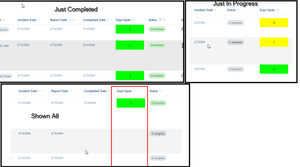
I made a simple SharePoint list to track Incidents. There is a column for [Incident Date] and [Complete Date] and a [Status] column for "Closed" or "In Progress". We want to be able to show "Days Open" in the list so we tried to create a [Days Open] calculated column which was simply If([Status] = "Closed', [Complete Date] - [Incident Date], Today() - [Incident Date]) Unfortunately, we quickly relized that SP will only recalculate Today() when an item is added or edited. After some more research I saw I could use the JSON column formatting to accomplish what I wanted so I created a dummy column [Days Open] configured as single line of text with the default text of "Days Open Placeholder". I setup the JSON shown at the bottom of the post. This works perfectly if I have a view that only shows me list items where [Status] is "In Progress" OR "Completed". When I am in a view that shows me All Items, the [Days Open] column only shows the open days for items where [Status] = Completed. The list items that are still "In Progress" have blanks. The JSON is configured to check if the Status is "Completed" and if it is completed, show the number of day it took to complete by [Completed Date] - [Incident Date] and if it is not completed it caluates @now - [Incident Date] to show the total days open. The JSON will also set the background color based on the Days Open value as Pink, Yellow, or Lime. JSON { "_comment": "Update back color and text to show days open to completion or how long in progress", "$schema": "https://developer.microsoft.com/json-schemas/sp/v2/column-formatting.schema.json", "elmType": "div", "style": { "background-color": "=if([$Status] == 'Completed',if(floor((Number([$Completed_x0020_Date] -[$Incident_x0020_Date]))/86400000)>=30,'Pink',if(floor((Number([$Completed_x0020_Date] -[$Incident_x0020_Date]))/86400000)>=7,'Yellow','Lime')),if(floor((Number(@now -[$Incident_x0020_Date]))/86400000)>=30,'Pink',if(floor((Number(@now -[$Incident_x0020_Date]))/86400000)>=7,'Yellow','Lime')))", "border-radius": "1px" }, "attributes": { "title": "@currentField" }, "children": [ { "elmType": "div", "txtContent": "=if([$Status] == 'Completed', floor(Number([$Completed_x0020_Date]-[$Incident_x0020_Date])/86400000), floor(Number(@now -[$Incident_x0020_Date])/86400000))", "style": { "font-size": "12px", "font-family": "inherit", "color": "Black", "white-space": "nowrap", "margin": "auto" } } ] }469Views0likes0Comments
Recent Blog Articles
No content to show