User Profile

Fernando_Klurfan
 Microsoft
Joined 3 years ago


User Widgets
Recent Discussions
Re: Latest Version of Teams not installing on Server 2019
New Microsoft Teams for Virtualized Desktop Infrastructure (VDI) - Microsoft Teams | Microsoft Learn Teams version 24335.208.3315.1951 fails to install on Windows Server 2019 with DISM error 15606 (0x3CF6) due to a change in the AppxManifest.xml. Microsoft is working on a fix. Version 25007.x.x.x that is coming out soon (currently in the public preview ring) has the fix.3.6KViews4likes4CommentsRe: "The paramter is incorrent" error in new Teams client (VDI)
Can you try modifying redirections.xml file in your existing FSLogix implementation, and add a new exclusion for the StartMenuExperienceHost TempState data. <Exclude Copy="0">AppData\Local\Packages\Microsoft.Windows.StartMenuExperienceHost_cw5n1h2txyewy\TempState</Exclude>4.4KViews1like2CommentsRe: "New Teams" in Windows 2019 RDSH environment with FSLogix profiles
When Teams cannot be started by the user, Do you see anything on the event viewer? https://learn.microsoft.com/en-us/microsoftteams/new-teams-vdi-requirements-deploy#troubleshooting-new-teams-deployment-errors Also, can you run these and attach outputs: > Get-AppxPackage -name MsTeams (from a PowerShell command under the user’s context, not as Admin. If output empty=Problem) > Get-AppxPackage -name MsTeams –allusers (from an elevated PowerShell command, and compare with the previous command)Re: "The paramter is incorrent" error in new Teams client (VDI)
In order to address this problem at the root, we recommend the upcoming FSLogix HF4 release https://techcommunity.microsoft.com/t5/fslogix-blog/announcing-release-date-for-fslogix-2210-hotfix-4/ba-p/4129512 and if you are using Citrix, the CPM 2402 release.4.7KViews0likes1CommentRe: New Teams on terminal servers
DavidYorkshire Teams Meeting Add In has a known issue in Windows Server environments, discussed here https://answers.microsoft.com/en-us/outlook_com/forum/all/new-teams-meeting-add-in-is-missing-from-outlook/8e9531ce-3852-4a5b-ac1f-5a3f5d3bacf0?page=6 We plan to fix this, and also document the workaround for manual installation of the MSI61KViews0likes8CommentsRe: Teams 2.0 Bootstrapper not working
T2.1 bootstrapper doesn't autostart. It is meant to be run only once, and it will provision the new Teams MSIX app machine-wide. Posterior user logons will then "register" the app to the user, finishing the installation process automatically.4.6KViews0likes1Comment
Recent Blog Articles
Keep your Microsoft Teams in VDI client up to date to ensure the best user experience
In the fast-evolving world of collaboration tools, Microsoft Teams stands as a cornerstone of productivity. But as with any modern software, staying current isn’t just about accessing the latest feat...4.1KViews0likes2CommentsNew Teams optimization for VDI now Generally Available in Citrix environment
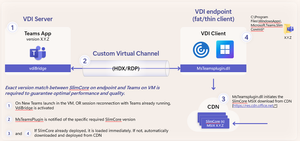
Today Microsoft is pleased to announce that our collaboration with Citrix on the new Teams optimization architecture based on the Slimcore media engine has reached 100% availability. This is a major...9KViews0likes16CommentsNew VDI solution for Teams on AVD/Windows 365 environments now generally available
Today Microsoft is excited to announce that the new VDI solution for Teams on Azure Virtual Desktops/Windows 365 environments is generally available. As explained in our previous blog, this new arch...25KViews3likes13Comments