User Profile

MurrayWallForte
Iron Contributor
Joined 8 years ago


User Widgets
Recent Discussions
Re: How to switch from a local user account/profile , to using an Azure AD connected account/profile?
You should be able to login to a computer you have previously been authenticated on, on a new machine, you must be connected to M365 to authenticate. You canalso have a hybrid joined machine or use a hardware token or passwordless auth that has something stored in the local TPM that is trusted as a long term solution. Also know that you need to be online at some point in time to be able to renew and actually use the SaaS....104KViews0likes0CommentsRe: School Assignment for Windows 10 LTSC
carlygoldI am not sure Windows 10 LTSC is the right approach - LTSC is a limited updated version, never re 'certified' with new released hardware, LTSC is meant for specific use cases - a good thread here talks about it. In my experience, 'Friends don't let Friends deploy LTSC' (unless use case is met!) - Check your use case....2.3KViews0likes0CommentsRe: System reports No Internet despite having active connection
Andrew SparksI had tried the netsh as well and had no success, it was only this method I blogged about that actually worked, multiple times, the Troubleshooting routine did correct it everytime I ran it and had it force a reboot. That being said, the problem has reoccurred twice so I don't believe the issue is corrected long term and there is something definite on the new builds that is causing this issue to appear.7.5KViews0likes0CommentsRe: System reports No Internet despite having active connection
Andrew SparksHey Andrew I blogged https://www.onthewinside.com/post/network-connection-in-windows-10-goes-dark the fix, its essentially to reset the network connection, I have had great success in this approach, used it multiple times on the newer insider builds. My blog goes step by step on resetting the network adapter via the control panel network and sharing utility. Let me know how you make out!7.5KViews0likes2CommentsRe: How to push message to all PC ?
The image that you have shown is an email sent out to all users, you could use a distribution group to do that, and as long as the users were logged in via email they would get that. Maybe I didn't understand your ask correctly - you asked for a broadcast to all computers - What I wrote was a quick set of commands to broadcast to each computer whether it had outlook/email on it or not. This shows up on the users screen no matter what is running and will not get recorded in the email system as this is completely independent of email, it does get recorded in the Computers Event Viewer that a message was sent - this broadcast is a message to the Active logged on user only on a domain computer only with no way for user feedback or acceptance- This would used like a legacy paging system. There are better ways to do this - commercial programs etc, but this broadcasts quick and dirty to all computers in the list of computers in your domain. As long as you are an administrator and the machine you are broadcasting from is a domain connected computer, and all your computers don't have the windows firewall COMPLETELY locked down - this is not default - it should work to broadcast to the computers.36KViews0likes1CommentRe: How to push message to all PC ?
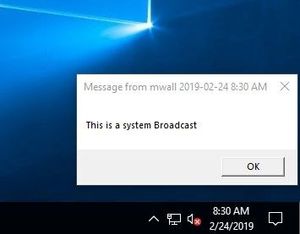
Hello, there is a feature built in to windows that will do this! The msg command on windows 10 or net send on windows 7 or older will accomplish this. That being said its probably not as feature rich as you are going to want it! Format of the command is MSG username /Server:Machinename "The Message you Want to Send" It presents a couple of issues for you as an administrator, including the fact that you have to know the list of machines on your network, have access to them via the MSG command (Basic Microsoft networking firewall access has to be enable at the domain level). The list of machines can easily be gotten if you have Powershell AD module loaded via (get-adcomputer -filter *).name If you don't have the Powershell Module you can use ADSI to enumerate your domain members via a searcher - $Search = [adsisearcher]"(&(objectCategory=Computer))" ($search.findall()).properties.name > Computers.txt Edit the list to remove out unwanted machines, DC's etc The following code will enumerate the active logged on user ((qwinsta /server:$ServerName | foreach { (($_.trim() -replace "\s+",","))} | ConvertFrom-Csv)|where {$_.state -like "*ACTIVE*"}).username We could take this code from the TechNet Community https://gallery.technet.microsoft.com/scriptcenter/Ping-Multiple-Computers-7d13a3aa And quickly modify it up so that if it pings the machine it sends the message Its not pretty and needs error handling and some fine tuning, possibly more logic as you require etc but $ServerName = Get-Content "c:\Temp\Computers.txt" foreach ($Server in $ServerName) { if (test-Connection -ComputerName $Server -Count 2 -Quiet ) { $Username=((qwinsta /server:$Server | foreach { (($_.trim() -replace "\s+",","))} | ConvertFrom-Csv)|where {$_.state -like "*ACTIVE*"}).username msg $username /Server:$Server "This is a system Broadcast" } else {"$Server not pinging" } } Should broadcast to all the machines active logged on users from a Windows 10 computer36KViews0likes3CommentsRe: Unable to login to Windows 10 build 18329 or 18334 with Office 365/Azure AD account.
So I ran into this issue and it appears your machine may be suffering from the same thing. Most likely what has happened is that at some point in time after you joined Azure AD your machine was renamed, and if you can believe it, Windows 10 doesn't have (yet) a mechanism for renaming it in Azure AD that is part of the rename computer procedure! I blogged the solution here https://www.onthewinside.com/blog/i-figured-out-error-code-caa5004b It has worked for a few people so I would check it out. Murray2.5KViews0likes0CommentsRe: Unable to login to Windows 10 build 18329 or 18334 with Office 365/Azure AD account.
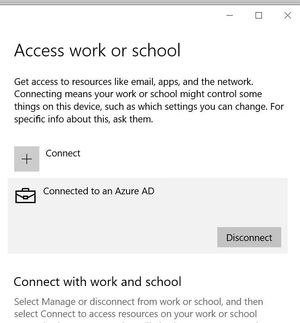
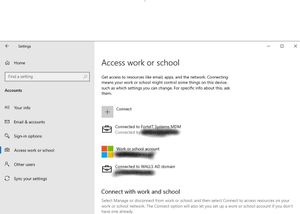
Hey Gerben In you Settings --> Accounts Access Work or school page do you see your connection properly to Azure AD Does it show like the first picture or the second. If its like the 2nd picture your connection to Azure AD is most likely correct - you can also verify this at the command line with DSREGCMD /status This should help validate your Azure Join. I suspect something is not valid, possibly you are connected Via MDM or some other process and that the domain join is some how broken. If you have another Azure AD account, I would add that user to the Computer and see if they get the PIN process via the login and validate that part is working, you could then remove that user that the Pin isn't working on and then re Add them and the PIN process should re validate - The local windows profile should stay intact though having a backup is advisable. Let me know how you make out! - Murray2.5KViews0likes2CommentsRe: How to switch from a local user account/profile , to using an Azure AD connected account/profile?
Yes it will - Be sure you login with the account you specified when you joined to the device to Azure AD - or added any other accounts to the machine that you want logging in. I use this on a good number of my devices.139KViews0likes2CommentsRe: How to switch from a local user account/profile , to using an Azure AD connected account/profile?
In the Settings menu --> Accounts choose the Access Work or School and choose the connect, make sure you choose the option to join Azure AD, then from the Accounts --> Other Users Add other users and add the Azure AD account you want to login as a Standard or Administrator. This will allow the user to then login. At the login prompt use the Azure AD email address (UPN) to login. It will create a new profile for you.139KViews2likes9CommentsRe: Installation fails every time!
I have seen this issue previously and it may have to do with old unused or rarely accessed accounts and the migration of their store applications this link https://social.technet.microsoft.com/Forums/en-US/9e12ac9e-8d06-4f06-98c3-ba90c6da3b9a/trying-to-upgrade-insider-preview-from-17711-to-newer-builds-stops-at-11-reboot?forum=WindowsInsiderPreview Talks about resetting the APPX cache - I ended up deleting the old users but this is most likely a better approach to simply remove the cache10KViews1like9CommentsRe: Installation fails every time!
I believe it has to do with this known issue as why it is not working - I suggest that a good choice is for you to wait for a new build to come around! Update Orchestrator Service stops working periodically. A fix will be included in an upcoming build. As a result of this issue, you may see an error on Windows Update Settings saying that the update failed to restart. If you see this, restarting using the power menu in Start (“Update and restart”) should work, although there’s a chance that it won’t.10KViews0likes0CommentsRe: Cannot install Insider Preview 18305
Formating is really the last option - if you are that far go into settings--> update and security --> and choose Recovery and reset this pc and wipe everything - Just the fast and not the full drive wipe you probably don't need to go that far. I have had to do this on occasion with an insider build that went wrong, its all part of testing!3.1KViews1like0CommentsRe: Windows 10 Insider Preview 18312.1001 (rs_prerelease)
I know you have done some manual resets with the bits but one of the things I have always done is run the TechNet article that references reset-windowsupdate.ps1 - I blogged about it here https://www.onthewinside.com/blog/complete-windows-insider-troubleshooting under the title Windows updates failures. The blog goes alot deeper to go through and sulution troubles that insiders have - the Microsoft Script I use is on the technet site here https://gallery.technet.microsoft.com/scriptcenter/Reset-WindowsUpdateps1-e0c5eb78 (By Ryan Nemeth) and I have almost 100% success (in the end) running this script and reseting windows updates. You seem to be ready to choke out your InsiderBuild, why not give this a try to see if it gets you further? Murray4KViews0likes0CommentsRe: Prevent auto-installation of Apps on Windows 10 computers and remove the apps
While disabling the Windows store is not highly recommended, more and more features are using modern applications - it is however an option! I assume these machines are Windows 10 Pro, as they are not connected to a domain. On each machine since they are not domain connected Edit local Group policy and go to Computer Configuration -> Administrative Templates -> Windows Components -> Store; in the Settings pane on the right, double click Turn off Store application, select Enabled in the properties page for the policy and click OK. See this link for details https://social.technet.microsoft.com/Forums/en-US/a8405957-5025-427e-9405-331b1a8dde21/uninstall-or-disable-the-microsoft-store?forum=win10itprogeneral You also have some other options to disable downloads etc so you may want to experiment with limiting rather than disabling completely. You can also remove applications individually - I have done this lots at Image build time - Get-AppxPackage *windowsmaps* | Remove-AppxPackage will remove the Maps using powershell This article details it fairly well on how its done https://www.thewindowsclub.com/remove-built-windows-10-apps-users-using-powershell-script If you remove the applications and don't disable the Local policy to update apps in the store on an nondomain joined PC, the store apps may show back up depending on how the PC is being patched so consider that... If the machines are being managed via Intune, you also have some options... Let me know Murray20KViews1like1CommentRe: Cannot install Insider Preview 18305
Troubleshooting upgrade errors from one Insider version to the next always involves detailed troubleshooting. In your case I would say the download of the version is just fine, its in the upgrade process that you issue lies. I have blogged https://www.onthewinside.com/blog/how-to-troubleshoot-a-bad-upgrade-part-2-lets-dig-deeper about ways to look into this. It involves some digging that some are not comfortable with doing. If you are adventurous, consider going down this route. In my blog post my issue was a problem with a new version of Dot Net and IIS. I suspect your version has to do with the windows store. First thing first is to get some more information about your error Check out my blog post or run the Microsoft utility SetupDiag https://docs.microsoft.com/en-us/windows/deployment/upgrade/setupdiag to find some more information. Post what you get along with some details, does this machine have a lot of windows features enabled or extra software installed? **bleep** luck and let us know if you can get some details on your error Murray3.5KViews2likes2CommentsRe: Scan & Repair Drive
There are ways of disabling the Scan and Fix, a google shows how, but I think the root problem is that there is likely an issue with the drive itself whereby it is marking itself as having an issue. When you have some time, let the machine boot up and do its check, then ensure you have a backup copy of the D drive. Make sure no programs are accessing that drive or have any explorer windows open. Run a command prompt as administrator and then issue the command CHKDSK d: /F /R. This command will not only fix the current marked problems but will do a detailed check (located bad sectors, recover or mark them bad) to see if there are any bad sectors, which I am expecting you fill find, which is likely why your drive is always coming up dirty, its possible that the drive is ok and the CHKDSK D: /F /R will mark those sectors bad and no longer complain. If bad sectors showup, it is a sign of a failing drive and having a backup prior to running the chkdsk is highly recommended. The chkdsk may take a long time to run (hours or even days depending on the drive, its state and the size) I have seen this go both ways, fixing a drive completely, marking a couple sectors bad and having no other issues, and failing to complete while continually marking sectors bad - a sign of failed drive. Hence the backup prior! Good luck and let us know how you make out. Patience is the key when running CHKDSK1.4KViews0likes0CommentsRe: Resetting my desktop
I do recommend you make a list of the applications you had on the machine to ensure you know what to put back on, it sounds like you may have many. Backing up the data on your machine may also be prudent. Shortcuts, userdata etc - You may have data inside the user profiles directory or scattered throughout the machine, ensure you get everything you need. Also if you use any modern applications that contain data you may want ensure that you properly back them up. Resetting the machine is easy but ensure you are committed to do this, as its undoable! In the settings app choose Update & Security and then go to recovery - I stress make sure you backup everything you need!854Views0likes0CommentsRe: Outlook not updating inbox
The root of the problem may be that the second account has a large number of folders >500 will cause a problem with the OST file, it cannot handle more then 500 folders (in all accounts in this current profile) and this is why turning off cached mode may help. Removing this 2nd account may also correct this issue. It is a known limitation within the outlook client. Be aware that not running in cached mode may present performance issue if the mailbox is large or connected over a slow connection1MViews2likes2Comments
Recent Blog Articles
No content to show