User Profile

BrandoCal
Copper Contributor
Joined 8 years ago


User Widgets
Recent Discussions
Re: Detect when apps are managed in iOS and allow them in Conditional Access
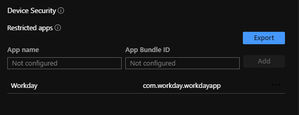
I think I finally found a solution, or at least a way to achieve what I want. In the iOS Compliance Policy there is an area where you can list "Restricted Apps." So as I test I added the Workday app to the list of restricted app in my compliance policy, then on my test device I downloaded the Workday app from the Apple App Store. As expected my device was no longer compliant, and the reason in the Comp Portal app was because I had the Workday app installed. Then I went to the App Store in the Comp Portal app and installed the "Managed" version of the Workday app. Once it finished installing I check the device settings again and synced the device from the Intune portal; the device was now compliant. This doesn't automatically install the app, but does allow my to detect the apps and make the users remedy the issue. The Microsoft documentation doesn't explicitly say this is how it works, but it definitely seems to work for my scenario. Just thought I would share in case someone else comes across this scenario.3.2KViews0likes0CommentsDetect when apps are managed in iOS and allow them in Conditional Access
Here is my scenario, we want to allow our users to use some specialized apps such as AutoCAD or ArcGIS to access OneDrive files on managed iOS devices, but we want to ensure that the app the users are using are in the "Managed area" of their iOS device. This means the app needs to be installed from the App store in the Intune Company Portal app, however we see instances where users are downloading the app from the public app store. To me there are two approaches I can take: 1. Detect when one of these apps is installed from the app store and then force the installation from the Company App store. Is this possible? 2. Create an App Configuration for the app, which only gets applied when the app is installed from the Company App store, and then use Conditional Access to detect this setting. Is this possible? Or perhaps there is another way to achieve what I am looking for?3.4KViews0likes2CommentsRe: Allow 3rd Party Keyboards when block unmanged apps iOS Restriction is enabled
Technically this works for Outlook and the other Office apps, but for some of our non Microsoft apps documents can be sent to unmanaged apps (Workday, ServiceNow, ProjectWise). I wish Apple provided a way to enforce these restrictions on certain apps so I can use Intune policies on other apps.6.9KViews0likes0CommentsAllow 3rd Party Keyboards when block unmanged apps iOS Restriction is enabled
I have set the iOS restriction Viewing corporate documents in unmanaged apps to Blocked but I want to allow my users to still use 3rd party keyboards in iOS apps like Outlook, OneDrive, Word, etc.. Is there a setting that will enable this exception?7.1KViews0likes3CommentsiOS Kiosk Device Scheduled Sleep
I am working on setting up about 200+ iPads in Intune that will be used as kiosk display devices in offices throughout my company. I have created an iOS restrictions configuration that displays an app in Single App mode and prevents the screen from going to screen, this configuration works great. One requirement I am having trouble figuring out is how i can make it so the devices turn their screen off during non-business hours. Has anyone implemented this scenario yet in Intune? I cant shut down the devices because they will have to be manually powered back on.1.1KViews0likes0Comments
Recent Blog Articles
No content to show