User Profile

kandrews5725
Brass Contributor
Joined 3 years ago


User Widgets
Recent Discussions
Re: No logged events from ODJ connector service on Windows Server 2022
I'm trying to sign in with the global admin account now. Everything seems to have joined ok, and behaving as expected. The only issue now will be getting the individual apps to install as needed, but that's another issue. Thanks!4.1KViews1like1CommentRe: No logged events from ODJ connector service on Windows Server 2022
I removed the OU entry in the Domain Join policy since that is optional. Our DC is setup to automatically add newly joined computers to the MyBusiness\Computers\SBSComputers\New OU. I just used the Fresh Start feature in Intune since the device record was there, but I was stuck with that App failure, and couldn't reset from that point. The Fresh Start worked really well. It removed the device from Intune, but now it's back trying to setup again and there's a new device object in Intune. I also just checked my AD, and there's a new device object in there as well. Something to keep in mind if someone uses Fresh Start. They need to remove the computer object in AD, otherwise there will be duplicate devices in there for each time you reset a device.4KViews0likes3CommentsRe: No logged events from ODJ connector service on Windows Server 2022
Making some progress now. I don't know why it all of a sudden started working, but I did change my domain join profile back from mycompany.com to mycompany.local and that seemed to work. I was presented with the "Setting up your device for work" window and made it all the way to the Device setup - Apps section when it finally failed. I have since removed all apps from Intune that I wanted to pre-load onto the device, with the exception of Company Portal and M365 apps. If those successfully install after the device reset is complete, then I will start adding each additional app individually until there is a failure.5.1KViews1like5CommentsRe: No logged events from ODJ connector service on Windows Server 2022
Harm_Veenstra I was finally able to pull up a command prompt during enrollment. I was able to confirm I can ping both the on-prem DC, and the URLs for Intune and Azure. It doesn't appear to be an issue with connectivity. I'm going to review the logs to see if there's anything I'm missing.3.9KViews1like7CommentsRe: No logged events from ODJ connector service on Windows Server 2022
Yeah if I can get to a cmd prompt during enrollment, that would make a world of difference in troubleshooting. Unfortunately I just haven't been successful in doing so yet. Thanks for your time, and have a nice weekend!4.2KViews1like8CommentsRe: No logged events from ODJ connector service on Windows Server 2022
Harm_Veenstra All permissions should be setup correctly. The server is a domain controller with AD, so there shouldn't be any issue there. This is a laptop, but I haven't had any issues with the keyboard for entering the creds at the beginning of the enrollment process. Not sure why it's not allowing a command prompt. I did read somewhere that you can only do that during the device stage and not the user stage? Not sure if that is correct, or even applies. When we've joined workstations in the past it has been with either an ethernet cable, or over the wireless LAN connection. There's never been an issue there, but that's a different process. I'm still thinking there's an issue either with the device not having line of sight with the DC, or there's a problem with the ODJ Connector. That appears to be the stage I'm stuck at.4.2KViews0likes10CommentsRe: No logged events from ODJ connector service on Windows Server 2022
So, I have no way of knowing if the workstation can ping the DC yet, but from speaking with our Engineer, there shouldn't be any restriction on the connection preventing it from seeing the DC. I have tried all combinations of Shift+F10, or Ctrl+F10, etc... Nothing seems to bring up a CMD prompt during the enrollment process. When we used to manually join the new workstations to the domain, we would go through the steps in the Network ID section of Windows Advanced System Properties. This requires putting in the FQDN of the domain on the network (companyname.local), and then entering the creds of a user who is authorized to add devices to it. Because this works in the way described above, this leads me to believe that the DCs are visible to any connected device on the network. The only thing I can think of is, because I have no way to specify what the domain FQDN is on the new device during the enrollment process, the device isn't able to find the DC, but I thought that information would be provided from Azure and the Intune connector.4.3KViews0likes12CommentsRe: No logged events from ODJ connector service on Windows Server 2022
Yeah as far as I can tell, everything is setup correctly. I did just tracert to some of those FQDN and IPs listed on that page you referenced, and I was able to reach the destinations. With regard to the domain-join profile, I kept it as simple as possible, by not using any custom OU for joining the computers to, and keeping my name prefix to just five characters of the company name, with no special characters, spaces, etc... I've also made sure the group where the devices are is included in the assignment. For the profile, I have it assigned to the group that all of the new workstations are placed into when we purchase them (AutoPilot). I can see all of the devices in the group and there are no exclusions. In our MDM/MAM settings for Azure, I have chosen "Some" under User Scope and then the AutoPilot group, per Microsoft Support's recommendation.4.4KViews0likes14CommentsRe: No logged events from ODJ connector service on Windows Server 2022
Harm_Veenstra Thanks for your reply. When I launch the ODJ connector wizard on the server, it shows that it is enrolled. I am not able to sign in since that step has already been performed. If I look on my Intune account online, I can see that the connector status is active from that server and healthy. Wouldn't that indicate that the outbound firewall rules are properly configured on the server?5KViews1like16CommentsNo logged events from ODJ connector service on Windows Server 2022
I am trying to enroll some workstations in our Intune environment via Hybrid AAD. We have the ODJ Connector installed on our Windows server, and the service is running. I have confirmed connectivity to Intune is healthy. When I go through the user-driven enrollment of the device, I am able to see our organization's login screen as we've set up prior, and I'm able to authenticate to Azure with my credentials. Afterward, I can see the device has enrolled in Intune, but I am not able to get any further than that. I have checked the ODJ service on the server to see if there are any events related to the creation and uploading of a Blob to Azure, but there are no events logged. When the process finally fails, I am given the typical 80070774 error which people say has something to do with line of sight to the domain controller. The device is plugged into an ethernet cable in my office and should be able to ping the DC from there. I have also tried to use the wireless LAN connection, but the result is the same. I am unable to use the Shift+F10 trick during enrollment to bring up a cmd prompt to run any PowerShell scripts, to see where the hangup is occurring. The only information I am able to derive throughout the process is from Intune Device Monitor, which states that there was a failure with the ESP deployment state. There has also been observed a failure related to the Blob. I have gone through most online tutorials and references with regard to setting up AutoPilot and Intune, and nothing seems to help. I have made sure the user has the Intune license, I have made sure the domain-join profile is there, and is not configured incorrectly with the OU path, or with the device name using a special character. I have covered every base I can think of. If anyone has any thoughts on how I can determine why the connection to the domain controller is failing, please let me know! Thank you in advance! KeithSolvedRe: Restrict access for some users to certain folders
Thank you for the reply. We do currently have SharePoint set up. I'm just wondering if we'll need to remove access to all of the other sites by changing the security group that the members belong to. Right now the users belong to a number of different groups, so that might be why they have access to all of the folders. Perhaps creating a new group and putting those members into it and allowing that group to access the folder is the way to go, rather than remove everyone else's access to the folder.4.3KViews0likes0CommentsRestrict access for some users to certain folders
Hello! We have Members who access our org's OneDrive, but only need to view a single folder. Is there a way to set them up in a security group, or similar, that will only grant them access to that single folder on OneDrive? We do not want to prevent other users in the org from accessing OneDrive, we just want to limit what these specific members have access to. Thanks in advance! Keith4.4KViews0likes2CommentsCannot get default associations configuration XML file to apply to user at logon
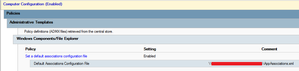
I have a GPO set to use a particular XML file with the default app associations our organization wants to use for all users. The XML file is on a network share and was created using DSIM from an existing workstation that is already setup correctly. When I run "gpupdate.exe /force" and "gpresult /r" I can see that the policy is applying to the test user, but the app associations do not change. For example, we would like .pdf files to open with Acrobat, not with Edge, but even after running the gpupdate.exe command and restarting the computer, the app association for .pdf remains associated with Edge. Any thoughts on what might be causing this? Thanks! Keith
Recent Blog Articles
No content to show