User Profile

andy471100
Copper Contributor
Joined 3 years ago


User Widgets
Recent Discussions
Address book
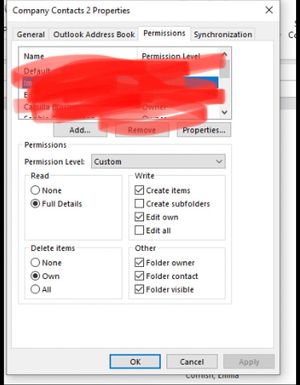
I have a user in 365 but there is an address book that user would need access too, where they click on the book it should display but it’s not there , plesse see screenshot , I have granted permission by right click the contacts on the other user outlook and adding user in, but when I click outlook address book it’s not shown it should show like the above “company contacts “ but for the new user , but when I click on the new user outlook there is nothing there ? How can I add please ? thank you - most helpful guysRe: Distribution lists created in 365
Yes, but where would they type in the email address to add into the current DL ? Then the list would be updated with the new email address included? Would they add a new contact manually in the address book, then modify the DL list , and find the contact ?2.1KViews0likes1CommentRe: Distribution lists created in 365
They are set as owner , when chick address book in outlook , click modify they can remove , but can’t see where they can new new external email by typing it in and saving to list ? Can you detail in screenshot please ? Having trouble finding . Thanks2.1KViews0likes3Comments365 account sync to AD on prem
Hello, I have created an email address and user name directly in 365 admin, but the same user needs to be added into AD server on prem as I need to add into emails groups and I can only add to groups on AD server then it will sync , but is there a script or something that I can add from account from 365 admin to the on prem server so I can add groups etc ? I don’t want to delete and recreate as user is already using emails thank you - I’m new to this3.4KViews0likes7CommentsDistribution lists created in 365
Hi, I have created in dissolution group in 365 and added external email addresses to it. This would be like a bulk email list then the group name added in the BCC feild in outlook. But is there a way I can edit the emails and remove from this grounp directly in outlook.. this would easier for end user who hasn’t got access to 365 admin. Thank you for you help2.6KViews0likes18CommentsOne drive Secure with password
Hello, I have setup one dive business can I secure with a password , or if I setup MFA for the user will this secure on drive aswell, basically if laptop was lost stolen etc, so people can’t get access to the data. If it’s MFA, how can I set up in office 365 admin? thank you very muchConnect SP library to teams
Hello, is there a way I can connect a SP library and or one drive to Microsoft teams channel, but can I do this using the admin centre and then I pick which users have access rather via adding a tab in each users teams software? hope this makes sense - I’m fairly new to this Thank you1.1KViews0likes3Comments
Recent Blog Articles
No content to show