User Profile

Alex_Rechs
Brass Contributor
Joined 3 years ago


User Widgets
Recent Discussions
Re: Method not found 'Void Microsoft.Graph.TokenCredentialAuthProvider'
Eventually I installed Microsoft Graph version 1.24.0 on Hybrid Worker machine I remember I installed that certificate under system account and Hybrid Worker account, but I don't recall what worked and at this point I'm afraid to touch it 🙂 The way I connect to Graph is: Connect-MgGraph -CertificateThumbprint "<certThumbprint>" -ClientID "<clientID>" -TenantID "<tenantID>" Select-MgProfile -name Beta I hope that helps.9.3KViews0likes0CommentsRe: Cannot connect to Exchange Online module via Runbook
What helped to resolve the issue is to install Exchange Online management module V2 (Install-Module -Name ExchangeOnlineManagement -RequiredVersion 2.0.5). I have two version why it works the way it works: 1. This issue is related with PowerShell version (I'm using 5.1 and it may be not fully supported by EOMv3) and it requires at least v7. 2. This is an actual bug, but I have no time to put effort for investigation. I'm leaving error transcripts below for the future reference whoever gets this: For non-interactive: "exception": "Could not find file 'C:\\Windows\\TEMP\\5158977d-0c0a-4d8e-9a2c-36a2d88bb65e\\tmpEXO_zvn3zqdw.mjv.psd1'. (Could not find file 'C:\\Windows\\TEMP\\5158977d-0c0a-4d8e-9a2c-36a2d88bb65e\\tmpEXO_zvn3zqdw.mjv.psd1'.)" For interactive: Could not find file 'C:\Users\TEST\AppData\Local\Temp\2\95fd959b-fa0f-47c5-be2a-f1ea93533467\tmpEXO_aomlgbj5.w1b.psd1'. At C:\Program Files\WindowsPowerShell\Modules\ExchangeOnlineManagement\3.1.0\netFramework\ExchangeOnlineManagement.psm1:733 char:21 + throw $_.Exception; + ~~~~~~~~~~~~~~~~~~ + CategoryInfo : OperationStopped: (:) [], FileNotFoundException + FullyQualifiedErrorId : Could not find file 'C:\Users\TEST\AppData\Local\Temp\2\95fd959b-fa0f-47c5-be2a-f1ea935 33467\tmpEXO_aomlgbj5.w1b.psd1'.2.6KViews1like0CommentsRe: Cannot connect to Exchange Online module via Runbook
Yes, I used to sort it out by Module reinstallation or restart and it helped for interactive sessions. For non-interactive from Azure runbook nothing helps it seems. I tried different versions of Module, preview including.2.4KViews1like0CommentsCannot connect to Exchange Online module via Runbook
That's very strange error that I came across a few times on my own workstation, but now I cannot get rid of it on Hybrid Worker machine. My runbook connects to Exchange Online to perform get-mailbox cmdlet, however at the connect-exchangeonline phase I'm getting the following error: "exception": "Could not find file 'C:\\Windows\\TEMP\\a70a8826-0c1f-4902-b1bc-767587023327\\tmpEXO_rj4fdl4e.yzc.psd1'. (Could not find file 'C:\\Windows\\TEMP\\a70a8826-0c3f-4902-b2bc-767587023327\\tmpEXO_rj4fdl4e.yzc.psd1'.)" I tried to uninstall, clean-up, restart, install previous version, nothing helps. Any ideas what could be the reason?SolvedRoom is not added to Location field when selected in a Meeting
Hello, This is probably a minor, but very irritating problem. So when I schedule a meeting, I open a Room Finder and select a room I'm after. It is added to "Required" field, but not to "Location" field. I use MS365 2208 and all updated are rolled out. I checked various settings in the Options and couldn't identify where that can be configured. Any advice would be appreciated!1.4KViews0likes1CommentRe: Method not found 'Void Microsoft.Graph.TokenCredentialAuthProvider'
LainRobertson VasilMichev Alright. I wiped out module repository and reinstalled all modules (MSGraph 1.23), including Azure.Core.dll which is a part of Az.Accounts (2.12.1). That didn't help and I started getting "Connect-MgGraph : <ThumbprintId> certificate was not found or has expired". Then I tried to import a certificate using Runbook into CurrentUser with "Import-PfxCertificate -FilePath "localPath" -CertStoreLocation Cert:\CurrentUser\My\", but I got again: "Connect-MgGraph : <certName> certificate was not found or has expired." I tried to use the guide and specify the cert path: "$Cert = Get-ChildItem Cert:\LocalMachine\My\$CertThumbprint", but this time I got the same error, but instead of basic <certName>, I got full details of my certificate with ending message "certificate was not found or has expired." which is kind of ridiculous, because the certificate is displayed. Locally and from Runbook all working well. I just run out of ideas what else could be wrong.9.7KViews0likes1CommentMethod not found 'Void Microsoft.Graph.TokenCredentialAuthProvider'
Hello, I try to run a runbook in Hybrid Worker to collect info from Azure Registered Apps. For that activity I connect to MS Graph with certificate and execute Get-MgApplication cmdlet. However, I see "Welcome to Microsoft Graph!" response and then: Get-MgApplication : Method not found: 'Void Microsoft.Graph.TokenCredentialAuthProvider..ctor(Azure.Core.TokenCredential, System.Collections.Generic.IEnumerable`1<System.String>)'. At line:24 char:1 + $SApps = Get-MgApplication -all + ~~~~~~~~~~~~~~~~~~~~~~~~~~~~~~~ + CategoryInfo : NotSpecified: (:) [Get-MgApplication_List], MissingMethodException + FullyQualifiedErrorId : Microsoft.Graph.PowerShell.Cmdlets.GetMgApplication_List My current version module is 2.0.0-preview5, but I also tried other versions and got different results (but never successful). All cmdlets, including connecting via certificate, can be executed successfully locally and within Azure runbook. I run out of ideas. Any ideas?Re: Cert not found for Connect-MgGraph via Runbook Hybrid Worker
Hi Lain, Thanks for the suggestions. The article you are referring to says: > To use a certificate stored in your machine's certificate store or another location when connecting to Microsoft Graph, specify the certificate's location. I guess it's talking about "Service account" nevertheless? Also, when selecting "Service account" there are the list of services is presented where you have to select the needed. However, no services with *powershell* keyword is available. Microsoft documentation just says: "Hybrid Runbook Worker jobs run under the local System account", but what Service account exactly used is unknown.6.9KViews0likes2CommentsRe: Need assistance with automating MS Authentication in a PowerShell script
$User = "email address removed for privacy reasons" $PWord = ConvertTo-SecureString -String "password_blablah" -AsPlainText -Force $Credential = New-Object -TypeName System.Management.Automation.PSCredential -ArgumentList $User, $PWord Connect-PowerBIServiceAccount -Credential $Credential1.8KViews0likes0CommentsCert not found for Connect-MgGraph via Runbook Hybrid Worker
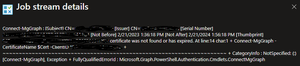
I use certificate to connect to Microsoft Graph and it works fine in runbooks azure instance. However, when I perform Connect-MgGraph -CertificateThumbprint <certThumbprint>-ClientID "<clientID>" -TenantID "<tenantID>" in runbook for Hybrid Worker machine I'm getting the following error: Connect-MgGraph : Certificate with subject name '[Subject] CN=CertName [Issuer] CN=CertName [Serial Number] CertSN [Not Before] 1/21/2023 1:33:10 PM [Not After] 1/21/2024 1:53:13 PM [Thumbprint] CertificateThumbPrint ' was not found in certificate store or has expired. At line:14 char:1 + Connect-MgGraph -CertificateName $cert -ClientID "<ClientID>- ... + ~~~~~~~~~~~~~~~~~~~~~~~~~~~~~~~~~~~~~~~~~~~~~~~~~~~~~~~~~~~~~~~~~~~~~ + CategoryInfo : NotSpecified: (:) [Connect-MgGraph], ArgumentException + FullyQualifiedErrorId : Microsoft.Graph.PowerShell.Authentication.Cmdlets.ConnectMgGraph The certificate is found and data is valid, but error says "not found" anyway. I tried to specify the exact path to the certificate and use store, also I switched different graph module version, none of that helped.Solved7.6KViews0likes4CommentsCalling principal does not have required MSGraph permissions AuditLog.Read.All
I have a Runbook (Automation Accounts) parsing AAD SignIn and Audit logs, however, when it executes Get-AzureADAuditSignInLogs I'm getting the following error: Get-AzureADAuditSignInLogs : Error occurred while executing GetAuditSignInLogs Code: Authentication_MSGraphPermissionMissing Message: Calling principal does not have required MSGraph permissions AuditLog.Read.All The Managed Identity I'm using in Runbook has Security Reader role, but it doesn't seem to be enough?Solved
Recent Blog Articles
No content to show