User Profile

Zohaib_Yousuf
MCT
Joined 3 years ago


User Widgets
Recent Discussions
Re: Configure Dedicated Exchange Server Application
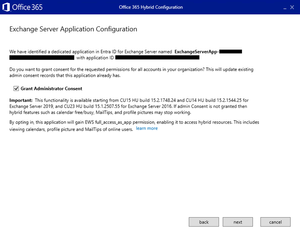
Hi, If HCW detects an existing dedicated Exchange Hybrid application, it displays the application's name and ID. The dialog also shows the current administrator consent status for the full_access_as_app EWS API permission. If consent has already been granted (checkbox is selected) and you deselect it, the consent will be revoked - potentially breaking your existing configuration and impacting hybrid features such as Free/Busy, MailTips, and profile photo sharing. Once configured, the Hybrid Configuration Wizard doesn't automatically enable the feature for your on-premises Exchange Server organization. HCW only creates the application in Microsoft Entra ID and prepares the Exchange Server configuration. To enable the feature, run the New-SettingOverride cmdlet. Before doing so, ensure all Exchange servers are running a version that supports this feature. Run the following command from an elevated Exchange Management Shell (EMS): New-SettingOverride -Name "EnableExchangeHybrid3PAppFeature" -Component "Global" -Section "ExchangeOnpremAsThirdPartyAppId" -Parameters @("Enabled=true") -Reason "Enable dedicated Exchange hybrid app feature" Get-ExchangeDiagnosticInfo -Process Microsoft.Exchange.Directory.TopologyService -Component VariantConfiguration -Argument Refresh6Views0likes0CommentsRe: We have set RejectDirectSend to true
Hi, RejectDirectSend = $true does NOT block SMTP AUTH, MX inbound, or anonymous mail over the MX. The RejectDirectSend setting only blocks unauthenticated outbound relay FROM your own Microsoft 365 tenant when using: smtp.office365.com port 25 or 587, no auth It does NOT block mail coming into your tenant using the MX endpoint: <tenant>.mail.protection.outlook.com Because the MX endpoint must accept anonymous SMTP traffic—it's how email works on the internet. Therefore: Spoofing via MX is STILL POSSIBLE even with RejectDirectSend = True And this is expected and cannot be blocked using that setting. How SPF validation actually works When someone sends mail from outside to your MX but spoofs @yourdomain.com, Microsoft 365 will: Accept the connection anonymously (required) Apply inbound anti-spoofing: SPF DKIM DMARC ARC Composite Authentication If you have DMARC = none, spoofing WILL be delivered. If you have DMARC = quarantine or reject, spoofing WILL be blocked. So the real fix is DMARC enforcement not RejectDirectSend.6Views0likes0CommentsRe: Could any one explain Exchange Server SE Licensing Model?
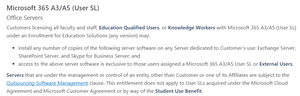
Assigning the M365 A3/A5 license is mandatory for compliance, even if the mailbox is fully on-premises. There is no separate “Exchange SE User CAL”, your cloud suite license is the entitlement. The license simply grants the user rights to use Exchange Server SE.141Views0likes1CommentRe: new Exchange Installation Autodiscover
Hi, 1. Check your Entra ID role in the Azure Portal Go to: https://entra.microsoft.com In the left menu → Identity Select Users Search and open your account Click Assigned roles You will now see whether you have roles such as: Global Administrator Privileged Role Administrator Security Administrator Cloud Application Administrator Application Administrator User Administrator These are the cloud roles that matter for Entra ID. 2. Check your Entra roles via PowerShell Run: Connect-MgGraph -Scopes "RoleManagement.Read.All" Get-MgUserAppRoleAssignment -UserId "<YourUPN>" | Select-Object ResourceDisplayName,AppRoleId27Views0likes0CommentsRe: Exchange SE product key Clarity
Hi, Yes, you can safely leave the server in this state until Microsoft releases the new CU and provides the Exchange SE product key. The evaluation period has not expired. A product key has not been entered (ProductID is blank). Trial period = 180 days Renewable only with entering a valid product key later Set-ExchangeServer -Identity "ServerName" -ProductKey XXXXX-XXXXX-XXXXX-XXXXX-XXXXX After that, the server will show: StandardEdition or EnterpriseEdition IsExchangeTrialEdition = False ProductID populated restart Exchange Information Store service.54Views0likes0CommentsCould any one explain Exchange Server SE Licensing Model?
I have the following M365 licenses in my education tenant: Microsoft 365 A5 without Audio Conferencing (Student Use Benefit) As per my understanding, each user requires an A3/A5 license to access their mailbox on an Exchange Server (Exchange SE). Since A3/A5 licenses already include Exchange Online, do we still need to assign these licenses to each on-premises user, or is this only for compliance purposes? For example, if we have 100 on-premises users, must all 100 users be assigned A3/A5 licenses in Microsoft 365? Reference articles are below. Microsoft Product Terms Please correct me if I am wrong.Solved156Views0likes2CommentsRe: Outlook Client unable to search on Server. 'Server unavailable. 12 months of results shown.'
Hi, Most Common for Outlook 365 ProPlus 1902, Outlook 365 build 1902 has known EWS/MAPI search issues This is a well-known broken build (Feb 2019), and Microsoft officially confirmed server-side search fails on hybrid/on-prem environments. Office 2016 works → Office 365 1902 does not. Update Office 365 1902 → Latest version97Views0likes0CommentsRe: new Exchange Installation Autodiscover
Hi, As per my understanding, Your Domain Is Still Federated. Go to Entra ID → Custom Domain Names and check your domain. It will likely show: Authentication Type: Federated instead of: Authentication Type: Managed This happens because: Old lab used ADFS You created a new lab but synced the same domain name, Entra ID stored the old federation configuration, including metadata, Sign-in URL, and IssuerURI How to Fix the Issue: Convert Domain from Federated → Managed (recommended) Once you convert: Outlook autodiscover will stop redirecting to ADFS147Views1like2CommentsRe: Finding Unused Proxy Addresses for Exchange Online Mail-Enabled Objects
Hi, The PowerShell + message trace approach is a solid method. Once you identify proxy addresses that haven’t appeared in historical message traces, here are the recommended next steps: What to do with unused proxy addresses? Validate Before Removing Before making any changes, verify: The proxy address isn’t used for any forwarding, shared mailboxes, applications, or SMTP relays The proxy is not part of any old email domain still active for routing No users or processes rely on it (even rarely) You can log occurrences over 30–90 days to be sure. Option A – Remove the unused proxy addresses Use PowerShell: Set-Mailbox -Identity <User> -EmailAddresses @{remove="smtp:email address removed for privacy reasons"} Option B Archive the Unused Proxy Addresses47Views0likes0CommentsRe: Exchnage 2019 on prem EMS not working. Recreating Exchange Virtual Directories failed
Hi, The PowerShell (Exchange Back End) virtual directory already exists in Active Directory for server MAIL2. To recreate or reconfigure it, you’ll need to manually remove the existing AD entry before running the New-PowerShellVirtualDirectory command again.85Views0likes0CommentsRe: Arbitration mailbox
Hi, Run the following commands to identify system and arbitration mailboxes, and then migrate them to the Exchange 2019 mailbox database. Get-Mailbox -Arbitration | ft Name,ServerName,Database Get-Mailbox -Database "DB01" -Arbitration Get-Mailbox -Database "DB01" -Arbitration | New-MoveRequest -TargetDatabase "DB02"35Views0likes0CommentsRe: What Microsoft Entra Really Means for Identity and Security
HI JohnNaguib With the launch of Microsoft Entra, Microsoft is making a bold move to redefine identity, access, and zero-trust security. It’s far more than a rebrand of Azure Active Directory, it’s a strategic shift in how Microsoft approaches identity in today’s hybrid, AI driven and multi-cloud world.84Views1like0CommentsRe: Automatically apply Addressbook policy
Hi shnlnryn , No, Exchange Online does not currently support automatically applying a specific Address Book Policy (ABP) at mailbox creation natively. You must use automation (PowerShell, Graph API, provisioning workflow, etc.) Microsoft 365 does not have a built-in policy assignment trigger.38Views0likes0CommentsRe: Send admin notifications on x number of messages from an email address
Hi lsward, I think Ahmed_Masoud97 provided a good solution. I’ve configured a similar rule in my environment for one of our executive users. As a second option, you can run a message trace to identify the suspicious email. Sometimes, the displayed sender address differs from the return address, so make sure to check both. Also, review the sender IP. if multiple spam emails are coming from the same IP, you can block that IP to prevent further emails.41Views1like0Comments
Recent Blog Articles
No content to show