User Profile

Matt_P_Standing
Brass Contributor
Joined 3 years ago


User Widgets
Recent Discussions
Remove groups from a user with an exception
Hey, I am trying to remove a number of users from all of their group memberships, with the exception of one group. I've been working on this for an hour or so and hit a stumbling block: $username="User01" $groupdntoexclude=(get-adgroup "group 1").distuishedname get-aduser -identity $username -properties MemberOf | where-object -ne $groupdntoexclude | for-eachObject { $_.MemberOf | remove-adgroupmember -members $username -confirm:$true} So far all I seem to be able to do is remove the user for every group. I've tried playing around with the Where-Object conditions but can't quite get it right. Any suggestions would be greatly appreciated! Thanks, MattSolved698Views0likes4CommentsRe: No output for Invoke-MgGraphRequest for user presence
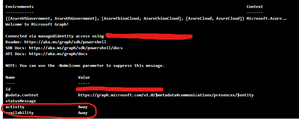
I managed to resolve myself using: $Result = (Invoke-MgGraphRequest -method GET -Uri "https://graph.microsoft.com/v1.0/communications/presences/xxxxxxxx-xxxx-xxxx-xxxx-xxxxxxxxxxxx") I was just missing the brackets! Thanks PowerShell!496Views0likes0CommentsNo output for Invoke-MgGraphRequest for user presence
Hi All! I am experiencing some odd behaviour with a Invoke-MgGraphRequest and an Azure Runbook and could do with a nudge in the right direction. I am trying to report on my Teams presence using GraphAPI. When I use the following code, it works, presence returned: Invoke-MgGraphRequest -method GET -Uri "https://graph.microsoft.com/v1.0/communications/presences/xxxxxxxx-xxxx-xxxx-xxxx-xxxxxxxxxxxx" But, When I try and assign this output to a variable (so it can be passed to a SharePoint list) I don't get any output: $returned=Invoke-MgGraphRequest -method GET -Uri "https://graph.microsoft.com/v1.0/communications/presences/xxxxxxxx-xxxx-xxxx-xxxx-xxxxxxxxxxxx" $returned.value | ForEach-Object {$_.availability} Am I doing something wrong, or is this expected behaviour?Solved482Views0likes1CommentExtracting the value from a pipeline variable
HELP! I am going mad with this! I am trying to enumerate a SharePoint group name using PowerShell. I'm using this: $SiteMembersGroup = get-pnpsitegroup | where {$_.Title -like "*members"} | select { $_.Title } Which gives me the output: $_.Title ---------- AcmeCo Members How do I extract JUST the value? I've tried dozens of ways and can't get it to work. There MUST be a simple way right? Thanks for any pointers! MattSolved501Views0likes2CommentsRe: Object reference not set when using New-MgInvitation with Runbook and Managed Identities
I wasn't able to resolve this but found a workaround. Instead of using the dedicated PowerShell command I was able to use the REST API to generate the same request: $body = ConvertTo-Json -InputObject @{InvitedUserEmailAddress="email address removed for privacy reasons";InviteRedirectURL="https://myapps.microsoft.com";SendInvitationMessage= $true} $uri="https://graph.microsoft.com/v1.0/invitations" $response = Invoke-MgGraphRequest -method POST -Uri $URi -Body $Body568Views0likes0CommentsObject reference not set when using New-MgInvitation with Runbook and Managed Identities
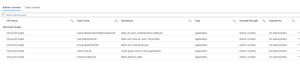
I am trying to send an AzureAD guest invitation using an Azure Runbook and GraphAPI. I have created a system managed identity for this (can successfully run Connect-MgGraph -identity in the runbook). When I try and execute: New-MgInvitation -InvitedUserDisplayName "John Doe" -InvitedUserEmailAddress email address removed for privacy reasons -InviteRedirectUrl "https://myapplications.microsoft.com" -SendInvitationMessage:$true I get the following error: New-MgInvitation : Object reference not set to an instance of an object. At line:4 char:1 + New-MgInvitation -InvitedUserDisplayName "John Doe" -InvitedUser ... + ~~~~~~~~~~~~~~~~~~~~~~~~~~~~~~~~~~~~~~~~~~~~~~~~~~~~~~~~~~~~~~~~~~~~~ + CategoryInfo : NotSpecified: (:) [New-MgInvitation_CreateExpanded], NullReferenceException + FullyQualifiedErrorId : Microsoft.Graph.PowerShell.Cmdlets.NewMgInvitation_CreateExpanded I have a managed identity for the runbook, with the following permissions: Microsoft.Graph.Identity.SignIns and Microsoft.Graph.Authentication modules are both loaded in my automation account. If I run the code in a local PowerShell session it works. Has anyone had any experience with this? Thanks in advance, MattSolved596Views0likes1Comment- 678Views0likes0Comments
SharePoint site template not applying
I think there are probably quite a few people in the same boat as me. I have created a Modern SharePoint Communication site that I would like to save as a template to apply to future sites, to speed up creation time. Unfortunately apply to template to a new default site does nothing. This is the process that I am going through: Extract JSON script for site: $AdminCenterURL="https://***-admin.sharepoint.com" Connect-SPOService -Url $AdminCenterURL $SiteSchema = Get-SPOSiteScriptFromWeb -WebURL $siteurl -IncludeBranding -IncludeTheme -IncludeRegionalSettings -IncludeSiteExternalSharingCapability -IncludedLists ("Lists/Events","Shared%20Documents") The resulting JSON is saved locally. Get-Content 'C:\Test\Extranet Template site - JSON.json' -Raw | Add-SPOSiteScript -Title "Extranet site template" Add-SPOSiteDesign -title "Extranet Site Template" -WebTemplate "64" -SiteScripts "cbfaedfb-9403-4601-aeb1-3382c7592af1" -Description "Extranet Site Template" I am then able to see the template in SharePoint Online, but when I apply this to a new site I am told that it has applied successfully but nothing has been changed. I have tried tis in both Edge and Chrome.809Views0likes1CommentSharePoint migration and shared access files duplicated with computer name
Hi, I am going through a phased domain, M365 tenant and document library migration from one SharePoint tenant to another, and have experienced some strange behaviour with OneDrive Sync. These are the steps taken so far: PCs migrated from old domain to new domain. Users now signing in with M365 accounts for the new tenant. New M365 tenant's accounts added as external users on the old tenant and access added to old SharePoint document libraries. Additional OneDrive account added to sync on user's PCs using the new M365 account. We are now at the stage where we are about to migrate over the data from the old SharePoint site to the new and have found that some Excel spreadsheets (large worksheets that are collaborated on by a large number or users) are being duplicated with the filename being appended with the computer name of the user that makes the change. Further more, this duplicate only has the changes that that specific user has made. Has anyone come across this before? I'm hoping that once the data is migrated to the new SharePoint tenant and remnants of the old OneDrive sync are removed from the user's devices this will resolve - but would like to understand why this is happening. Any advice would be appreciated. Thanks, Matt939Views0likes0Comments
Recent Blog Articles
No content to show