User Profile

Bjhartline
Brass Contributor
Joined 3 years ago


User Widgets
Recent Discussions
Task Constraints Power BI
Hi folks, Do you know which Dataverse table I need to use to visualize if a task has a contraint or not? I would like to see this information in Power BI. Also, some feedback for the Project team: our team doesn't use constraints very often. Would it be possible to set the contraints manually within the task rather than having them set automatically when the dates are adjusted? Thanks!! BrandonSolved652Views0likes2CommentsRe: Meet the new Microsoft Planner: Manage all your tasks and plans in one simple, familiar experience
Meenah, do you know if this new Planner will use the same Project Dataverse tables as Project for the Web? We have a lot of PowerApps and PowerBI reports built on these tables because we are using Project for the Web.5.4KViews1like2CommentsRe: Project for the Web (P4W) Baselines or Due Dates
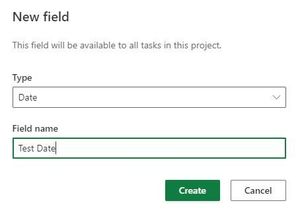
Thank you! To clarify, the custom columns when added to a project in Project for the Web. Where does that data live? It does not appear in Dataverse as far as I can tell. In other words, if I added a custom 'Test Date' date column in a project schedule and started adding data, is that information somewhere on the backend in Dataverse? Which table?7.1KViews0likes10CommentsProject for the Web (P4W) Baselines or Due Dates
Hey All, Are baselines or due dates planned for P4W? Do we know when they will be added? Is there a workaround in the meantime? Related question: where does the data for the custom columns live? If we were able to access that information via PowerBI that would solve it for sure. Thanks!!8KViews0likes19CommentsProject for the Web and PowerApps/Automate
Hi folks, My understanding is that Project for the Web is a PowerApp that uses dataverse as the backend. I created my own basic canvas PowerApp with an edit form to the msdyn_projecttask table. It appears that the P4W data pulls in fine and is up to date, however, I am unable to save or update any of the information through the PowerApp. I typically get an error message telling me to use the P4W UI. Does anyone have a workaround or can explain the why behind this? Without the ability to filter and edit tasks across all projects P4W does not serve as a good solution for task management relative to a SharePoint List. Thanks in advance.Solved1.4KViews0likes2Comments
Recent Blog Articles
No content to show