User Profile

stsm_glen
Brass Contributor
Joined 8 years ago


User Widgets
Recent Discussions
Re: Creating a shared folder - what's the "official" method?
Stephen, Thank you for that overview, I have a better understanding now of how OneDrive and Sharepoint work together. It makes more sense now with how the OneDrive online UI is setup - you can access both your private files and sharepoint site files in once place. That's actually really convenient. Alexander, The manual folder/file sharing thing is definitely something I was hoping I could avoid. Using Sharepoint to organize groups seems to be the ideal solution at this point, so I'm a happy camper. Thanks guys!7.2KViews0likes0CommentsRe: Creating a shared folder - what's the "official" method?
Alex, I really appreciate the tips and warnings about using Sharepoint for file hosting. I have to admit, I've been a little confused about how Sharepoint and OneDrive (for Business) are intertwined. For example, if I look at my personal OneDrive space online, I have the ability to view files in Sharepoint sites from the same UI. In addition, if I drill down into advanced file permissions, I'm taken to a Sharepoint page for managing said permissions. It makes me wonder if OneDrive is using Sharepoint as some sort of underlying technology, maybe even as the core file storage system? At any rate though, I'm just happy to have a solution and to have the knowledge you've given me. Many thanks!7.3KViews0likes6CommentsCreating a shared folder - what's the "official" method?
Hello fellow admins, I recently embarked on trying to move our organization to a standard cloud file-hosting solution. I'd like to create several shared folders available to employees, although the process seems more complicated that it could be. I'm wondering if there's supposed to be an "official" way to create a shared folder for an organization, emphasizing that the folder is not owned or controlled by any one particular member? Here's what I've done so far: Create a Sharepoint site for the files if one is not ready Open the site contents view, and open the Documents folder If everything is configured as it should be, there will be a Sync button in the toolbar. Clicking this will begin syncing the contents of that folder to your computer. A few drawbacks/complaints I have about this is that you can't really provision folders for users or groups - as far as I can tell, the syncing must be manually initiated on the machines of users who will be using the folder. It would also be really great if the sharing could be setup and configured in one place separate of SharePoint sites, perhaps in the OneDrive admin center? Am I doing this whole process wrong, or are there better ways other people use? Thank you!Solved7.7KViews0likes10CommentsRe: Google Authenticator app & Office 365 MFA
Przemyslaw W wrote: No true, you are not forced to install MS Authenticator, You can without problem use Google Authenticator, but you need to display the "Secret" key: In screen with QRCode to scan there is a small blue link "Setup application without notifications" (sorry don't exactly know if this is proper translation for it) , click it and you'll get the secret, then just type it into G Authenticator and you're set :) (You don't have to type the full account name, this is for you to identify it only). Thank you, that was the key for me. For anyone else wondering, this is the process for setting up 2/MFA with any OTP app (I use https://github.com/andOTP/andOTP): Open the security verification page for your user: https://aka.ms/MFASetup Check the Authenticator app box, and click the Configure button. Click the Configure app without notifications URL Now scan the QR code with your app and configure like normal. It seems like Microsoft really go out of their way to obscure the fact that you don't actually need Microsoft Authenticator to use this factor for authentication.236KViews9likes4CommentsUsing variables/properties in Sass?
I'm developing a SharePoint SPFx web part and starting to work on a property pane for it. I've realized that users may want to configure the line height of text in my webpart, and I'd like to make that configurable as a property using the https://docs.microsoft.com/en-us/sharepoint/dev/spfx/web-parts/basics/integrate-with-property-pane. I'm not sure how to access properties in an Sass file though, or if that's even possible? Is my only option to do this directly in the typescript code?763Views0likes0CommentsRe: Gantt chart doesn't like percentages?
Hello Juan, Actually, it looks like the date(s) fields in my list aren't required. I noticed that the Gantt chart supports showing undefined dates by displaying a different box though. I thought it odd that only percentages seemed to be confusing it though. Are there other displays in SharePoint that would make it easy to show my data like the Gantt chart? Thank you for your response!1.8KViews0likes0CommentsGantt chart doesn't like percentages?
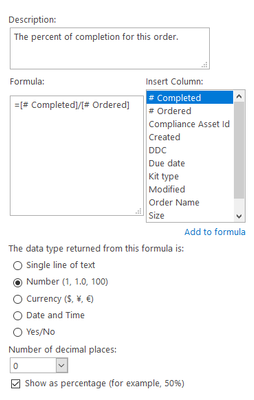
Hi everyone, I'm having some issues getting a Gantt chart to work with percentages. My dataset is basically a list of orders. Each order has a quantity ordered, a quantity completed for that order, and then I also have a calculated column that displays the percent complete for that order (settings shown below:) So as you can see, this is supposed to show a calculated percentage with 0 decimal places. In the AllView view, this looks just as I would expect it: Now I have another view which is a Gantt chart. I have it configured so that the Percent complete pulls its data from my Completion calculated column above. When I switch to the Gantt chart view, it errors out with "This list cannot be displayed as a Gantt chart because it lacks required fields." If I make the Percent completed field optional in the Gantt chart configuration, it is able to load without a hard error. However, the Gantt chart ignores my configuration of the column insofar as decimal places and percentage values are concerned: So I don't seem to have any options for displaying a nice completion value anywhere in the Gantt chart. I understand from https://social.technet.microsoft.com/Forums/sharepoint/en-US/6498a9f2-fe65-4bcf-a67d-40200adf6afc/using-calculated-fields-to-show-percentage-complete-in-a-gant?forum=sharepointadminlegacy that this is a bug in the Gantt chart, that it's unable to display calculated values. Is there any chance of any of these bugs (displaying calculated values or respecting column configurations) being fixed? Thank you!1.9KViews0likes2Comments
Recent Blog Articles
No content to show