User Profile

Aladdin_Ajaj
Copper Contributor
Joined 4 years ago


User Widgets
Recent Discussions
Re: Index and filter to mirror data
=FILTER(CHOOSECOLS(Source_Sheet[[date]:[notes]],{1,15,2,3,4,5,6,7,8,16,17}),(Source_Sheet[currency]="usd")*(Source_Sheet[order]="buy")) I modified this formula with the help of the community and I'm able to extract specific column that meet the criteria . Now I'm wondering If I can use spill formula inside excel table?3.1KViews0likes1CommentIndex and filter to mirror data
=INDEX(FILTER(Source_Sheet[[date]:[notes]],(Source_Sheet[currency]="usd")*(Source_Sheet[order]="buy")), , {1,2,3,4,6,7,8,16,17}) I'm using this formula to retrieve data from source sheet but it only extract the first value that meet the criteria I want all data to be retrieved3.7KViews0likes3Comments- 1.9KViews0likes0Comments
Create a dashboard based on variables
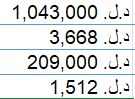
I'm working on currency exchange project for 6 months so far, when I made my first step I didn't had clue about the power of excel right now my eyes are wide open and enthusiasm to get my project to the next level, In simple terms I have a based currency Let's call it DL and every day I buy and sell DL/USD and DL/EUR based on the transaction type and region the cost will be added to the exchange rate. I created a source sheet where I make my daily activities and with the use of power query I transferred the the whole data to power query to represent it in the different view and accumulate each data type to analyze it separately, Now I need to get more specific to make an accurate solutions. After 6 months of working and testing I faced some Issues like: Weighted Average In power Query I manually calculate the weighted Average in the bottom of the table I want the power query to calculate it automatically I want power query to daily calculate the accumulation of the difference between the previous day and current day for buy and sell of local currency and and foreign currency as balance I want to calculate EUR/DL to USD based on DL rate of EUR/USD All those data when power query calculate it I want to represent them in one dynamic dashboard Hope I can get advanced help to keep my project running in professional way. Down bellow I attached sample of my data.797Views0likes0CommentsHow I calculate two average fields in pivot table
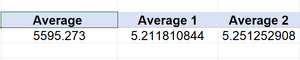
I'm trying to subtract two averages in pivot table using calculation filed option "average 2 - average 1" but the result comes out incorrect it's not the subtraction of both averages I changed the field format to average and still incorrect Am I missing something?Solved8.3KViews0likes5CommentsHow to get certain region from region columns and inserted in new columns as others
I have certain regions in excel table I have managed to get data from top regions using add conditional columns in power query "if region equal x then insert x value'' and so on I got 80% of the data and for the rest regions I want to combine them as others. The formula I want to achieve is (If Region equal x region or x region or x region then don't return there values instead return me the values from list I choose from the table ) note: each region associate with certain row data I want to extract and separate them into certain columns1.3KViews0likes1CommentRe: Automatically pull data from excel table to another based on criteria
Thank you for your precious details. If I want to add columns for the blue table would it harm the syntax of green table? Because I still need to add date, name, place, and notice columns that already associated with my original data27KViews0likes2CommentsAutomatically pull data from excel table to another based on criteria
I'm working on excel table that has currency exchange data for multiple currencies and multiple filters to specify the the operations, I would like to keep the excel table as it is for daily use of data entries and create new excel table that automatically pull data with new arrangement. The problem is in the main table all currencies shares same 3 columns for value but differentiate in rows data, I want to divide those 3 columns based on currency to 6 columns without affecting rows data (vertically values based on horizontally data). Main Excel Table Automation table I want to create As you can see in the main table I have name then currency then order (buy/sell) then type of order those steps distinguish the operations, then it comes to the main part I want to solve which are the 3 columns of values I want to automatically pull whether the operation is (buy/sell) with the data associated with (from the left and right) to new excel table. I have been searching for a solution and most accurate one is using power query but I still don't have decent knowledge on how to use the M code or other tools it provide. Hope I can get help from excel community.Solved30KViews0likes8Comments

Recent Blog Articles
No content to show