User Profile

Fiza_Azmi
 Microsoft
Joined 4 years ago


User Widgets
Recent Discussions
Participate in the MSIX Developer Survey '24!
Hello MSIX community, We’re inviting developers to contribute to the enhancement of MSIX! We’ve initiated a survey to gauge your experience with MSIX and discover areas for improvement. By sparing a few minutes to share your thoughts, you can play a crucial role in refining MSIX for the developer community. Get Started: Take the survey here: Survey Link Thank you for being a part of the community. Your insights will help us make MSIX better for all developers! Want to learn more about MSIX Packaging? Explore here The MSIX Platform Team938Views0likes2CommentsRe: Unable to launch Microsoft MSIX Package Tool if disconnected from the internet
AppsPackG Have you tried uninstalling the package and then Analyze Package again using MSIX Packaging tool? Also, is it working in connected mode for the VM that you're using? Please share logs using Get-AppxLog (Appx) | Microsoft Learn for any error warnings. Thanks, Fiza PM, MSIX1.4KViews0likes0CommentsRe: Windows Desktop (App) Runtime with latest MSIX Packaging Tool
Hi GrahamGB As mentioned in MSIX February Blogpost, if the tool detects that the package has a desktop shortcut present, it automatically adds the Windows App SDK dependency in the package, along with the desktop7:Shortcut extensions in that manifest. Can you please check if the packages in question have existing desktop shortcuts? -Fiza, PM, MSIX4.6KViews1like2CommentsRe: New version of MSIX Packaging Tool and WIndows App Runtime Dependency
Hi TIMOTHY_MANGAN If the tool detects that the package has a desktop shortcut present, it automatically adds the Windows App SDK dependency in the package, along with the desktop7:Shortcut extensions in that manifest. Can you please check if the packages in question have existing desktop shortcuts? -Fiza, PM, MSIX2.4KViews1like0CommentsRe: Unable to launch Microsoft MSIX Package Tool if disconnected from the internet
AppsPackG While using Package Analyzer in disconnected environments, you shouldn’t notice any difference in your experience. However, we’ll investigate this anomaly to identify any potential causes for this. Meanwhile, can you please verify if it is working in connected mode for the VM that you're using?1.7KViews2likes2CommentsRe: msixbundle - powershell installation as unprivileged user
Hi justhxor. What is the use case you're looking for? An end-user may or may not be able to update an application at their end without admin privileges. In either case, the app will only be updated for their profile. -Fiza PM, MSIX490Views0likes0CommentsRe: MSIX Packaging Tool - Package Analyzer
Hi GrahamGB This does not look like a Package Analyzer issue. We have replied to this thread - Re: What is the "gap" and how do I eliminate it? - Microsoft Community Hub, suggesting uninstalling the package, then retry the Package Analyzer and see if the issue persists. Thanks, Fiza PM, MSIX1.8KViews0likes3CommentsRe: What is the "gap" and how do I eliminate it?
Hi GrahamGB Is this delay in launch happening only for this specific package or other packages as well? You can try to uninstall the package and then Analyze Package again using MSIX Packaging tool. Once you do this, please collect and share the logs using Get-AppxLog (Appx) | Microsoft Learn for any error warnings that point to the cause of delay. Thanks, Fiza PM, MSIX629Views0likes0CommentsRe: PSF Config generation / validation
AppsPackG Thanks for sharing that feedback. We will continue working towards making this feature more intuitive. For the question on validating patterns - Yes, you can use any regex validator tool, like the one you mentioned, to verify the regex patterns. -Fiza, PM, MSIX517Views0likes0CommentsRe: Need Help in Applying File Redirection Fixup in MSIX Packaging Tool
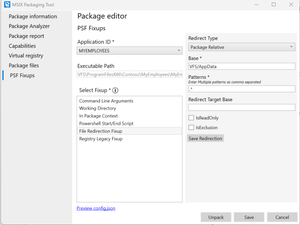
Hi Abhi211 Please find the attached example for applying File Redirection Fixup. Few points worth noting: Default for any application's app data is under '%localappdata%\packages\[packagename]\localcache' The given configuration allows to redirect any package write operation under VFS/AppData folder, after application has been launched. Appdata that was already captured during installation will not be redirected. To move such existing VFS/AppData, you will need to use PSF powershell script fixup.1.2KViews0likes0CommentsRe: Duplication Shortcuts on Win11
TIMOTHY_MANGAN This is mainly required to get Win App SDK runtime. For packages that want to create Shortcuts, you just need to add Win App SDK (Min Version: 1.4.2) to the dependencies list in your Manifest as below: <PackageDependency Name="Microsoft.WindowsAppRuntime.1.4" MinVersion="4000.1010.1349.0" Publisher="CN=Microsoft Corporation, O=Microsoft Corporation, L=Redmond, S=Washington, C=US" /> App Installer will download it for you during installation. If you are using Powershell command or other means to install, you can download Win App SDK from here. In the upcoming releases, the MSIX Packaging Tool will automatically add this dependency when it detects shortcuts.6KViews0likes2CommentsRe: Signtool cannot sign msix file produced by dotnet publish
Hi AndreiBel To diagnose this issue accurately, please attach the logs or share the error code that the SignTool is generating. While signing an MSI and an MSIX package share some similarities, they are different. Please verify that the certificate meets requirements for signing MSIX- See here. Thanks, Fiza Azmi PM, MSIX1.7KViews0likes1Comment