User Profile

Satyajit321
Iron Contributor
Joined 8 years ago


User Widgets
Recent Discussions
Re: OneDrive Desktop Sync\Backup causes Thumbnail Preview to be enabled
Also to add, this is distracting and makes it harder to find the files. Which was a breeze earlier and spot on. Tiny icons next to the content isn't so great. It should be a easy registry fix, I'm just yet to be publicly exposed\announced.2.4KViews0likes1CommentOneDrive Desktop Sync\Backup causes Thumbnail Preview to be enabled
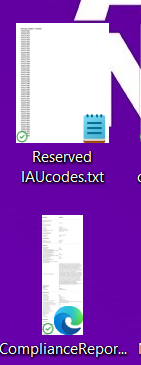
Hello Experts, After I install OneDrive and enable sync on the Desktop, my text files, html, pdf look like this Instead of the usual text file, html, PDF icons. As shown, in the first image, OneDrive somehow makes the icon of the text file change into the text file's content, and I want to disable this behavior. I've tried enabling "Always show Icons, Never Thumbnails" in the explorer view settings, but this disables previewing on other file types which do have previewing enabled, even without OneDrive, such as pictures or videos. This was working fine on Win 10, Win 11, without the Desktop backup enabled, as soon as backup is enabled this changes. Stopping the backup, immediately restores the view. In the folder view of Desktop we can select list view or other view to fix this problem partially. However in Desktop there are only 3 views, all of them has the problem. I'm sure this preview is hitting performance issues on the device, trying to build thumbnails of large files. Folders outside the sync doesn't have this issue. They only preview images, videos only as expected default Windows behavior.2.4KViews0likes2CommentsRe: What is the MAPI property for the 'info' AD attribute?
Review this if not yet done. The Contact Card in Outlook 2010 does not change when you try to customize it by using Group Policy or the Office Customization Tool (OCT). https://support.microsoft.com/en-us/help/981022/the-contact-card-in-outlook-2010-does-not-change-when-you-try-to-custo Why not update the notes data into the location field itself instead of making these changes\customization.2.6KViews0likes0CommentsRe: DL management
SharePoint \ Flow for this seems to be ambitious. As an IT we should come up with facts and numbers, based on actual data. Present it to the business along with the decision. Example: >DLs not used in next 6month\1year to be deleted. >Message trace to find out when was the last time an email was sent to those DLs. >Keep a script to do that every 7 days, so that you can build up that evidence. >And end of the 6th month you have all you need to prove that this can go. Lastly ask your users to move away from DLs and upgrade to O365 groups and use the expiry feature. Configure the expiration policy for Office 365 groups: https://docs.microsoft.com/en-us/azure/active-directory/users-groups-roles/groups-lifecycle Office 365 Group Expiration Policy https://support.office.com/en-us/article/office-365-group-expiration-policy-8d253fe5-0e09-4b3c-8b5e-f48def064733 FIM Distribution List Expiration time: https://social.technet.microsoft.com/Forums/en-US/58cf4c95-bf4e-4d80-97ca-b469ff6a2b34/fim-distribution-list-expiration-time?forum=ilm2 Regards, Satyajit4.4KViews0likes0CommentsRe: Excel sheet protection
It is doable, but your users need to do one extra step to view the contents. A1 Cell will be visible to all, but not the others. Step: 1.Fill in the workbook and sheets as required 2.Ctrl+A select all the content \text set white as the font color, it makes it invisible 3. Review->Protect sheet, remove all the check boxes and set the password. 4. Repeat the steps for each sheet and separate passwords can be set on each one. They can move the boxes and view, but not the selected cell hence the data remains hidden. When the users unlock, they need to just select all and change the color back to automatic.1.2KViews0likes1CommentRe: Changing DNS settings due to domain transfer
Why do you need to change anything on O365 side. What it appears to be is you are just moving the record or replicating it from one server to another. As long as they are visible to public there and the Check DNS button says all green there is nothing to worry.1.5KViews0likes0Comments
Recent Blog Articles
No content to show