User Profile

Andrew__K
Brass Contributor
Joined 4 years ago


User Widgets
Recent Discussions
Symbol Vertical Alignment
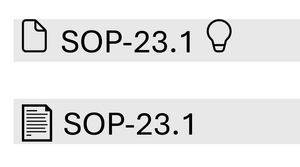
Can anyone tell me if the vertical alignment of a symbol can be adjusted? Wanting to use Segoe Fluent Icons as bullets, but the fluent symbols are aligned with the top of the line space and the text is aligned in the middle. Hoping I can get the symbol and text to be aligned. See below examples, 2nd example is using Segoe Emoji, which aligns fine. TIA Edit: Worth noting, the symbol appears vertically aligned when there is no text next to it.427Views0likes1CommentRe: Best way to segregate certain rows into each of their own worksheet from a primary
NotSoFastEddie you can use FILTER to achieve this. =FILTER(A1:G11,A1:A11="PCODE") or below using your table references =FILTER(TBL_Bouquets,TBL_Bouquets[Record Type]="PCODE") Repeat on each sheet for each record type. You could also use Power Query from Table/Range and simply filter by Record Type then load to corresponding sheet.937Views0likes1CommentPower Query not behaving as expected.
I use a Power Query that pulls data from files in a folder, the data is a daily report of product that has been transferred from one warehouse to another. Typically, the cartons of product are scanned to a pallet number (SSCC) and the SSCC is transferred between warehouses. I use the Sample File (First file in folder) to transform and filter out unwanted columns/rows, then the main query groups the product by the SSCC, etc... The PQ has worked fine since I created it, however, I recently came across an issue when for the first time a single carton that hadn't been scanned to an SSCC was transferred between warehouses. The SSCC number is in column 8 of below examples of source data, when the single carton without an SSCC number is included (highlighted below), it shows the cell as empty, and the product rows below it have the SSCC as usual. However, when processed by the query, it is showing every row as null in column 8. I would expect null for the empty cell, the row without an SSCC number, but I can't figure out why it is showing null for every row... Far as I can tell, the source data is no different, other than the cell missing the SSCC number. Even when I change the sample file source to the problem file, the whole column shows null at the first step. Can anyone point out something I'm missing, or what I can do to fix? Any help would be appreciated! Thank you. Example 1 - Typical source data, PQ works as expected. Example 2 - Source data with single missing SSCC number (Col-8)473Views0likes2CommentsRe: Split Columns into multiple columns
djclements Amazing! thank you very much for the solution. I'm not going to pretend I understand how you got there, but it will go a long way in increasing my understanding of these functions. Are you able to demonstrate how TAKE/DROP would be used in your solution? as suggested by PeterBartholomew1. Would it reduce the calculations as you mentioned?3.6KViews0likes2CommentsRe: Split Columns into multiple columns
Thanks, PeterBartholomew1 djclements Lorenzo rachel Some really great suggestions! The use of WRAPCOLS, WRAPROWS, etc... in these solutions has really opened my eyes to those functions and the ways they can be used. The other challenge was the page break, ideally the data would spill across columns as you have demonstrated, then continue on the next page, left to right again. Rather than running 500+ rows down multiple pages and then spilling to the middle column back on page 1. Example below; again, the numbering has been added to demonstrate and is not part of the dataset. Date/Time Temp Date/Time Temp Date/Time Temp 1 01/02/2024 06:58:00 46.000 °C 5 01/02/2024 07:02:00 39.000 °C 9 01/02/2024 07:06:00 33.000 °C 2 01/02/2024 06:59:00 44.000 °C 6 01/02/2024 07:03:00 37.500 °C 10 01/02/2024 07:07:00 32.000 °C 3 01/02/2024 07:00:00 42.000 °C 7 01/02/2024 07:04:00 36.000 °C 11 01/02/2024 07:08:00 31.000 °C 4 01/02/2024 07:01:00 40.500 °C 8 01/02/2024 07:05:00 34.500 °C 12 01/02/2024 07:09:00 30.000 °C --- PAGE BREAK --- 13 01/02/2024 07:10:00 46.000 °C 17 01/02/2024 07:14:00 39.000 °C 21 01/02/2024 07:18:00 33.000 °C 14 01/02/2024 07:11:00 44.000 °C 18 01/02/2024 07:15:00 37.500 °C 22 01/02/2024 07:19:00 32.000 °C 15 01/02/2024 07:12:00 42.000 °C 19 01/02/2024 07:16:00 36.000 °C 23 01/02/2024 07:20:00 31.000 °C 16 01/02/2024 07:13:00 40.500 °C 20 01/02/2024 07:17:00 34.500 °C 24 01/02/2024 07:21:00 30.000 °C With your suggested solutions, a data set of say 2000 rows would need to extend 700+ rows on the left side from say page 1 to page 15 and then continue in the middle from page 1 to page 15, etc... Is it possible to limit the rows to say 40... so there are 3 x 40 rows per page and then continue on the next page?4KViews0likes8CommentsSplit Columns into multiple columns
I have sets of data generated from temperature data loggers. It spans two columns and up to 2000+ rows. One column is the date/time, the other column is the temperature data. Example below. Date/Time Temp 1 01/02/2024 06:58:00 46.000 °C 2 01/02/2024 06:59:00 44.000 °C 3 01/02/2024 07:00:00 42.000 °C 4 01/02/2024 07:01:00 40.500 °C 5 01/02/2024 07:02:00 39.000 °C 6 01/02/2024 07:03:00 37.500 °C 7 01/02/2024 07:04:00 36.000 °C 8 01/02/2024 07:05:00 34.500 °C 9 01/02/2024 07:06:00 33.000 °C 10 01/02/2024 07:07:00 32.000 °C 11 01/02/2024 07:08:00 31.000 °C 12 01/02/2024 07:09:00 30.000 °C I would like to spread the data across 6 columns (3x2), as per the example below. The data would populate top to bottom, left to right and then repeat after a page break. I have added a column with the number in between to demonstrate where the data should end up. Date/Time Temp Date/Time Temp Date/Time Temp 1 01/02/2024 06:58:00 46.0 °C 5 01/02/2024 07:02:00 39.0 °C 9 01/02/2024 07:06:00 33.0 °C 2 01/02/2024 06:59:00 44.0 °C 6 01/02/2024 07:03:00 37.5 °C 10 01/02/2024 07:07:00 32.0 °C 3 01/02/2024 07:00:00 42.0 °C 7 01/02/2024 07:04:00 36.0 °C 11 01/02/2024 07:08:00 31.0 °C 4 01/02/2024 07:01:00 40.5 °C 8 01/02/2024 07:05:00 34.5 °C 12 01/02/2024 07:09:00 30.0 °C This would allow me to include 3 times the amount of data per page when saving reports. Is it possible to achieve this? Where would I start? Avoiding VBA. Thank youSolved4.7KViews1like17CommentsRe: PowerQuery Remove Rows dependent on value in column.
Thank you! with your suggestion, I was able to find a solution. I ended up creating a helper merged column with PPN-DATE-SERIAL, then grouped by this column and filtered out any rows >1. Then I just expanded the All-rows column and removed the helper column. Thank you!1.7KViews0likes1CommentPowerQuery Remove Rows dependent on value in column.
Labelling software generates a transaction report that represents each label generated, I pull data from this report using PowerQuery. Each row is an individual label or transaction. When an error is made during the labelling process and the operator deletes/reverses that label, the transaction report shows it as a normal transaction with a 1 in a Transaction Type (Trx Type) column, followed by another row with the same information, but has a -1 as the transaction type to represent the deleted label. Is there any way I can remove both these rows in my query? I know I can filter -1 Trx Types, but this leaves the original transaction in place. There is also a serial column for each transaction, these match on the -1 and 1 rows, so could potentially be used? Below is an example of the report. Label Date Product PPN Description Prod Date Serial Number Trx Type 4/12/2023 99999 PRODUCT LABEL 2/11/2023 70001 1 4/12/2023 99999 PRODUCT LABEL 2/11/2023 70002 1 4/12/2023 99999 PRODUCT LABEL 2/11/2023 70003 1 4/12/2023 99999 PRODUCT LABEL 2/11/2023 70004 1 4/12/2023 99999 PRODUCT LABEL 2/11/2023 70005 1 4/12/2023 99999 PRODUCT LABEL 2/11/2023 70006 1 4/12/2023 99999 PRODUCT LABEL 2/11/2023 70007 1 4/12/2023 99999 PRODUCT LABEL 2/11/2023 70008 1 4/12/2023 99999 PRODUCT LABEL 2/11/2023 70009 1 4/12/2023 99999 PRODUCT LABEL 2/11/2023 70010 1 4/12/2023 99999 PRODUCT LABEL 2/11/2023 70011 1 4/12/2023 99999 PRODUCT LABEL(*Deleted*) 2/11/2023 70011 -1 4/12/2023 99999 PRODUCT LABEL 2/11/2023 70012 1 4/12/2023 99999 PRODUCT LABEL 2/11/2023 70013 1Solved2KViews0likes6CommentsFormula that changes after finding value in row
Our labelling software generates a CSV of production data daily, its formulated as shown in the table below. The products are listed followed by a summary row of batch 1, batch 2, etc... i.e anything above the row for 'Total of Batch 01' is batch 1, then the list for batch 2 products start after that, followed by a row for 'Total of Batch 02' and so on. I want to generate a formula that puts the batch number for each product in the row of that product. It would need to search the B column for 'Total of Batch 01' row and apply 1 to the rows above that in a column, then search for 'Total of Batch 02' and apply 2 to those rows. I plan on using PowerQuery and transforming the data from each CSV to pull it into another sheet for analysis, I will also need to exclude the 'Total of Batch' rows for this. Can anyone point me in the right direction of how to do this? TIA Product PPN Description Prod Date 10751 PRODUCT 1 17-Jul-23 10751 PRODUCT 1 25-Jul-23 14014 PRODUCT 2 26-Oct-23 15582 PRODUCT 3 26-Oct-23 85393 PRODUCT 4 26-Oct-23 87025 PRODUCT 7 25-Oct-23 87119 PRODUCT 8 20-Oct-23 87121 PRODUCT 9 25-Oct-23 Total of Batch 01 87025 PRODUCT 7 25-Oct-23 85393 PRODUCT 4 26-Oct-23 87119 PRODUCT 8 20-Oct-23 Total of Batch 02 87025 PRODUCT 7 25-Oct-23 87119 PRODUCT 8 20-Oct-23 87121 PRODUCT 9 25-Oct-23 87712 PRODUCT 10 25-Oct-23 87306 PRODUCT 12 25-Oct-23 Total of Batch 03Solved1.2KViews0likes4CommentsRe: Auto populate and expand table from range on another sheet
The master sheet isn't a table, it contains data that gets added from a CSV report each week. The table on the other sheet has helper columns such as DAY and MONTH, batch number, etc... This table is then used to populate a printable calendar.907Views0likes0CommentsAuto populate and expand table from range on another sheet
I am trying to automatically populate and automatically expand a table with data from a range in another sheet. Each week new data is added to the master sheet from a production report, I would like the separate table to automatically fill and expand as data is added to the master sheet. I figured using a named range with an offset column reference could work, but not sure the table will auto expand? Is it possible to do this? I feel like I am missing something simple. TIA1KViews0likes2CommentsTEXTSPLIT UNIQUE TEXTJOIN
I am trying to split text from a range (B2:B5), then re-join the unique values in one cell, separated by commas. Ingredients Allergen Ingredient 1 Milk Ingredient 2 Gluten, Soy, Milk Ingredient 3 Ingredient 4 Milk So far, I have below, which returns - Gluten, Soy, Milk, Milk. TEXTJOIN(", ",TRUE,UNIQUE(SORT(B2:B5))) But when I add TEXTSPLIT in, it will only work when one cell is referenced. TEXTJOIN(", ",TRUE,UNIQUE(SORT(TEXTSPLIT(B3,,",")))) Can anyone point me in the right direction to get this work for a range? Maybe I am missing something simple. Thanks in advance.Solved3.6KViews0likes2CommentsRe: Need the ability for external users to upload files into MS Forms
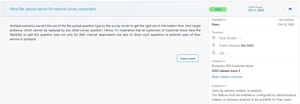
AlexUnipa https://experience.dynamics.com/releaseplans/?app=Customer+Voice&status=new Edit: the page says preview, and if thats just a preview to a new release plan template… and they used that feature as a preview, it’s pretty cruel 😂108KViews0likes0CommentsConditional formatting for row if any dates in that row have elapsed.
I am trying to set up conditional formatting that highlights an entire row if any dates in cells of that row have elapsed. I tried preparing the conditional formatting formula in regular cells first to ensure my true/false statements are working. My problem comes if there are blank cells in the range, I can't seem to figure out how to ignore blanks in the formula. As you can see below, the formulas work until blanks are introduced, I feel I am missing something simple but can't seem to figure it out. Can anyone point me in the right direction? Thank you Condition Date 1 Date 2 Date 3 Date 4 Date 5 Date 6 Formula Result No date elapsed 9/07/2023 11/08/2023 31/08/2023 9/07/2023 31/12/2023 27/01/2023 =OR($B2:$G2<TODAY()) FALSE 1 date elapsed 9/07/2023 9/07/2022 31/08/2023 9/07/2023 31/12/2023 27/01/2023 =OR($B4:$G4<TODAY()) TRUE No date elapsed with a blank 9/07/2023 9/07/2023 31/08/2023 9/07/2023 27/01/2023 =OR($B3:$G3<TODAY()) TRUE 1 date elapsed with a blank 9/07/2023 9/07/2022 31/08/2023 9/07/2023 27/01/2023 =OR($B5:$G5<TODAY()) TRUESolved1.1KViews0likes2Comments

Recent Blog Articles
No content to show