User Profile

Charles_Kenyon
Bronze Contributor
Joined 4 years ago


User Widgets
Recent Discussions
Re: Make numbering independent of position
Stefan is correct (as is usual). I use a commercial product Sn**it to create such step numbers. They go on images and are independent of location. I know of no way native to Word (or any other program) to have numbers which automatically update regardless of position. Sn**it has a number of features designed for producing documentation.18Views2likes0CommentsRe: How to add a new field to existing XML Mapping
clickable link: https://sharepointmaven.com/how-to-add-sharepoint-metadata-to-word-documents-using-quick-parts-document-properties/ Thank you for sharing this. I've added a link to it in my page on Repeating Data Using Document Property Content Controls and Other Mapped Content Controls. I also updated my original discussion with that link. I am not a SharePoint user. I have found repurposing the built-in ones sufficient. My page includes methods using Building Blocks to give a menu of the repurposed controls. However, simply adding them to the built-in menu is even better.24Views0likes1CommentRe: How to add a new field to existing XML Mapping
See: Mapped Content Controls by Greg Maxey and Repeat Text in MS Word by Mapping Content Controls with the XML Pane by Laura Townsend The first link is a web page. The second is to a video. Both are done by experts who are good at explaining. It has been a while since I've done this. I usually do not need many such content controls and simply repurpose some of the built-in Document Property Content Controls. See : Repeating Data Using Document Property Content Controls and Other Mapped Content Controls and MS Word - Type Once, Repeat Many BTW: These are Content Controls, not fields. (Word jargon) Using Fields in Microsoft Word Word Content Controls by Greg Maxey28Views0likes3CommentsRe: Spelling doesnt work
Proofing language settings are set on a character level, not for the document. Select an obviously misspelled word and check the settings for that word. Make sure that "Do not check spelling or grammar' is not checked. AutoCorrect is a related but separate function from spell checking.23Views1like0CommentsRe: Add style to headings sidebar
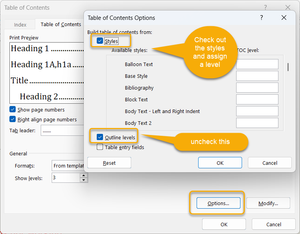
It would add it to the default TOC. That uses outline levels 1-3 as well as heading styles, I believe. It is quite possible to have a TOC that does not use outline levels. You could set the TOC to use the heading styles but not the outline levels. See: TOC Tips and Tricks by Suzanne Barnhill, MVP The above shows how to have styles but not outline levels in the TOC.15Views1like0CommentsRe: Add style to headings sidebar
To edit a post, click on the ellipsis dots to the right of your title as shown in Doug's response. Only paragraphs with outline levels show up in the Navigation pane. These need not be in your multilevel list but can be. A multilevel list can have both numbered and unnumbered levels. Depending on your TOC settings, such paragraphs may or may not show up in a Table of Contents. Styles attached to a multilevel list can have outline levels, or not. Outline levels can be set in paragraph formatting, the outline levels of the built-in heading styles are hard-wired and cannot be changed. Another way to change outline levels is when in Outline view. Do use Styles rather than direct formatting to set outline levels. Outlining - Use the Navigation Pane Numbering Levels and Outline Levels are not the same thing. Automatic Numbering in Word - my 5-page pdf Headings that do not show up in the Navigation Pane or in a Table of Contents (or in Cross-References / Hyperlinks) The Importance of Styles in Microsoft Word Why Use Word's Built-In Heading Styles? by Shauna Kelly31Views1like2CommentsRe: Customize theme fonts Word
KTrock You may want to post your own question. See Stefan Blom's July 6, 2023 response in this thread. You may want to look at Font Themes by John Korchok. The simplest solution may be to create the Theme Fonts file in Word for Windows. See also my article (Windows): Quick Style Sets and Themes in Microsoft Word You may want to look at the following feedback and comment and vote, or add feedback of your own. Major Feature Discrepancies Between Word on Windows and Mac Once you have a theme you like, you can apply it to your Normal.dotm file and it will then be a part of any new documents.26Views1like0CommentsRe: Switching off comment notifications in word documents
Your request here is seen only by your fellow users. To have it seen by the people who can fix the problem, use the feedback mechanisms, especially the public feedback portals. This is a user-to-user support forum. -- You can give feedback TO MICROSOFT designers and decision makers on Microsoft Word or other Microsoft Products using their feedback mechanisms, (not here). (This is a link to directions.)1.7KViews0likes0CommentsRe: Table Borders in Word Disappearing
It is a known bug. It is reported as having been fixed. Try updating. See https://support.microsoft.com/en-us/office/in-a-coauthored-word-document-table-formats-get-corrupted-1e58f9a1-df7a-48be-b82c-d76131dc2319 and https://support.microsoft.com/en-us/office/fixes-or-workarounds-for-recent-issues-in-word-for-windows-bf6bf17c-2807-4871-83ce-e337ae8f0b86197Views1like0CommentsRe: Can't remove spaces between rows
Paragraph formatting - space after or space before. Also, line spacing. This looks like a hanging indent. This may be in the underlying style. Select the text. Right-click on it (not sure how this is done on Mac) and pick paragraph. Change the settings. ======= If you regularly use Word, you would benefit greatly by checking out this series of short tutorials. Basic Concepts of Microsoft Word - from Shauna Kelly It is written for Windows, but the basic concepts are the same including Why you should press Enter only once to end a paragraph.23Views0likes0CommentsRe: Spellcheck problem
You are welcome to save an excerpt with the spelling mistakes uncorrected on OneDrive and post a link here for us to look at. Is this all a single document or multiple documents? If multiple documents, what happens if, with Word closed, you rename the normal.dotm file?43Views0likes0Comments
Recent Blog Articles
No content to show