User Profile

aevle
Copper Contributor
Joined 4 years ago


User Widgets
Recent Discussions
Re: How to fix Windows Update 0xc1900101 error?
If you run the "D!SM /Online /Cleanup-Image /RestoreHealth" does it stop at 4.5%? please replace "!" with i, the tech community doesnt allow me to write the command :-D I know "SFC /scannow" doesnt work the most of the time... but can you try this and see if throws any errors?382Views0likes1CommentRe: Force change password at next login on-premise and MS online
This is a limitation from Microsoft, as the "User must change password at next logon" setting does not sync from Entra ID to on-premises AD by default https://learn.microsoft.com/en-us/entra/identity/hybrid/connect/how-to-connect-password-hash-synchronization#cloudpasswordpolicyforpasswordsyncedusersenabled I have executed it on a couple of customers and my own test lab :-)251Views0likes0CommentsRe: Outlook Organizational Theme - Varying Across Devices
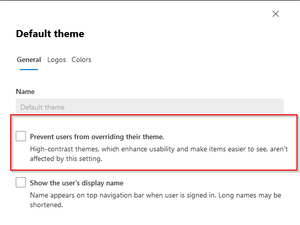
Hi! irritating, I know this feeling... How are your theme configured today? Do you have multiple themes you push out or only one? Do you have "Prevent users from overriding their theme." ticked under admin.microsoft.com -> Settings -> Org settings -> Organization profile -> Custom themes895Views0likes0CommentsRe: adding acquired company to existing O365 Tenant
Hi The multi tenancy might be an option for you: https://learn.microsoft.com/en-us/microsoft-365/enterprise/plan-multi-tenant-org-overview?view=o365-worldwide It's still in preview but take a look at it anyways. The technology used is Cross Tenant Synchronization that pulls users from source tenant to destination (or visa versa), this means that (all or selected users) would be synced as either member or guests however you like it to be. Cross synced users will now be able to collaborate in Company A's resources if allowed 🙂 To use this feature you have to set the org updates to: Targeted Release I hope you achieve your goal even tho this might not be the answer!913Views0likes0CommentsWord: Updating templates in Assets library not working
Hi I got a Sharepoint Online Assets Library which contains all of our Office templates. When I update or reupload a template, it doesn't sync to the users who has been using this template before. It seems to be some kind of cache because if I rename the document to something else, it works fine. The templates have never been replaced or updated before. So, I'm curious on how to manage these templates... it's not very intuitive to give the template a new name every time it has been updated. I have tried to clear Word cache, but it doesn't work.5.7KViews1like7Comments
Recent Blog Articles
No content to show