User Profile

A_D_R_I_A_N
Copper Contributor
Joined 4 years ago


User Widgets
Recent Discussions
MS Teams not outputting to my headphones/headset.
Hi, I'm connecting with my Bose NC700 Headphones (https://www.bose.com/p/headphones/bose-noise-cancelling-headphones-700/NC700-HEADPHONEARN.html) and they work under Windows 10 Pro. While they are also connected to my phone (Pixel 6) and Window laptop, I can hear YouTube videos fine and I can record fine. However, I can't hear anyone when I connect to a meeting, though those in the meeting say they hear me. I've tried using the "Call me" feature to connect to the meeting, but after a while, I get choppiness in hearing and others say I sound choppy. Attempting to force to all Teams.exe to priority 13 seems to help, but the issue is still there. I've also attempted this while disconnecting from my phone with the same results. Doing a test call Settings > Devices > Make a test call seems to also has this same issue. More > Settings > Device Settings shows mic's bar rising and falling and the circle around Echo flashes to appear to indicate that it is trying to say something. Switching to internal speakers bear this out. The mic works, I'm just not getting output to my headset/headphones. At one point there was a workaround where I'd have to connect to the meeting, go to More > Settings > Device Settings and changing the speaker to the laptop and then back to my headset, but this workaround also no longer works. 😠 I've had to resort to connect to the meeting on my phone, but now I can barely see anything on the screen. Connecting to both laptop and phone causes the phone output to stop working (not sure about the mic) even when I tell the laptop connection to not use audio which says, "Join muted to avoid causing audio disruption". NOTE: There is no Test call" to allow me to verify this type of connection and would be appreciated for diagnostics. Anyone else having this issue? I've been crippled from BEING ABLE TO DO MY JOB for over a couple of months now AND IS GETTING VERY TIRESOME! I need at least a workaround that works other than connecting with my phone so I can see what's being presented. Thx.4.6KViews2likes8CommentsOrganizing my inbox
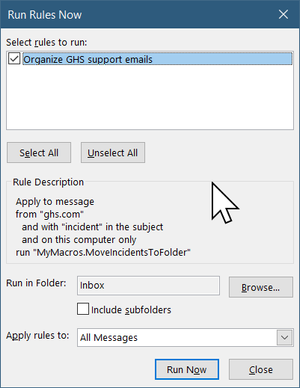
So, I, like many of you, get tons of emails and I desperately need to organize them so I can keep track of them. What I'd like to do is when I get an email from a particular domain with the text "incident xxx" in the subject line (where xxx is any number), I'd like to put it into a subfolder off of "domain\incident xxx". "domain" will be something static, but "incident xxx" will be dynamic as it could change from one set of emails to another. Also, "incident xxx" may have text before or after it. I've tried to ask Chat GPT this question and it gave me some useful info regarding how to setup rules. However, it started to get wonky in terms of how to setup the subject filter, stating I could use a regex in it and then use a group pattern number ($1) to name the folder to move the file to. That didn't work. Does Outlook support regex or has Chat GPT gone senile? 😄 Using Microsoft® Outlook® for Microsoft 365 MSO (Version 2208 Build 16.0.15601.20540) 64-bit EDIT: I was able to get Chat GPT to help me write some VBA code to do this (with a lot of modifications). I think that I now have something that will work but now I've found that executing the script is generating an error: Does anyone know why the error doesn't see the script name but the run rules dialog shows that it does? More importantly, how do I get my script to execute? Thanks924Views0likes0Comments
Recent Blog Articles
No content to show