User Profile

Aamir
Copper Contributor
Joined 8 years ago


User Widgets
Recent Discussions
Re: Changes to a Room's Booking settings, keep resetting
Thank you for the solution! It has been way over 2 days since I have been unchecking those boxes 🙂 I tried your solution, but unfortunately running into authentication problem logging onto the exchangeonline module. I have imported the module . I will keep this thread posted on how it goes. Thanks though!585Views0likes1CommentChanges to a Room's Booking settings, keep resetting
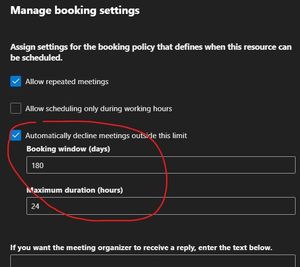
I am trying to uncheck the auto-decline option for a room. When I save it, it displays a green label "Booking options updated". But when I come back to this settings page again, the checkbox is showing filled in. The same is not happening for another room. For both of them, the "Booking Delegate Setting" is set to "Accept or decline booking requests automatically". Can anyone please tell me that why the changes that I make, keep resetting?709Views0likes3CommentsCannot run ASP.Net Webforms app with Windows Integrated Authentication on my PC
For quite sometime I have not been able to run ASP.Net web applications with Windows Authentication locally on my PC (Windows 10). This is true while debugging in Visual Studio (currently v2019) and is also true while running on IIS alone on my PC. I used to be able to do that, but not anymore. My PC is on my company domain and I am working remotely via Direct VPN. When I run a web application (ASP.Net Webform application) that has Windows Authentication ON, I get the dialog box where I type in my login info and soon after the page crashes with error. The error message depends on which browser I am using. For example in : `Hmmm… can't reach this pageIt looks like the webpage at http://localhost:50767/ might be having issues, or it may have moved permanently to a new web address.` In the Event Viewer the following Warning is logged under Windows Log > System: ``` The application-specific permission settings do not grant Local Activation permission for the COM Server application with CLSID {2593F8B9-4EAF-457C-B68A-50F6B8EA6B54} and APPID {15C20B67-12E7-4BB6-92BB-7AFF07997402} to the user MYDOMAIN\MY_USERNAME SID (MY SID) from address LocalHost (Using LRPC) running in the application container Unavailable SID (Unavailable). This security permission can be modified using the Component Services administrative tool. ``` I have looked up this error online and have found some https://www.itexperience.net/event-id-10016-fix-the-application-specific-permission-settings-do-not-grant-local-activation-permission-for-the-com-server-application-with-clsid/ to go into Registry and Component Services and allow permissions to that class id, which happens to be "PerAppRuntimeBroker" in my case. Still it did not resolve the issue. Has anyone else run into this issue and if so what did you do to resolve it? Thanks1.1KViews0likes0Comments
Recent Blog Articles
No content to show