User Profile

manish1614
Brass Contributor
Joined 4 years ago


User Widgets
Recent Discussions
Re: Authentication Failure for IMAP and POP3 using Client Credential flow for OAuth2.0 | Java
Just thanks is not enough, so I'd like to express my heartfelt gratitude for all the effort you put into taking my work one step forward. You did a truly excellent and remarkable work, and I feel fortunate to have someone like you as a collaborator. Its a very appreciative work you did there by trying to resolve the POP3 related authentication problem. I appreciate your willingness to go above and beyond to help many people out there to achieve their goals.1.4KViews0likes0CommentsAuthentication Failure for IMAP and POP3 using Client Credential flow for OAuth2.0 | Java
I am facing an authentication failure issue while trying to connect for both IMAP and POP3 protocols using the Client Credential Grant flow for OAuth2.0 Where, I have been following the steps suggested in "https://docs.microsoft.com/en-us/exchange/client-developer/legacy-protocols/how-to-authenticate-an-imap-pop-smtp-application-by-using-oauth#get-an-access-token" I have been using this github project to fetch the Access Token using Client Credential Grant flow: https://github.com/Azure-Samples/ms-identity-msal-java-samples/tree/main/1.%20Server-Side%20Scenarios/msal-client-credential-secret Java Code for IMAP: public static void connectIMAP(String userEmail, String accessToken){ String SSL_FACTORY = "javax.net.ssl.SSLSocketFactory"; Properties props= new Properties(); props.put("mail.imap.ssl.enable", "true"); props.put("mail.imap.port", "993"); props.put("mail.imap.auth.mechanisms", "XOAUTH2"); props.put("mail.imap.sasl.mechanisms", "XOAUTH2"); props.put("mail.imap.auth.login.disable", "true"); props.put("mail.imap.auth.plain.disable", "true"); props.setProperty("mail.imap.socketFactory.class", SSL_FACTORY); props.setProperty("mail.imap.socketFactory.fallback", "false"); props.setProperty("mail.imap.socketFactory.port", "993"); props.setProperty("mail.imap.starttls.enable", "true"); props.put("mail.debug", "true"); props.put("mail.debug.auth", "true"); Session session = Session.getInstance(props); session.setDebug(true); try { final Store store = session.getStore("imap"); store.connect("outlook.office365.com",userEmail, accessToken); if(store.isConnected()){ System.out.println("Connection Established using imap protocol successfully !"); } } catch (NoSuchProviderException e) { // session.getStore() e.printStackTrace(); } catch (MessagingException e) { // store.connect() e.printStackTrace(); } } Java code for POP3: public static void connectPOP(String email, String accessToken){ Properties properties= new Properties(); properties.put("mail.pop3.port", 995); properties.put("mail.pop3.forgettopheaders", "true"); properties.put("mail.pop3.auth.mechanisms", "XOAUTH2"); properties.put("mail.pop3.auth.login.disable", "true"); // If true, prevents use of the USER and PASS commands. Default is false. properties.put("mail.pop3.auth.plain.disable", "true"); // If true, prevents use of the AUTH PLAIN command. Default is false. properties.put("mail.pop3.auth.xoauth2.disable","false"); // If true, prevents use of the AUTHENTICATE XOAUTH2 command. Hence set it to false properties.put("mail.pop3.auth.xoauth2.two.line.authentication.format", "true"); // If true, splits authentication command on two lines. Default is false. properties.put("mail.pop3.connectiontimeout", 15000); properties.put("mail.pop3.timeout", 15000); properties.put("mail.debug", "true"); Session session = Session.getInstance(properties); session.setDebug(true); try{ Store store = session.getStore("pop3"); store.connect("outlook.office365.com", email, accessToken); if(store.isConnected()){ System.out.println("Connected with pop3 successfully !"); } }catch(Exception e){ e.printStackTrace(); } } Following are the credentials which I have used while performing the Client Credential Grant flow userEmail:- Email of the user which is used to login to Azure portal (eg, email address removed for privacy reasons) authority=https://login.microsoftonline.com/<tenant - id - here>/ client_id= <client(application) - id - here> secret= <client - secret - key - here> scope= https://outlook.office.com/.default Note: I have been using the Default Active Directory, and the default user(Admin) for my Azure account. Is it fine this way ? or does it require a new custom Azure AD and a separate tenant for performing client credential flow Below Image contains list of permissions I have applied in my app: Error Logs: Following is the list of jars I have used as a part of this development: My Java Code Link(ideone): https://ideone.com/2RaWN9 Please help and let me know if the program is not correct. Or if any important step seems to be missing. Thank you.Solved64KViews1like60CommentsRe: Authentication Failure for IMAP and POP3 using Client Credential flow for OAuth2.0 | Java
shrey_soni I have attached the java code link above as "https://ideone.com/2RaWN9" where you can easily find the java code which I used during implementation. Or else, you can import the project directly to your local by from https://github.com/Azure-Samples/ms-identity-msal-java-samples/tree/main/1.%20Server-Side%20Scenarios/msal-client-credential-secret. Apart from that I have followed the steps mentioned in "https://docs.microsoft.com/en-us/exchange/client-developer/legacy-protocols/how-to-authenticate-an-imap-pop-smtp-application-by-using-oauth#get-an-access-token" Must check the answer in this thread which I have marked as best response before running the cmdlets9.7KViews0likes1CommentRe: Authentication Failure for IMAP and POP3 using Client Credential flow for OAuth2.0 | Java
shrey_soni Yes your understanding is correct, from 1st Oct 2022, you will be required to move to OAuth2 in case you are still using Basic Authentication technique. Please refer to this post for more information about the announcement. https://learn.microsoft.com/en-us/exchange/clients-and-mobile-in-exchange-online/deprecation-of-basic-authentication-exchange-online10KViews1like4CommentsRe: Authentication Failure for IMAP and POP3 using Client Credential flow for OAuth2.0 | Java
LinaMM2022 Thank you for suggesting this change, but for my case we are currently moving forward with only IMAP based connections because there were other modules in my product which highly depends on the JavaMail jar. In case if we plan to implement POP3, we would definitely try to connect using the Jakarta Mail api. Thanks alot.10KViews0likes0CommentsRe: Authentication Failure for IMAP and POP3 using Client Credential flow for OAuth2.0 | Java
I have been using JavaMail jar 1.5.5 all this time, so I tried to update it to 1.6.2(latest). I have checked the msal4j jar, which have version 1.12.0(released on May 06, 2022), seems fine. Post updating the jars I ran the flow for POP3 connection again, but didn't got any success till now. In some posts they say that we need to add the scope as "https://outlook.office.com/POP.AccessAsUser.All" explicitly in the code, but never tell how or where to specify it exactly. As per my findings, the only valid scope value is "https://outlook.office365.com/.default"15KViews0likes8CommentsRe: Authentication Failure for IMAP and POP3 using Client Credential flow for OAuth2.0 | Java
DestryHines Thanks for pointing this out. For me, this command is executed internally from the JavaMail library functions. After reviewing your comment I tried to split the command into 2 lines using the property, "mail.pop3.auth.xoauth2.two.line.authentication.format" as true Reference was taken from https://javadoc.io/static/com.sun.mail/jakarta.mail/2.0.1/jakarta.mail/com/sun/mail/pop3/package-summary.html But I am still unable to establish a connection with POP3 protocol. And getting the same error message. Note: Updated the POP3 code in this post jambo Thank you for suggesting me to apply this property. I have tried to implement it in my existing code but I haven't got any success in establishing a connection through POP3. Apart from this property, I tried setting:- mail.pop3.auth.xoauth2.disable as false mail.pop3.auth.mechanisms as XOAUTH2 mail.pop3.starttls.enable as true Please let me know if any other parameters are required, or an existing parameter needs to be removed.15KViews0likes10CommentsRe: Authentication Failure for IMAP and POP3 using Client Credential flow for OAuth2.0 | Java
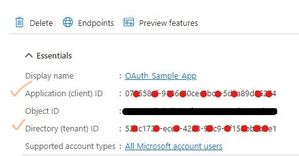
borist2 Thank you for pointing out this clue where we need to use OBJECT ID from the Enterprise application view in all the cmdlets i.e. New-ServicePrincipal, Get-ServicePrincipal and Add-MailboxPermission. It is finally working fine (only for IMAP flow) for me after trying out the same set of steps on a new application, keeping in mind that I have to use OBJECT ID value from Enterprise Application view. But still there is some issue while trying to connect with this application for POP3 flow. As per my understanding, following is the list of parameters used while performing Service Principal related queries: (Please correct me if I am wrong) Parameters used (and where to find them): appId: Application (client) ID [ found in Application Overview screen, from both Enterprise and App reg] entObjId: Object ID(Enterprise app) [ found in Enterprise Application Overview screen only ] orgId: Directory (tenant) ID [ found in Azure AD overview screen ] Commands: New-ServicePrincipal -AppId appId -ServiceId entObjId -Organization orgId Get-ServicePrincipal -Organization entObjId | fl Add-MailboxPermission -Identity "<email_id_here>" -User entObjId -AccessRights FullAccess Confusions: In Add-MailboxPermission cmdlet, <SERVICE_PRINCIPAL_ID> creates confusion, because in order to apply permissions like "IMAP.AccessAsApp", the internet tells that "Service Principal ID" can be found at [ Azure AD -> Enterprise Application -> (chosen application) -> Permissions -> IMAP.AccessAsApp -> use the Service Principal ID from Flyout menu ] Enterprise Object ID can be used in place of Organization ID in all 3 cmdlets jambo Anjitha170 DestryHines Thanks for your suggestions and findings on this issue that I have raised. However I am still unable to establish a connection through the POP3 protocol, and I want to do it just like we did it for IMAP. Below is the error log for the issue I am facing while trying to connect with POP3. Any help and suggestions will be much appreciated.15KViews0likes13CommentsRe: Authentication Failure for IMAP and POP3 using Client Credential flow for OAuth2.0 | Java
jambo and DestryHines As per my understanding, if you are unable to find "Office 365 Exchange Online" in <API-Permissions -> +Add a permission -> APIs my organization uses> then probably it is because you are not having an active subscription. However I have tried applying the Service Principals (like POP.AccessAsApp and IMAP.AccessAsApp) as suggested by the step-by-step guide, using GUI as well as PowerShell(as given in "Register service principals in Exchange" section), but didn't got any success yet.34KViews0likes1CommentRe: Authentication Failure for IMAP and POP3 using Client Credential flow for OAuth2.0 | Java
DestryHines Thanks for your response, it was a typo which I have corrected now from "https://outlook.office.com/.default" to "https://outlook.office365.com/.default". I have cross-checked the documentation several times now, but I am still unable to resolve this problem.34KViews0likes0Comments
Recent Blog Articles
No content to show