User Profile

vetadmin
Copper Contributor
Joined 4 years ago


User Widgets
Recent Discussions
Re: Start-process launches windows installer
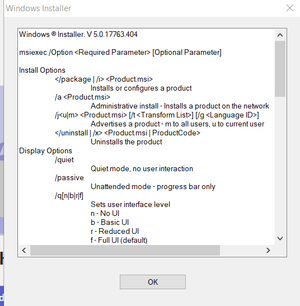
LainRobertson Hi Lain, Thanks for the correct format. I know the installdir is not specified $Installdir="" Start-Process -FilePath msiexec.exe -ArgumentList @("/p", "$Installdir\ndp48-x86-x64-allos-enu.exe", "/sAll", "/rs", "/rps", "/msi", "/norestart", "/quiet EULA_ACCEPT=YES"); I still get the msiexec popup19KViews0likes1CommentRe: Start-process launches windows installer
Hi Thanks Lain for the correction This is what I have written # Check if Software is installed already in registry. $CheckADCReg = Get-ItemProperty HKLM:\Software\Wow6432Node\Microsoft\Windows\CurrentVersion\Uninstall\* | where {$_.DisplayName -like "Adobe Acrobat Reader DC*"} # If Adobe Reader is not installed continue with script. If it's istalled already script will exit. If ($CheckADCReg -eq $null) { # Path for the temporary downloadfolder. Script will run as system so no issues here $Installdir = "c:\temp\install_adobe" New-Item -Path $Installdir -ItemType directory # This is a 32 bit install version. Use the same 64 bit version file. # Download the installer from the Adobe website. Always check for new versions!! $source = "\\company.local\Share\\Software\Adobe\Acrobat\Patch\AcrobatDCx64Upd2200120169.msp" $destination = "$Installdir\AcrobatDCx64Upd2200120169.msp" Invoke-WebRequest $source -OutFile $destination # Start the installation when download is finished #Start-Process msiexec.exe -FilePath "$Installdir\AcrobatDCx64Upd2200120169.msp" -ArgumentList "/sAll /rs /rps /msi /norestart /quiet EULA_ACCEPT=YES" #The above syntax is what I had and I added yours below Start-Process -FilePath msiexec.exe -ArgumentList @("/p", "$Installdir\AcrobatDCx64Upd2200120169.msp", "/sAll", "/rs", "/rps", "/msi", "/norestart", "/quiet EULA_ACCEPT=YES"); # Wait for the installation to finish. Test the installation and time it yourself. I've set it to 240 seconds. Start-Sleep -s 240 # Finish by cleaning up the download. I choose to leave c:\temp\ for future installations. rm -Force $Installdir\AcroRdrDC* } Does this look ok?19KViews0likes0CommentsStart-process launches windows installer
I think there is something I am missing that when I try to run the installer for an msp file and using this syntax it stops and brings the windows installer window. Start-Process msiexec.exe -FilePath "$Installdir\AcrobatDCx64Upd2200120169.msp" -ArgumentList "/sAll /rs /rps /msi /norestart /quiet EULA_ACCEPT=YES" Am I missing something?Solved21KViews0likes4CommentsExecute MSP
Trying to run this command and it fails and gives error as such. Any idea where I might be going wrong Installdir = "c:\temp\install_adobe" New-Item -Path $Installdir -ItemType directory This is the command executed shown below and get error. Execute-MSP -Path '$Installdir\AcrobatDCx64Upd2200120169.msp' -ArgumentList "/sAll /rs /rps /msi /norestart /quiet EULA_ACCEPT=YES" Error Execute-MSP : The term 'Execute-MSP' is not recognized as the name of a cmdlet, function, script file, or operable program. Check the spelling of the name, or if a path was included, verify that the path is correct and try again. At line:1 char:1 + Execute-MSP -Path '$Installdir\AcrobatDCx64Upd2200120169.msp' -Argume ... + ~~~~~~~~~~~ + CategoryInfo : ObjectNotFound: (Execute-MSP:String) [], CommandNotFoundException + FullyQualifiedErrorId : CommandNotFoundException2.6KViews0likes2CommentsSetting up default font in Office apps and other apps
We would like to set ARIAL as the default font for all users within the organization on all the apps (Office, Adobe, Outlook) etc... How can we go about doing this in a simple an in an efficient way. I tried using Group Policy, but this is only if you want to make other fonts as default other than the one that is available. We want ARIAL as the default when we launch MS WORD instead of Calibri which seems to be the default. We do not want this to be set by users, but we want to make sure that it reflects in users apps. Thank you1.4KViews0likes0Comments
Recent Blog Articles
No content to show