User Profile

david_webb2375
Copper Contributor
Joined 4 years ago


User Widgets
Recent Discussions
Multiple monitors with physical size attributes in addition to resolution
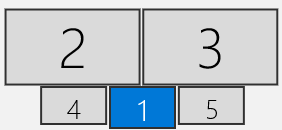
Windows 10 and prior versions allow arrangement of multiple monitors by their resolution. Each monitor is arranged in the [Rearrange your displays] dialog with the monitor's resolution used to define its relative size in the display arrangement. A 22" 1K monitor does not arrange accurately on this dialog relative to a 27" or 34" 4K monitor. I'd need to have 44" 4K monitors to make it accurate. Similarly, my 16" laptop screen doesn't arrange well relative to the other monitor sizes. I would like two things: Include physical dimensions metadata for each monitor in the display arrangement. Use the physical dimensions to calculate where the monitors are in relation to each other when moving the mouse from one screen to another. My monitor array consists of two 4K 34" monitors across the top and one 16" 1K laptop monitor on the bottom with two 22" 1K monitors on either side of the laptop monitor. I arrange them physically in a curved orientation instead of a flat orientation. I use each screen for different purposes (I use one of the 1K monitors for sharing my screen with others). The [Rearrange your displays] dialog shows the 4K monitors twice as wide as the 1K monitors even though they're only 2/3 as wide. In my arrangement, the laptop and 22" monitors are physically wider on the desk than the 4K monitors side-by-side, but they show up as narrower on the [Rearrange your displays] dialog. More importantly, the positioning of the monitors on the [Rearrange your displays] dialog corresponds directly to the position of the mouse when moving the mouse between screens. Even though my physical arrangement is wider on the bottom than on the top, Windows thinks my arrangement is wider on the top than on the bottom, so when I move my mouse from the lower outside corner of the 4K monitors down onto one of the 1K monitors, the mouse runs into the edge of the logical screen and doesn't proceed to the lower monitor. I need to move the mouse inboard and then watch it jump close to 12" out as it finally moves to the 1K monitor. My primary goal is to have the mouse know where to move to on the destination monitor when moving between screens.442Views0likes0CommentsOutlook Calendar Feature Request - allow [Retain History] when canceling recurring meetings
I use Outlook Calendar to track my time worked on different activities and also as a reference when I need to refer back to what I did over time. Sometimes I am invited to a recurring meeting where the end date is either not set, or is set using the Outlook default. The meeting organizer may view past meetings as irrelevant, so when there is no longer any need for future meetings, they simply cancel the series instead of setting the end date of the recurrance. When this happens, I receive notification that the meeting has been canceled and I have two options: Click the button to [Remove from Calendar] Don't click the button. If I click the button to [Remove from Calendar], all record of past meetings is removed, regardless of whether I attended them. If I don't click the button, then an indeterminate number of recurruing meetings remains on my future calendar with "Canceled:" added to the subject. Neither of these options are optimal. Feature request: Add a button next to [Remove from Calendar] to [Remove Future Meetings]. This button will retain all past meetings from the series on my calendar, along with all meeting details, notes, etc saved in the meeting invitation, and it will remove all future meetings.2.3KViews1like1Comment
Recent Blog Articles
No content to show