User Profile

mhornoloopers
Copper Contributor
Joined 4 years ago


User Widgets
Recent Discussions
Onedrive for storing all company documents
Hello I'm considering onedrive for storing all a company's documents (.docx files, videos, images.. etc) The idea would be that employees would be able to access this files limited by their user permissions (perhaphs handled through active directory?) I saw in the office 365 plans that onedrive has a limit of 2TB per user. However, I'm more concerned about the limit of the account the company would use to store all these documents I'm talking about. Rather than user specific is like a big storage site where most company files would go to and other users have access to. So I'd like to know if this 2TB limit can be raised for a particular account of if there's better ways of doing this Thanks in advance692Views0likes0CommentsCompany Portal with office 365 technologies
I'd like to make the most use possible of office 365 apps to create a company portal. This company portal would have common business features like login with your microsoft acc, checking/changing your employee info, handling holidays, formations, onboarding/offboarding processes... etc I know this is a very vague description but I'd like to know if, in general something resembling a company portal would be feasable for example with sharepoint (maybe ocmbined with power apps?) or if on the other hand it's a ridiculous idea and sharepoint is not designed to handle such business logic but rather just informative pages. Thanks in advance738Views0likes0CommentsAre there any limitations when inviting guest users to my sharepoint?
I read online the following limitations but I'd like to confirm here if they are really like that or if there are other limitations that I am not aware of. You can have up to 5 guest users per employee internal license you have. Although micrososft does not monitor this Even if they don´t have a micrososft license could they still use sharepoint and other office 365 apps such as powerapps that are in the sharepoint site or having access to sharepoint files? Are there any other limitations I should be aware of?Solved3KViews0likes2CommentsRe: I can´t invite external Users
1. I'm trying to invite external people (who also have microsoft licenses) to a microsoft sharepoint group (sharepoint then handles page permissions based on that group) 2, I tried sharing it on a team sharepoint site and it did let me for some reason. The one where is not working is not a team site but a communicaiton site, in case that matters I can also confirm the external user did accept the invite. I can see him as a guest in users5.8KViews0likes1CommentI can´t invite external Users
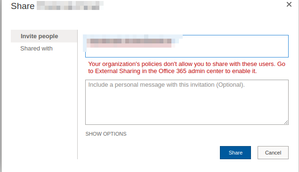
Problem: When I try to invite external users to my Sharpoint site I get the following error: Things I've tried: Checked admin sharepoint policy settings: Checked admin sharepoint active site policy settings: I'm at a loss as to what to do to be able to invite external users. Any help would be greatly appreciated. PS: If I invite an external user do I have to pay for their license or can they use the one they already have?Solved6.7KViews0likes9CommentsAzure directory with Sharepoint Online?
Hello I'd like to have a company's user's permissions centralized with azure directory so I can manage their access from one place rather than on different services Is it possible to connect AD with Sharepoint Online to do so? I'd like if I could, for example, set up group permissions from AD and have them work for different Sharepoint sites rather than creating these groups on each sharepoint site thus being independent from each other rather than having a centralized auth solution.Solved1.3KViews0likes1CommentRe: Product catalog with image and file attachments?
Hello David, thanks for your response There's two things I'm still confused about regarding implementing this with PowerApps. The first would be how to have each element of the list have many images, videos and pdf attachments since a list element does not have a type for multi images and multi videos. The second would be, if what I asked above is possible somehow, how would that translate into PowerApps; would it be possible to somehow show the videos and images of a product in a detail view? I was just looking into powerapps and all I found so far is adding videos manually in the design window2.2KViews0likes1CommentProduct catalog with image and file attachments?
Would it be possible to create in Sharepoint a product catalog CRUD website? Something like: List of products with some basic data Each of them has more detailed view with its data and some images/videos/pdf files that are linked to this product. You can also create edit and delete products I was looking into putting them into a Sharepoint list but I don't see how I'd have this relationship of one product can have one or more images, videos or pdfs since a list document can only have many attachments but there's no difference between them which I assume would make showing these attachments in different places of the detail view and the creation/editing hard. Lastly, would it be better to use powerapps connected to sharepoint list or sharepoint cross-site published website with the list as a catalog? Thanks in advanceSolved2.4KViews0likes4Comments
Recent Blog Articles
No content to show