User Profile

ahelton_kcl
Brass Contributor
Joined 4 years ago


User Widgets
Recent Discussions
Re: Why does Wipe/Fresh Start remove MS Store and other built-in UWP app distributed by Microsoft?
I believe the issue for me was a registry item being changed in my debloat script, so if you are changing any registry keys to prevent MS from auto-installing or auto-reinstalling certain UWP apps like Candy Crush and what not, one of those might actually be preventing the reinstallation of the MS Store app and other apps after a wipe/reset. I can't recall precisely which registry key it was. If I figure it out, I'll post back here and let you know.2KViews0likes0CommentsWhy does Wipe/Fresh Start remove MS Store and other built-in UWP app distributed by Microsoft?
I am trying to find out if this is expected behavior. When I first onboard (join) a new device to Intune and a user logs in for the first time, MS Store and other built-in UWP apps distributed by Microsoft (i.e., Calculator, Photos) are all there. I do specify some for uninstallation via Niehaus’ branding script, and, as expected, those are removed. The problem, however, is that if I need to Wipe/Reset a device. I pretty much always use Wipe as I find it to work more reliably and much quicker than either Fresh Start of Autopilot Reset. For some reason, after performing an Intune Wipe (same thing happens after a Fresh Start) the MS Store and other built-in UWP app that I want to keep are all gone. Only the apps that I have specified for install via the Intune portal are there. I could obviously specify the missing store apps to be installed via the Intune portal, but I can't specify the MS Store for install this way (it would be nice if you could!). My question is, is this normal and expected behavior? Are Wipe and Fresh Start supposed to remove the MS Store and all UWP apps? Based on the MS Docs, I don't feel this is supposed to be happening, but maybe I'm mistaken. Any feedback will be much appreciated.2.5KViews2likes8CommentsRe: Bug? Restrict which accounts can be used as Microsoft Edge primary accounts prevents auto sign-in
Yep. Did that. And it correctly shows up on the edge://policy page. I also triple checked for typos. It seems that for some reason that policy is breaking my automatic sign and sync policy set up.5.4KViews0likes0CommentsBug? Restrict which accounts can be used as Microsoft Edge primary accounts prevents auto sign-in
Hi, I just yesterday enabled the "Restrict which accounts can be used as Microsoft Edge primary accounts" in Configuration Profiles and deployed it to my dev machine. I then performed a Wipe from the Intune, relogged in as the dev user, and then started verifying all the profiles I've set up so far properly applied from start to finish. Unfortunately, when I fired of MS Edge, I immediately notice a problem: it did not automatically sign-in and sync like it had been doing. I went back and disabled the "Restrict which accounts can be used as Microsoft Edge primary accounts" and sure enough automatic sign-in and sync started working again. Is this a bug? It seems like it should be.Solved6.2KViews0likes6CommentsRe: Microsoft Defender SmartScreen Setup Setting Catalog vs. Endpoint Security??
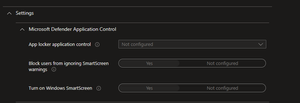
Do I need to configure both the "Configure Microsoft Defender SmartScreen" in the Settings Catalog and the "Turn on Windows SmartScreen" in Endpoint to effectively turn on this feature? Or can I just do the latter of the two? It seems to me that, based on the provided tooltips in Intune, they do the exact same things. I wasn't sure if there was any reason to configure both...3.1KViews0likes1CommentMicrosoft Defender SmartScreen Setup Setting Catalog vs. Endpoint Security??
Hi, I've notice that there's seems to be a couple of different places to turn on Microsoft Defender Smart Screen. In Endpoint Security -> Attach Surface Reduction -> Application Control, I find the following screen: Additionally, I can find the setting to turn on Smart Screen in Settings Catalog -> Microsoft Edge -> SmartScreen Settings as pictured here: I also find in these two locations the option to "Block users from ignoring SmartScreen warnings" (Endpoint Security) and "Prevent bypassing SmartScreen..." (Setting Catalog). Though found in different locations, are these setting essentially accomplishing the same thing or is there a difference?Solved3.6KViews0likes3CommentsCan't seem to get Universal Print Cloud Printers to automatically install via Intune Policy
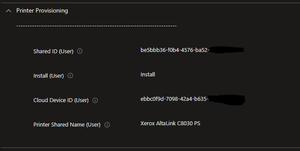
I can't seem to figure out how to get my Universal Printers to install automatically anymore. When I first did this a few months ago, everything worked perfect. Now I can see the printers when I click 'Add printer', but they don't ever install automatically despite having setup the Settings Catalog -> Printer Provisioning policy in Intune. I currently have the print permissions set to allow anyone to install the Cloud Printer, but in Intune I have a specific user group targeted for automatic deployment. In Intune, I don't get any official errors, but it does say "not applicable." How would it not be applicable if I directly assign it to a group of users for deployment? This doesn't make any sense to me. Any help will be much appreciated. (Note: I've verified that my test user has appropriate licensing)Solved1.9KViews0likes4Comments
Recent Blog Articles
No content to show