User Profile

RodrigoTarrats
 Microsoft
Joined 4 years ago


User Widgets
Recent Discussions
Re: Additional audio tracks on videos disappear after a few seconds of playback
MARK13 first off THANK YOU for taking the time to share this behavior in audio tracks with us, we really value your feedback. In this particular instance you are right it's not some isolated behavior, nor are you doing anything out of the ordinary; this is an incident we recently uncovered. We already have the mitigation rolling out as we speak, however it might take a couple of days to be fully available in all regions. I will update this thread when the mitigation rollout is complete. And thanks again for trying audio tracks, I'm sorry your first experience wasn't ideal but rest assured that we'll make sure the next one is!658Views0likes0CommentsRe: more than one audio language
Hey ScottBraun it's been a little over two months since I last replied, but I just wanted to let you know that we have finished our rollout for Audio Tracks. They should be generally available for you to try out at your earliest convenience. In case you require additional information, please refer to our support doc. I hope that Audio Tracks enables you to accomplish your video goals in Stream, but if it doesn't, please don't hesitate to share in this forum any feedback or insights you may have for us, as we love to connect with our customers. Thanks again for taking the time to post in the forum!Re: Ways to generate transcripts for videos over 4GB
AlyssaAshleyTsang first off let me thank you for your question and feedback. Unfortunately, what you're experiencing is an actual file size limitation currently in Stream for SharePoint. For automatic transcription generation it's capped for videos up to 1GB, while for on-demand there is a file-size limit of 4GB. You can refer to this support doc for more information on size limits. We understand this technical limitation is far from ideal and are looking for ways in which we can increase the file limit but nothing we can commit to announcing at this moment. I'd say that your solution to this restriction should work as long as the limits are not reached, but I also understand the extra hassle. If you feel comfortable answering how many 4GB or over you currently have, it could give us a pulse on this particular user pain point. Thanks again for taking the time to post your question and sharing your concerns and feedback with us. We really value it, and we do consider it. Thank you for being a Stream Champion!2.8KViews0likes7CommentsRe: more than one audio language
ScottBraun thanks for your prompt response! I'm curious if the new audio functionality will allow the end user to simply select a language and have both audio and captions change. Or if they will have to select their audio language and caption language separately. We decided to keep both audio and captions separate from each other to allow for additional flexibility eg. watching a video and selecting a dubbed Spanish track with English closed captions. As for your timeline a couple of months is all we need to fully roll out to General Availability. I wish I could provide you with a crisper estimate, but you should be able to try Audio Tracks & Descriptions before the holidays. I'm really looking forward to you trying this in your organization, and when you do don't be a stranger and please share your feedback! Cheers!Re: more than one audio language
ScottBraun SaeedAmin Stina Biärsjö just wanted to update you folks on this one. The ability to upload multiple audio tracks in Stream on SharePoint is starting to roll out in the next few weeks. We will start our rollout with a targeted release but are planning to quickly follow with General Availability. Scott I'd love for you to stay with Stream on SharePoint at least until you give this exciting, and inclusive, feature a go since I'd love your feedback and insights into what could we improve. Can you share with me when is a reasonable expectation for you and your org to have this working? Are you under any government clouds? Thank you!Re: Can't upload VTT caption files
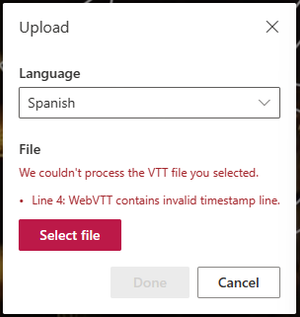
Hi acm48, and thank you for providing additional feedback. I tried reproducing the behavior by: Generating an English transcript for a video Downloading, and manually translating the WebVTT file Uploading the newly translated WebVTT file I found no issues when uploading the downloaded and updated WebVTT file even when the first lines look like this: WEBVTT ff4c60d3-6292-4955-8002-62a30bae8471-0 00:00:02.640 --> 00:00:06.940 Por 4° año consecutivo, México experimentó Golden I should also let you know that just very recently, we rolled out a feature that provides feedback in case the WebVTT file is malformed, like this one example: WEBVTT The line below should yield an error ff4c60d3-6292-4955-8002-62a30bae8471-0 00:00:02.640 --> 00:00:06.940 Por 4° año consecutivo, México experimentó Golden The feature is already 100% General Availability, so unless you're a Government Cloud tenant you should be able to try it out without going to an external WebVTT validator! I suspect there might be another error with the file? Which is why if you feel comfortable, you can send me the VTT and I can run it in case it's something most validators are missing. Thank you so much for reaching out to us!5.9KViews0likes2CommentsRe: Can't upload VTT caption files
BLayman I'm so glad you're finally able to upload your VTTs! I will share your feedback with the team in terms of our VTT parser, and potentially displaying the parser's output in the UI to give more context about the error. Thanks again for posting and sharing, we love your feedback!7.7KViews2likes5CommentsRe: Can't upload VTT caption files
BLayman thanks for taking the time to share your feedback with us, we really value it. Firstly, my apologies on you not being able to upload your VTT file, could I suggest one alternative before opening a support ticket? Could you please search online for "VTT file validator" and open one of your choosing? In the past I have used Live WebVTT Validator (w3c.github.io) in which you take the content of your VTT and paste it directly in the edit box. It would parse the file and output any potential errors. The reason I'm suggesting this, is because we actually parse the file for errors prior to uploading the VTT file, but we don't expose those details in the UI. Please let me know how it goes, and thank you again for feedback!8.8KViews2likes7Comments
Recent Blog Articles
No content to show