User Profile

BMoreOs
Brass Contributor
Joined 4 years ago


User Widgets
Recent Discussions
Microsoft Security Recommendation issues and Impersonation
Within the numerous dashboards for Microsoft, we see impersonation protection as failed/not compliant, or not enabled in our environment. This is a 2-part question: 1. Does it work well? Why do we see impersonated emails in our environment despite having the users set up for it? We have seen 3 in the last week for our CEO even though he is on the list. 2. Despite having it on and our owned domains added, the environment still shows we don't have it setup. Also, it gives us a limit of 350 users, are we supposed to check each person one by one? Why negatively impact security scores when you are only supposed to set this up for VIPs? Why not allow it to be on for all users? EDIT: This is what it advises even though you are limited to 350 users. Ensure that all users have an assigned anti-phishing policy with ‘Enable domains to protect’, ‘Include domains I own’ and ‘Include custom domains’ options enabled, by either updating your existing policies or creating new ones.Re: Sending OneDrive Files Externally is not working correctly
Hi. Unfortunately, this didn’t fix it. The user clicks on the link and it pulls up our branded company login page. They are not a guest so they can’t login to access the file. On my tests, it asks for a one time passcode and there is no issue getting to the file. We need one time passcodes for this process as the majority of users we share with are not tenant guests.577Views0likes0CommentsSending OneDrive Files Externally is not working correctly
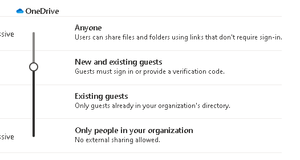
We send OneDrive file links to external partners. I setup a test account with F3 licensing which is what these users have. Sending from my test account to a Gmail account, the Gmail account receives the email, clicks the link and enters the email address and one time passcode.... no issues opening and downloading the files. For other users, when they send, the link forces them to login into our tenant to download the file. The external user doesn't have a guest account in our tenant so they have an error. I don't understand why it's doing this for the other users and not my test account. All settings are the same for both users. Below are the default sharing settings in SharePoint admin. How can I fix this quickly? Thanks822Views0likes5CommentsData Retention, Compliance, and Litigation Holds
We recently revamped our data retention policies and now I need to set up everything in M365. In the past, we would enable litigation hold under the user's account. Since that only does email, that is not enough. We are now drastically shortening our retention policy and it's critical that all data for a user is accessible if they were brought into a litigation issue. So if we were subpoenaed, I would "freeze" the users data and then it would be possible to search if we were required 1/2/3 months down the road. Is the best way to do this by starting an eDiscovery search and placing everything on hold but not searching for anything? Then, if we were required to search the account, I would edit that eDiscovery hold to include specific queries? Or maybe I would create a "Litigation Hold" retention policy outside of the new default one that would hold their data indefinitely? That seems like a pain to exclude the user and then add them to the other and probably not efficient. Looking for advice from anyone who does this a lot as Microsoft gives a ton of options.. which is great, but it makes it difficult to know the best way when handling critical data.652Views0likes2CommentsTeams Guests
I looked around and cannot figure this out. We have a vendor we are using short term who has Microsoft Teams. We also use teams. The communication involves sensitive data. We want to add the vendors in as guest accounts for communication. I added in one as a test account and they do not have the ability see or chat with anyone in our org. All settings are correct. They also have no visibility of the Team I added them to. Also, we want the chat data to stay in our tenant so it will not be available to the vendor after our project is complete. Is that possible? Thanks573Views0likes1CommentAdmin Teams Attendance Reporting
A manager contacted IT and needs a Teams' attendance report for those that report to her. Basically needs to know if scheduled meetings are happening on time and if those who are invited are showing up. If I go to Manage User and find the users, I see "Past Meetings" which lists the meetings and participants. If I click the meeting ID, the data the manager asked for is there. Unfortunately, there is no way to properly export this to provide the data the manager requested as the individual meetings only show that particular meeting. For "Past Meetings", there is no way to export. Is there a way to export this data?1.2KViews0likes1CommentSecure Remote Management
I need a secure and easy way to pull files from remote users on network and via Intune. This problem keeps coming up and rather then having to bother the user, global admins need to remotely connect to file explorer and pull a log file in various situations. It is not critical for this to work via Intune as the majority of the laptops we need to do this for are in an office and on domain.. but knowing how to do it via Intune would be great since we will eventually be moving all devices to it. I looked into PSTools and see that I need to enable firewall rules for some ports and some services via GPO. After testing it, I see that I have to enable file and print sharing firewall rules too. A further test showed that attack surface rules need to be modified... that is where I draw the line. What is everyone doing to securely allow this functionality? Thanks466Views0likes0CommentsSharepoint / Azure Storage Best Practices
Hello - We are buying a company and beginning to look at bringing all resources in. 2 old systems they have will be replaced with what we are currently using, leaving around 5 TBs of data that will need to be queried every 3-6 months or so. We do have hardware on prem where we could just throw it on there and save on costs but Sharepoint or Azure may be best if the cost is not too high. Our current Sharepoint library has all company documents and we have 2 TBs free of 4 TB. So I guess that isn't the best option. Next would be Azure? Azure cold or archived? I am not too familiar with that. In the end, we want to have this data accessible whenever it would be needed (compliance or audits, for example) but do not want to spend a ton. If on prem is the best option, we are OK with that too.Office 365 encryption is not working
We’ve used sensitivity labels to encrypt emails for months, no issues. No configuration changes have happened. We have had a drastic increase in complaints that our vendors cannot open attachments. I tested and see that, even with an external Microsoft license/tenant, I can open the email but it forces a login screen to open attachments. When I use the external account login, it attempts to login to our tenant ( the sending tenant). It rejects the login because there is no account there. Why is it asking for a login? This is causing chaos for our business. Any help is appreciated. ThanksMicrosoft Defender P1 and P2 - Any issues?
Hi All - I currently subscribe to Defender P1, with no known issues in the past. Everything worked great after testing and deploying. I would like to trial out P2, but I want to make sure it will not cause any issues. It should not, right? Does anyone have any experience with P2 blocking legitimate services and causing issues? Part 2 - If I turn it on and it does cause issues, is the fastest way to fix it just turning it "off"? I want to be as prepared as I can be. ThanksYammer Usage Reporting
I see related posts but they are years old. HR and Marketing want to see usage reports for Yammer. Obviously this is very valuable for them. Right now I export, clean it all up and send it. That was quarterly and now they want it weekly which takes a lot of my time. Is there any way for me to setup and send automated reports to them? Maybe power automate? I believe I can grant them the Office reports reader role, right? But does that grant access to anything else that they should potentially not be able to see? ThanksTeams Screen Share Problems
Hi - We have a weekly Teams meeting for new hire orientation. A particular remote speaker joins 30-45 minutes into the meeting to speak on their part. The presenter always has to share the slides again in order for them to see it. Why is this and how do we permanently fix that issue? Thanks604Views0likes0CommentsIPSec Azure AD
Hi. Really need help on this one as I am new to Azure. We are setting up an IPSec tunnel from our router to our new billing vendor for SSO. The router we have is not compatible with their setup... They refuse to modify anything and they do not have access to SSO registration for Azure SSO. It is on us now to figure out a solution. We have a connection from on prem to Azure AD for syncing. I see the virtual network, etc. but I am not aware if I can just add a new connection that can route to the new vendor. I am getting errors that the connection is already being used when I am setting it up. Can I latch onto that connection or do I need to setup something completely new? Do I need to create a connection from Azure to on prem AND to the vendor? Or can I just have a connection from Azure to the vendor for access to Azure AD? Thanks1.2KViews0likes1CommentRe: Microsoft Defender P1 and P2 - Any issues?
Thanks for your reply. My biggest concern is any type of legacy software that we have setup causing a false positive. Our billing system connections, for example. I am worried about the below 4 items from P2: Core Defender Vulnerability Management capabilities Automated investigation and response Advanced hunting Endpoint detection and response I feel confident that it will not cause any issues but just want to be safe! Thanks1.4KViews0likes0CommentsRe: Maximum Chat Participants needs to be increased
By default, all employees channel notifications are set to Custom - All new posts Off, Channel mentions - Banner and feed. As I am sure you know, it is impossible to get the majority of staff to make this modification on their own. Channel Conversations are not the answer. Some companies (ours) requires mass communication, real time. Like WhatsApp or Facebook Messenger, etc. We used channel conversations for 6 months and users hated it...prior to that, WhatsApp when we were a very small business. Now that I found a back end way of adding 200 users to a chat at one time, all feedback is "Let's not go back to channel conversations ;)"... But since there is a limit of 250 people... hence my post above.5.7KViews2likes0CommentsTeams and the new Co-Organizer feature
Hi - I am pretty sure I know the answer but wanted to exhaust all options... Employee A created a recurring meeting a year ago to a distribution list. Employee B started with the company last week. Employee A asked to make employee B a co-organizer of the meeting. I completed that but then employee A wants to allow employee B to modify and alter the calendar appt. if employee A were out or unavailable. I explained that the co-organizer feature does not allow the modification of the actual calendar event, it only allows control of the meeting itself. This is the correct statement? Although, I do agree that it should in the future. Is the only option to give employee B modify access of employee A's calendar? She does not want that. The only other option I can think of is setting up a shared calendar. Anything else? Thanks1KViews0likes1CommentRe: Maximum Chat Participants needs to be increased
Thanks, but if you see my posting: "We prefer the "real time" chat and how it looks compared to the Teams' forum posting format" By default, channel notifications are only mentions. Chat notifications are all messages unless you mute. Also, the channel posting has a community forum posting type feel that is not ideal for real time communication. I am seeing this request/complaint all over the place. I also see Microsoft developing a way to add chats based on security/distribution groups so they must be aware of the demand.5.9KViews2likes3CommentsMaximum Chat Participants needs to be increased
Hello - With how the default Teams' notifications are setup, our leadership decided we need a mass chat for all staff. This works much better and feedback has been positive from our staff. We prefer the "real time" chat and how it looks compared to the Teams' forum posting format. With that said, the chat participant limit is 250. WhatsApp just increased their limit to 512. Slack has a 1,000 person limit, Telegram is 200,000!! Does Microsoft have any plans to increase the 250 limit? We may need to move away from it if there are no plans. https://www.socialmediatoday.com/news/whatsapps-doubling-the-size-of-group-chats-in-the-app/623363/#:~:text=That%27s%20a%20significant%20expansion%20%E2%80%93%20users,new%20usage%20and%20communication%20options. Thanks6.2KViews0likes5Comments
Recent Blog Articles
No content to show