User Profile

st84
Copper Contributor
Joined 4 years ago


User Widgets
Recent Discussions
Re: Teams incoming Webhook error 403 & 401
The Teams documentation doesn't mention any ports needing to be opened for webhooks to work. Also, which firewall would/could that be anyways, if one is running/using Teams webapp? Shouldn't incoming webhooks work by default, provided the app is allowed and installed?5.6KViews0likes0CommentsTeams incoming Webhook error 403 & 401
Hello, I'm setting up a Teams incoming webhook. Work done so far: Modify Teams app policy for admins to allow Incoming Webhook app Create new channel in Teams 'webhook test' Added incoming webhook connecter app to channel Curl test: Webhook message delivery failed with error: Microsoft Teams endpoint returned HTTP error 403 with ContextId tcid=0,server=msgapi-production-eus-azsc2-4-94,cv=uImyuiqzxxxxxxxbWzQ.001=2.. POST test: ...failed with status code 401(Unauthorized) and reason {"Message":"STI server YQBPRxxxxxxx9853 failed to process request... Are there any more permissions/settings that need to be configured in order to get incoming webhook connectors working? Do I need to allow the Incoming Webhook app org wide, instead of just allowing a specific user group to add/manage incoming webhooks? Cheers,6.1KViews0likes3CommentsNeed FSLogix 2201 hotfix 2 - 2210 breaks things
Hello, ms or anyone else who might have it, we need FSLogix 2201 (2.9.8228.50276). If anyone has the file or if MS could actually publish more than just the last two releases, thanks! Also, why on earth would you only publish the last two releases ??@MS? What the heck...Solved1.3KViews0likes4CommentsCouldn't verify account - shared activation issue
Hello, some of our users, roughly 10-15% are experiencing an activation issue: Our setup: Shared computer activation, with the tokens saved on a network share. AzureADConnect sync. Office 365 licenses assigned via Office 365 portal. Symptoms: The above error message is displayed for some users. The tokens of the affected users are not being updated. When signing the user out of any of the Office 365 apps, nothing really happens. The user account remains in a half-signed in state (don't know how else to describe this behavior). Then when going to Account > Sign in, the first window asking for the email address appears. The user then provides the correct email address and clicks Next, and then instead of the password prompt window appearing, the window asking for the email address just disappears and nothing further happens. Now there is a manual workaround for this. And no, it's not editing the registry keys like mentioned in many other posts. What I discovered is the following: 1. Account > Sign in 2. Now provide an email address with an active O365 subscription other than the broken account 3. For some reason now the password prompt window appears 4. Instead of completing the sign in with this different account, click 'Sign in with another account' 5. Now when you provide the original email address of the account that couldn't be verified and didn't cause a password prompt, for some reason Office now does prompt for the password and everything starts working again after providing the password. 6. The tokens are now updated as well; this is confirmed by checking the modification date of the two token files. 7. However, the error will come back after the tokens expire after ~30, because for some reason the affected user profiles will not update the tokens which triggers this issue in the first place. I've browsed a multitude of forums and articles regarding this issue but have not found a permanent solution. The above works for us as a workaround but it's becoming quite annoying not only for our support staff but also for the users. Does anyone have a permanent solution for this?1.3KViews0likes0CommentsOutlook 365 not connecting to on-prem Exchange
Hello, in an effort to switch to a shared licensing model, we are re-deploying Office 365 via ODT. However, after re-deploying it, Outlook just will not connect to our on-prem Exchange server but instead connects to Exchange online. The attached "ODT 365.zip" file contains the two files: configuration-Office.xml | This one was used initially, everything works fine and Outlook connects to the on-prem Exchange without issues. However, it's not shared licensing. configuration-Office365Shared.xml | Everything but Outlook not connecting to on-prem works fine as well. We've already tried the registry fix mentioned here: https://techcommunity.microsoft.com/t5/office-365/outlook-365-outlook-install-does-not-see-local-exchange-account/m-p/320424 >> HKEY_CURRENT_USER\SOFTWARE\Policies\Microsoft\office\16.0\outlook\autodiscover DWORD: ExcludeExplicitO365Endpoint Value = 1 However, that registry key does not exist in our environment. There was mentioning of a different path in the registry somewhere (can't find the link anymore), but those paths did not exist in our registry either. We also tried manually adding the on-prem server by manually setting up an account in Outlook. This did not work either. So how do we manage to get Outlook 365 to connect to our on-prem Exchange server when installing it with the shared license option? We do not have a hybrid model yet and are not using Exchange online yet. ***EDIT*** I should have mentioned this is in a VMware Horizon Instant Clone environment. Thanks!14KViews0likes7CommentsMS Teams spikes host CPU - VMware Horizon environment
We're running into an issue with MS Teams installed on virtual machines where Teams does offload to the thin client, but it spikes the thin clients CPU to 90+%. This makes working in the virtual machine while attending a video call impossible. The video call itself is perfectly smooth though. This does not happen with Zoom, only with Teams. Our setup: Horizon View 7.13.1 - Instant Clones 10Zig 6000q thin clients, 2GHz 4 core, 6GB RAM, Windows 10 LTSC Teams: 1.5.00.21668 (64-bit). VMware Media Optimized Protocol: Blast We have following GPO setting set: Enable VMware HTML5 Features Enable Media Optimization for Microsoft Teams We've tried different values for the H.264 Max an Min GPO setting as well, but this seems to have no affect on the CPU spike at all. Any help appreciated.1.6KViews0likes1CommentRe: Outlook 365 not connecting to on-prem Exchange
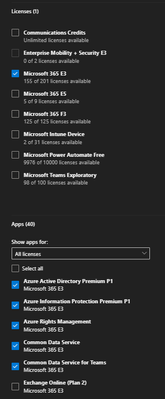
The solution/workaround in our case was to disable the 'Exchange Online' app in the users licensing tab: As soon as that checkbox is unchecked, Outlook will connect to the on-prem Exchange. This works for now. However, it would be convenient if this could be disabled at a group or license level, instead of having to go into each users settings and disable it. Perhaps there is an easier way?12KViews0likes2CommentsFSlogix - intermittent profile issues - fails to attach vhd
Hello, We're experiencing very random and intermittent issues with FSlogix profile containers. Intermittently FSlogix isn't able to attach the vhd and will display the error window with the following codes: Status: 0x...B Reason: 0x...5 Error 0x...570 If the affected user keeps trying and keeps reconnecting, it eventually will successfully attach the vhd and load the profile. Usually takes anywhere from 3-6 attempts. I currently do not have any log files available since we had not enabled FSlogix to login when encountering an error i.e. so far whenever above error message occurred, it logged the user out again. I have changed this setting now, but have not encountered the issue again yet. In addition to this and unrelated, every time we publish a new snapshot, users have to login to MS Teams again. Everything else, such as other Office applications seem to be retained and do not require reauthentication after publishing a new snapshot. Any help appreciated.1.3KViews0likes0Comments

Recent Blog Articles
No content to show