User Profile

GlossyChops
Copper Contributor
Joined 4 years ago


User Widgets
Recent Discussions
Azure AD (free) "Security Defaults" setting enabled seems to prevent RDP to Azure VM's - how to reso
I have an Azure AD Tenant (Free) and I have connected an Azure VM (Win10 Pro 21/H2) to it, but find that I cannot login to it via RDP with any Azure AD user accounts (with VM Administrator/User RBAC roles) from my home Win10 machine that is also connected to the Azure AD Tenant. The user account on the Windows 10 Pro 21/H2 home machine has Windows Hello and a PIN set - which I believe is considered a Strong Authentication mechanism wrt MFA. If I have "Security Defaults" enabled on my Azure AD tenant, my users cannot login, whereas if I set it to disabled - then they can login - I suspect that this is due to "Security Defaults" forcing MFA for my users (which I want), but that the Windows login is not able to accept the MFA login (but I thought it should if the client endpoint has Strong Auth / Windows Hello & PIN). I want to have "Security Defaults" Enabled for security reasons, but also want to be able to RDP to my Azure VM's - how can I do this?1.3KViews1like1CommentRe: Azure AD Sign-in to Azure VMs fails due to enforced MFA (I think)?
No, not really, I want "Security Defaults" enabled for security, but also to still be able to login to my Azure AD joined VM with my Azure AD user accounts. With the Azure AD Free tenant, it is not possible to turn off MFA for the Windows Sign-In cloud app (listed as a work-around) as there is no access to CA policies. Also Windows Hello with PIN should allow the MFA requirement to be passed shouldn't it - but I am not seeing this? And, why is it if I disconnect the Azure VM from Azure AD and then re-join it manually from within Windows, I can then login successfully with the account that I could not login with before with Security Defaults still enabled on the Azure AD tenant properties?3.8KViews0likes1CommentRe: Azure AD Sign-in to Azure VMs fails due to enforced MFA (I think)?
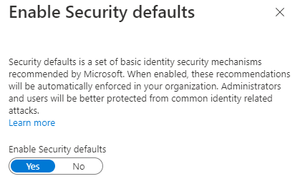
I have discovered that it is definitely the Azure AD "Security Defaults" that are now enabled by default on new Azure AD Tenants: If I set this to No - then I can login with the Azure AD (Global Admin, Work/School) account that I could not login with previously. What I don't understand is why the strong Authentication of Windows Hello and PIN from my Azure AD joined home laptop does not allow this MFA requirement to be passed when the "Security Defaults" is enabled?3.8KViews0likes3CommentsRe: Azure AD Sign-in to Azure VMs fails due to enforced MFA (I think)?
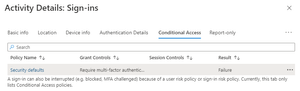
I have discovered that if I disconnect the Azure VM from Azure AD and then re-join using my Azure AD (Global Admin, Work/School account) - then I can RDP to the Azure VM successfully using the same account (i.e. the one that does not work if the account is joined at deployment time). It definitely seems to be something to do with MFA being enforced by the "Security defaults" Conditional Access policy (which I can't disable as it is a system policy) - I found this in the Azure AD Sign-In logs, which I think is related to the failure (even though the failure occurs on the Azure VM login screen): Why is it insisting on MFA and failing the CA policy when joined at deployment time, but not if I join it manually after deployment? Even if it insists on MFA, shouldn't I pass this OK with the strong authentication of Windows Hello and PIN from my Azure-AD joined home laptop (I have even tried when logged into the laptop as the Azure AD (Global Admin, Work/School account) instead of a local account, but this does not help.3.8KViews0likes4CommentsRe: Azure AD Sign-in to Azure VMs fails due to enforced MFA (I think)?
This MFA requrement is not a CA Policy - it is a set of enforced security defaults for all user accounts that are Global Admins or access the Azure Portal. MFA is setup on the account that I don't seem to be able to login to the Azure VM with - and gives the error in my original screenshot. If I login using another account that is not a global admin, but had to change the user's initial password by logging first into the Azure Portal (as you can't do Azure VM logins with intial temp passwords) - I then get the message saying that I must enable MFA on the account. But, I chose not to do this and it gives you 14 days grace to set it up. This account can login to the Azure VM successfully - this is what leads me to believe that it must be the enforced MFA (not via a CA policy) that is preventing my original user from logging in as this is the only difference I can think exists between the two accounts.3.8KViews0likes5CommentsAzure AD joined Azure VMs - How to reference Azure AD domain principals in the GUI?
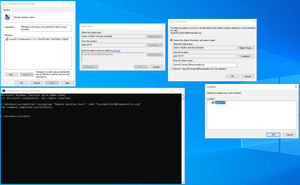
I have joined an Azure VM to Azure AD and can login as an Azure AD user with the VM Administrator RBAC Role, but another Administrator and a User account (both with the requisite RBAC roles) cannot login - it says that neither of these accounts are allowed for Remote Connections. When I try and add the accounts to the Remote Desktop Users Group via the Computer Management GUI, I don't seem to be able to reference the AzureAD location (see screenshot for the Anakin user), but I have found that I can add the Azure AD Toni user via the command line successfully and it shows in the GUI: Why is this, is this expected or indicative of an issue with the Domain Join? How do I reference Azure AD principals in the GUI (presumably this issue will be the same for other tools), as I would much rather be able to do this than need to add via the command line?657Views0likes0CommentsRe: Azure AD Sign-in to Azure VMs fails due to enforced MFA (I think)?
Hijoeyvldn thanks for taking the time to reply to my question. I am signing in to my local Win 10 21/H2 laptop using Windows Hello PIN auth - which I understand is considered a strong authentication method. I can't remove the MFA requirement for my user account as it is the account that I use as Global Admin for my tenant and also when logging in to Azure portal - On the free Azure AD Tenant, both of these force MFA which can't be turned off. If I create another user account in Azure AD to use as the login account for the Azure VM, I have to first try and login to the portal with this user account to reset the initial password, before I can login to the Azure VM with it. At this point, as I have tried to login to the Azure Portal with the account, then it sets a timer of 14 days until it will enforce MFA. The account works in the short-term for logging in to the Azure VM, but I presume this will stop working in 14 days. When I look at the Azure User's sign-in logs, you can see that the Windows Sign-In shows as successful: But it is the pass-through authentication that is sent to the Azure VM's Windows OS that then fails to login to the Windows session on the VM: When I look at the security logs on the VM, all I see is a Windows 4625 error which does not give me much of a clue as to why it did not allow the login:3.8KViews0likes7CommentsAzure AD Sign-in to Azure VMs fails due to enforced MFA (I think)?
Hi, I have an Azure AD Tenant (Free) and I have connected an Azure VM to it, but find that I cannot login with my Azure AD account (with VM Administrator RBAC role) from my home Win10 machine (that is also connected to the Azure AD Tenant) - I think this must be because my Azure AD account has enforced MFA configured? If I create another Azure AD account (with VM Admistrator RBAC role), then login via the portal to change the initial password set at user creation, but decline to set MFA (can only do this for 14 days) - I can then use this account to RDP to the Azure VM successfully. Is this expected behaviour? Is there some way that I can login using Azure AD accounts that have enforced MFA, as it seems all Azure AD accounts in the free AD tenant have enforced MFA (as I have to login to the Azure portal using the account to change the initial password before I can login via RDP with it - and portal access requires enforced MFA)? Or, am I missing something here...4.2KViews0likes9Comments

Recent Blog Articles
No content to show