User Profile

Pradeep_Patil
Copper Contributor
Joined 4 years ago


User Widgets
Recent Discussions
MS Teams programatically tap into incoming calls and accept the call (for load testing)
In our application we are using MS Teams as the calling end point (audio only calls). For the automated test; involving test for multiple calls (around 100 active calls) with multiple users going through our system to MS Teams users. Physically it is not possible to have 100 users logged in to MS Teams and be online to answer the calls. We did try to tap into the incoming calls using the `subscription` to the `/communications/callRecords`, but as per the MS documentation there is a latency of around 10-13 minutes that we are observing. So this option is not feasible. We have also registered a Teams calling Bot, and able to call the bot, we are getting events on `/communications/callRecords` subscription immediately when call is initiated and we are able to answer the call using the `/communications/calls/<call-id>/answer` Graph API. But this works only with Bot and with other users and we need multiple users. Is there a way we can mock MS Teams incoming call answer for multiple users for testing purpose?1.2KViews0likes1CommentGrant user consent for the delegated Graph API permissions without the UI flow
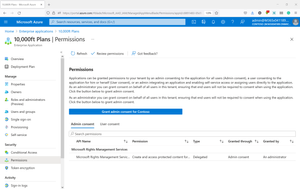
There are two types of the Graph API permissions we can grant for an AD application. 1. Application permissions 2. User Delegated permissions For the application permissions: AAD portal provides UI to Grand the Admin consent: For the user delegated permissions: For the delegated permissions to provide the consent, user need to login to the application requires the access and using the UI flow grant the permissions. This is possible for the application which has the web UI, but for the backend without any UI this is not possible. Questions: 1. Can we avoid the UI flow for granting the consent for the user delegated permissions? 2. Is there a way we can grant consent for the user delegated permissions from the Azure AD portal like we do for the Admin consent? 3. If it is not supported from the AD portal, is there a Graph APIs to grant the permissions? 4. If it is supported by the Graph APIs links to the documentation/example will help.Redirecting SIP calls from another SIP server to Teams user
I am trying to understand if SIP calls can be transferred/redirected from a another/thirdparty SIP server to a Microsoft Teams user. I was reading below links: https://docs.microsoft.com/en-us/microsoftteams/direct-routing-protocols-sip https://docs.microsoft.com/en-us/microsoftteams/sip-gateway-plan https://docs.microsoft.com/en-us/microsoftteams/direct-routing-plan As per my understanding we need to use Direct routing, and for direct routing Microsoft certified SBC need to be configured along with the SIP proxy. But if we have the URL for the Microsoft Teams SIP Endpoint and the credentials to access it, can we transfer calls from another SIP server by configuring the URL and credentials? Will it work or is this supported? I have below questions: 1. Can we transfer the SIP calls from another SIP server to Microsoft Teams user? 2. If it is possible what are the available ways of achieving this? 3. Do we need to have SBC configured for having this functionality, is it must? 4. Is there a document which explains this process step by step?1.7KViews1like3Comments
Recent Blog Articles
No content to show