User Profile

philmaynard_wap
Iron Contributor
Joined 10 years ago


User Widgets
Recent Discussions
Re: Outlook calendar add-in to store personal notes on events
Thanks Teresa. Using the 'calendar event email' to manage the notes within To-Do is an interesting option, although it's not very easy to find the relevant email so would be hard to role our to our users. Still, it may open up other ideas. Thanks again.6.1KViews1like0CommentsOutlook calendar add-in to store personal notes on events
Hi All. We have a need to enable people to make personal notes associated with Outlook calendar events. In the past colleagues have used the OneNote integration but this is problematic in the new version of Outlook as it doesn't automatically connect to a note that's already been made against the event. I'd have thought it would be relatively easy to create an Outlook add-in that would use the unique identifier for the event - e.g. iCalUId - to match against a a securely stored note but I've so far not found anything that does what we are after. Here are some examples of the scenarios we'd want to cover: An individual wants to make some personal notes ahead of a meeting as part of their preparation that will be quickly available from the Outlook (and/or Teams) calendar an executive assistance wants to provide a private briefing note to an executive director related to an upcoming meeting that both the executive assistant and director can quickly retrieve from the relevant event in either the Outlook and/or Teams calendar I'd love to help develop an app for this but it's a bit out of my capacity and capability at this time - I considered a simple Outlook add-in that would enable an individual to point the to a specific OneDrive or SharePoint folder that stored items using the unique event id. The idea is that this would enable the quick addition and retrieval of a note against the specific item and also allow for shared notes as it would just require those with delegated access to use a folder they both had access too - even nicer if sperate folders could be set up for specific mailboxes. I'd imagine that this would be a fairly common requirement so I'd be very interested to hear if there are people within the community who have already established either a technology or a way of working that facilitates this type of need.7.7KViews9likes3CommentsRe: Microsoft Kills Viva Topics to Focus on Copilot
I think AI can really enhance Knowledge Management, however, I still think there is a role for curated content and/or the ability for Knowledge Mangers to prioritise and flag trusted content. Also, unless the Microsoft CoPilot licenses come down in price, this is a real issue for organisations that are looking for a good KM solution but don't have the resources to invest in CoPilot for the whole organisation! Lets hope that there is a larger plan here - if anyone has insight on the Microsoft Knowledge Management approach I'd love to know more!2.2KViews2likes0CommentsRe: Now in public preview: Scoped Search for Viva Connections in Teams
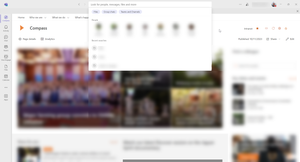
Hi Kaushik-Debsharma We've just got the update within the new Teams client so can users can now perform a scoped search from within the Viva Connections app - renamed 'Compass' on our Tenant. https://admin.microsoft.com/Adminportal/?ref=MessageCenter/:/messages/MC716386Re: Now in public preview: Scoped Search for Viva Connections in Teams
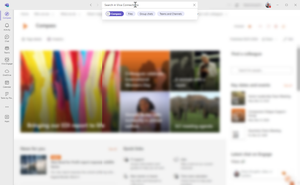
Hi Jan_Steberl This is a great feature but it's not working within the New Microsoft Teams for us. If I search within the Viva Connections app in Teams - renamed "Compass" in our environment - there is no option to scope the search results - see attached image. Do you know if this feature will be in the new Microsoft Teams or if there's something we need to do to enable it? Thanks!Re: Sending updates in Teams calendar app without unwanted notifications
Thanks for the update Christian. I've just run some tests using the Update Event (V4) action in Power Automate to add people to an event when they respond to a MS Form. I can confirm that the only the additional recipients have received the event notification. Before, all recipients would receive an update every time someone new was added by the flow. This is a fantastic update and opens up a range of opportunities. Thanks again 🙂55KViews0likes0CommentsRe: Sending updates in Teams calendar app without unwanted notifications
Nick_H99 sorry to hear that!! There doesn't seem to be any movement on this from Microsoft's side that I can see. Very surprised as it seems such an obvious thing to resolve. Let's hope the Microsoft Teams and Outlook developers pick up on this soon...62KViews1like3CommentsRe: Sending updates in Teams calendar app without unwanted notifications
Unfortunately not 😔 It looks like this is a 'feature'. I have a feeling that it's linked to the Graph API current capability. I noticed that in Power Automate, the current version of the 'Update Event (V4)' action has the same issue. This was raised on version 2 but I've not seen any update as yet. I think that until an update on this interface is made, I suspect any integrations with Outlook are going to have the same problem. Here's a link to a User Voice request made on the Update Event V2 issue - https://powerusers.microsoft.com/t5/Power-Automate-Ideas/Update-Event-v2-to-send-updates-only-to-new-attendees/idi-p/236165 (This of course could be a completely separate issue 🙂)88KViews0likes0CommentsSending updates in Teams calendar app without unwanted notifications
Modifying meeting invites through the Team Calendar app is sending updates to all attendees which is not what our end users are expecting! Does anyone in the community have any insight on this? As more users within my organisation are making use of Microsoft Teams, they're beginning to bump into unexpected 'features'. For instance, a user was adding a new attendee to a scheduled meeting via the Calendar app in Teams. What they didn't realise is that it would send up an update to all attendees! The expectation was that it would either give the option in the same way Outlook does to only update added or removed attendees OR that it would work in the same way Outlook online does and only send updates to attendees are required - as per this article https://support.microsoft.com/en-gb/help/3197165/send-updates-options-for-attendees-are-not-displayed-in-outlook-on-the Does anyone in the community have an insight on if this behaviour is going to be changed? I've raised a Uservoice post in case it's something that isn't currently being planned https://microsoftteams.uservoice.com/forums/908686-bug-reports/suggestions/39905293-manage-calendar-updates-the-same-as-outlook-onlineSolved91KViews3likes16CommentsRe: Email notifications for @Mentions on Private Channel not working
mhines thanks for sharing your experiences on this. We're having the same issues with Private Channels. This is especially difficult as we've got external guests in a private channel who rely on receiving email alerts as they're not regally in our Tenant. I tried the suggestions you'd had from Microsoft but it made n difference. Notifications from standard channels are working fine but nothing comes through from Private channels. I'm just about to raise a ticket with Microsoft Support but if anyone know's any official line on this or has any additional experience or updates on this it would be great to hear.10KViews1like3CommentsRe: Blocked accounts removed from Microsoft Teams even though they're still in the O365 Group!
VasilMichev My conversation with Microsoft Support has - unsurprisingly - come back with this being by design. However, they have raised it as an issue to their senior team. I'm not sure if this will get anywhere so anything that you can do to raise this through your contacts as an MVP would be great. I've also created a Uservoice for it but realise this will probably get lost in the noise of other request - https://microsoftteams.uservoice.com/forums/555103-public/suggestions/38783713-stop-teams-eligibility-criteria-removing-blocked-a Thanks for your thoughts and input here. Hopefully something will change either on this specific issue or around status notifications in general.35KViews1like1CommentRe: Blocked accounts removed from Microsoft Teams even though they're still in the O365 Group!
I'm inclined to agree with your thoughts on poor design. I think the inconsistency is also troubling. Why are they removed just from the Team experience but not the underlying group? The status messages are generally annoying but in this case it was extremely negative as team members thought someone had left the organisation - which was not the case at all. I struggle to believe this specific scenario is an intentional design. Either way, the verbose messaging in Teams significantly amplifies the issue.35KViews0likes6CommentsBlocked accounts removed from Microsoft Teams even though they're still in the O365 Group!
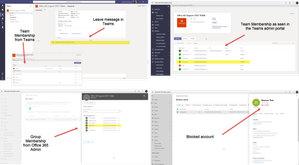
We've recently spotted that when we block an account in Office 365, the account is removed from the Teams it's in with a 'XYZ has been removed from the team.' message. This is behaviour we did not expect to see! Sometimes we need to temporarily block an account. These are accounts that are still active, still have licenses, and accounts that we will sometime unblock after a period of time. However within 24 hours of blocking the account, the member is removed from Microsoft Teams teams they're part of. As sometimes the blocking of an account is for sensitive reasons, for it to be broadcast to other team members is not our expected or desired behaviour. I'm raising a ticket with Microsoft Support but I'm posting here in case others have any insight to this. I'd be really interested to hear if you've experienced this or if you think this is expected behaviour that is acceptable and we should be changing our processes when temporarily blocking accounts. To clarify a couple of things: these accounts are not removed from the underlying Office 365 Group the licenses are not revoked we're experiencing this behaviour on multiple independent tenants when unblocked, the member is returned to the Team - with another message in the general channel! I'm expecting this to be related to Microsoft Teams eligibility criteria as the https://docs.microsoft.com/en-us/microsoftteams/create-an-org-wide-team talks about blocked accounts. However, this is not an org-wide team and I'd have not expected this behaviour for groups with manually managed membership. For reference, the image below shows the message in the General channel of a test Team we used to recreate the issue, alongside the status within different admin portals from the same in time. You'll see the blocked test account is still in the Group but is absent from the from end Team.39KViews4likes22CommentsRe: Missing Search Admin page
Hi Wendy_MSFT Thanks for the guide but I don't think this is our issue. I'm a global admin on the system, we've got targeted release on for everyone, and we've all got Microsoft E3 licenses. Microsoft Search is just not appearing in the Office 365 Admin portal under settings. As mentioned, I can address the admin portal through the old bing admin link but would like it to be visible for other admins through the main admin portal. Thanks :-)3.8KViews0likes1CommentRe: Missing Search Admin page
Hi Wendy_MSFT I think we're experiencing the same issue on our tenant. We're able to access the admin portal through https://www.bingforbusiness.com/admin but not through our main Microsoft Admin portal. I've only just noticed as it's been while since I've looked for the Microsoft search portal since the original configuration during the preview. What's the path for resolving this? Many thanks :-)3.8KViews0likes3CommentsRe: Turn Root Site Collection into Communication Site
Kiki Shuxteau thanks for the heads up. I'm a little lost for words as we've been waiting for this for a long time, only to be thwarted by the Publishing feature limitation! I'd imagine the vast majority of organisations wanting to use this are running a root site collection with the publishing features turned on as they're using it as the primary intranet! Do you know if there's a plan to remove this limitation? Just to expand on the limitation, it's not just that the publishing features are turned on, it's if they've been enabled in the past too - https://docs.microsoft.com/en-us/powershell/module/sharepoint-online/Enable-SPOCommSite?view=sharepoint-ps#notes5.1KViews0likes1CommentRe: Invite who you want in group calendars
Ethan Li This is great progress. However, you don't mention Microsoft Teams in the post. One of the significant use cases for this is meetings scheduled within a Teams Channel where only a sub-set of the overall team need to be invited. This is especially important as Groups based within Teams are not visible within Outlook! Is this on the road map?27KViews4likes0CommentsRe: Using the Custom Learning Site
Martin Front I'm afraid I don't have any direct thoughts. However, it looks like there was a similar issue raise and closed on the github site - https://github.com/pnp/custom-learning-office-365/issues/34 Julie has some good suggestions to troubleshoot the issue. Hopefully this will help you out - if not, the folks in the github site developing the app are very responsive :-) Martin Front wrote: I installed it today but I have an issue when a member or visitor to the site tries to access the module, we recieve: " The CustomLearningWebPart has not been properly configured and you do not have Owner rights to complete the operation. Please contact the site administrator." I might forgot something but i don´t know what. It works when they have Owner-status. Any thoughts? philmaynard_wap3.3KViews1like0Comments
Recent Blog Articles
No content to show