User Profile

frankfalvey
MCT
Joined 8 years ago


User Widgets
Recent Discussions
Re: M365 Copilot requirements explained!
What You Can Access with M365 E3 (No Copilot License) You’ll still see standard Microsoft 365 apps like Word, Excel, PowerPoint, Outlook, and Teams. You might see Copilot-related UI elements (like icons or placeholders) in some apps, but they’ll be non-functional unless a Copilot license is assigned. You can use basic AI features like Editor in Word or Ideas in Excel, but not the full Copilot experience (e.g., generating content, summarizing documents, or creating formulas via natural language). What You Can’t Use Without a Copilot License Copilot in Word, Excel, PowerPoint, Outlook, and Teams: These require a Microsoft 365 Copilot license (e.g., Copilot for Microsoft 365). Copilot Studio: You can browse and explore, but building or deploying agents typically requires a Copilot license. Copilot Chat across apps: This feature is gated behind the Copilot license. Should You See Copilot Icons? Possibly, yes. Microsoft has started rolling out Copilot UI elements even to users without licenses, especially in enterprise environments. These icons may appear in Word or Excel but clicking them will prompt you to upgrade or show limited functionality.108Views0likes0CommentsAzure Storage
You've asked for something about Azure Storage, and there's a wealth of information both from your own work and from trusted external sources. Here's a tailored overview that blends your contributions with broader context: 🔹 What Is Azure Storage? Azure Storage [1] is Microsoft’s cloud-based solution for storing modern data workloads. It offers: High availability and durability through redundancy and geo-replication. Massive scalability to support everything from small apps to enterprise-scale systems. Security with built-in encryption and fine-grained access control. Global accessibility via REST APIs, SDKs, Azure CLI, and Azure Storage Explorer. Azure Storage supports multiple data services: Azure Blob Storage: For unstructured data like images, videos, and backups. Azure Files: Managed file shares accessible via SMB or NFS. Azure Queues: For message-based communication between components. Azure Tables: A NoSQL store for structured data. Azure Disks: Persistent block storage for Azure VMs. Azure Elastic SAN and Azure Container Storage: For advanced storage orchestration and container-native workloads. 🔹 Your Contributions on Azure Storage You've made significant contributions to the Azure community, especially through your blog and event series: In your MVP Contributions tracker, you’ve documented multiple sessions and blog posts covering: Types of Azure Storage (e.g., Blob, File, Queue, Table) [2] Cost optimization strategies for Azure Storage [2] Azure Files and file sharing capabilities [2] Your presentation A COMPREHENSIVE GUIDE TO AZURE COST MANAGEMENT dives into how Azure Storage fits into broader cloud cost strategies, emphasizing budget control, resource allocation, and ROI [3]. 🔹 Practical Use Cases Azure Storage is ideal for: Backup and disaster recovery with geo-redundant storage. Big data analytics using Data Lake Storage. Web and mobile app content delivery via Blob Storage. Enterprise file sharing with Azure Files. IoT and telemetry ingestion using Queues and Tables. Would you like help turning this into a blog post, presentation, or training module? I can also summarize your past Azure Storage sessions or help you prepare new ones. References [1] Introduction to Azure Storage - Cloud storage on Azure [2] MVP Contributions [3] A COMPREHENSIVE GUIDE TO AZURE COST MANAGEMENT72Views0likes0CommentsChatGPT 5 Has Arrived: What You Need to Know
The wait is over. OpenAI has officially launched GPT-5, and it’s already being hailed as the most significant leap forward in AI capability since the original release of ChatGPT. OpenAI CEO Sam Altman described the new model as a "PhD-level expert" that offers a unified, smarter, and more reliable experience. This isn't just an incremental update; it's a fundamental shift in how the AI works, bringing together the best of previous models into a single, powerful system. What’s New and Improved? GPT-5 introduces a host of features that address key limitations of its predecessors. One of the most talked-about advancements is the reduction in hallucinations, where the model generates false information. According to OpenAI, GPT-5 is significantly more factually consistent and trustworthy, especially in "thinking mode," which uses a chain-of-thought approach to solve complex problems. This makes it more suitable for high-stakes tasks in fields like healthcare and coding. Another major change is the unified model architecture. Instead of manually switching between different models like GPT-4 or GPT-4o, the new system automatically routes your query to the best model for the job. This "smart router" instantly decides whether to prioritize speed for a simple question or engage in a deeper, more comprehensive reasoning process for a complex one. The context window has also been dramatically improved. While previous models had limits on how much information they could remember in a single session, GPT-5 can handle up to 272,000 tokens of input, allowing it to maintain context through much longer conversations and documents. A New Era for Developers and Users For developers, GPT-5 represents a game-changer. It is being called OpenAI's "strongest coding model yet," excelling in a variety of tasks from bug fixing and multi-language programming to generating entire software programs from a single prompt. This new capability, dubbed "vibe coding" by Altman, allows for the creation of functional applications with minimal human input, which could drastically reduce development cycles. For general users, the experience is more intuitive and personalized. GPT-5 is now the default model for all users, including those on the free plan, though with usage limits. You can also customize your experience with new selectable personalities like "Cynic," "Robot," "Listener," and "Nerd." This move towards greater accessibility and user control demonstrates OpenAI's commitment to making powerful AI tools available to everyone. The Road Ahead While GPT-5 marks a major step toward Artificial General Intelligence (AGI), it's not without its challenges. The initial rollout saw a minor mathematical error, a reminder that even the most advanced AI benefits from clear instructions. The ongoing competition with other models like Claude 4 and Gemini 2.0 also ensures that the pace of innovation will only continue to accelerate. Ultimately, GPT-5's true impact will be measured not just by its impressive benchmarks, but by how businesses and individuals leverage its new capabilities to solve real-world problems. It's a new era, and the AI landscape has been forever changed.578Views1like0CommentsRe: The types of files that can be created in Copilot Chat, Copilot in Word, and PowerPoint.
Yes, Copilot Chat supports direct document creation! You can upload files directly into the chat and ask Copilot to summarize, analyze, or suggest improvements for documents like Word files, Excel spreadsheets, and PowerPoint presentation, Its a moving target, more stuff added every day.362Views0likes4CommentsRe: The types of files that can be created in Copilot Chat, Copilot in Word, and PowerPoint.
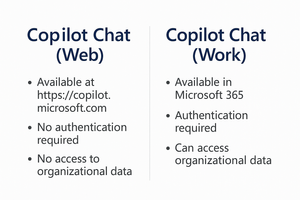
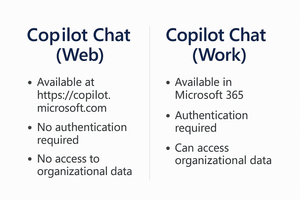
Thanks for sharing your test results it's a valuable question, especially as Microsoft Copilot continues to evolve across different platforms. Based on current functionality as of early 2025, here’s a quick summary of what file types can be created directly from each Copilot experience: Copilot Chat Web File Creation: Not currently designed to create files like Word docs or PowerPoint decks directly. You can generate content (e.g., text, summaries, outlines) which you can then manually copy into other apps. Output Style: Primarily conversational responses. No native file export options like .docx or .pptx yet. Note: This differs from Copilot for Microsoft 365 Work, which is more deeply integrated. Copilot in Word Microsoft 365 Work Account Creates: .docx Functionality: Can generate new Word documents, edit existing ones, rewrite, summarize, and format content using natural language. Copilot in PowerPoint in Microsoft 365 Work Account Creates: .pptx Functionality: Can build entire presentations, create slides from prompts or Word documents, adjust tone, layout, and design all within the app.371Views1like6CommentsA Complete Guide to Azure Cost Management
As companies shift to the cloud, managing the costs is as important as using the cloud to its fullest. Azure is one of the most popular cloud platforms, and it offers a lot of benefits such as scalability and flexibility; however, if you do not manage the costs associated with the cloud, you are likely to spend a lot of money. This is where Azure Cost Management comes in to help you get the most out of your cloud spending and how to use the money you spend on cloud services wisely. What is Azure Cost Management? Azure Cost Management is a set of tools available within the Azure platform that helps organizations in managing the costs of their cloud resources, optimizing their usage and sticking to the budget. It is integrated with Azure services to help in identifying waste and ways of getting the most out of the investment. Key Features of Azure Cost Management Cost Analysis Azure Cost Analysis gives you a clear view of your expenditure and helps you identify where your money is going. You are also able to customize your views to the resources, subscriptions, services or the regions to notice the changes and exceptions. Budgets Establish your funds with budgets to ensure that you do not spend more than you had intended to on Azure. Azure allows you to create budgets for certain subscriptions, resource groups or even services and it will send you notifications when you are about to reach or even go beyond your limits. This is a proactive way that prevents you from incurring exceeding charges. Cost Allocation with Tags Azure supports the concept of tagging, which means that you can associate keys (such as department, project, or environment) with resources. These tags are useful in helping assign the costs to the right teams or objects for example departments or projects. Suggestions for Enhancement Azure Cost Management is integrated with Azure Advisor to offer suggestions that include downsizing underutilized VMs, purchasing reserved instances, or identifying inactive resources. Integration with Power BI For more sophisticated reporting, Azure Cost Management is integrated with Power BI, which allows you to design your own reports and dashboards that meet your company’s requirements. Multi Cloud Support Azure Cost Management is not only limited to Azure, it also includes AWS thereby enabling organizations with a multi-cloud strategy to manage the costs of all the clouds from one platform. Tips for the Effective Implementation of Azure Cost Management: To enhance the usage of Azure Cost Management, implement the following tips: Implement Cost Governance Establish roles and responsibilities to ensure that spending is appropriate. Use Azure Policy to set policies such as restricting the creation of high-cost resources in some subscriptions. Monitor Spending Regularly Set up some alerts and review the spending reports frequently. This way you can notice any irregularities and deal with them before they become a problem. Use Reserved Instances and Savings Plans For the workloads with the certain schedule, it is recommended to buy Azure Reserved Instances or Azure Savings Plans that provide a significant price reduction compared to the pay as you go pricing. Optimize Resource Usage Shut down or remove inactive resources, shrink VMs to the required size, and use scaling to vary the resources according to the need. Leverage Spot VMs For less critical or lightweight tasks that can tolerate some level of downtime, Azure Spot VMs can be used to reduce the overall cloud spending. Tag and Organize Resources It is important to have a good tagging practice in place to increase the cost visibility. Some of the tags could be Project: AI Research, Department: Marketing and so on that help in identifying the costs and managing the spend against the right projects and departments. Real World Benefits of Azure Cost Management Example 1: Optimization for Reducing Costs A SaaS company was able to decrease its cloud spending by 30% by identifying dormant resources and downsizing over provisioned VMs with the help of Azure Cost Management suggestions. Example 2: Improved Budgetary Control An enterprise IT department did not spend more than the budget because it established subscription-level budgets and received notifications when the consumption was close to the limits. Example 3: Multi Cloud Efficiency A global company combined the tracking of its cloud expenses across Azure and AWS using Azure Cost Management and was able to generate one unified report for all the clouds, which in turn helped it make better financial decisions. The Future of Cost Management in Azure As cloud environments become more sophisticated, cost management tools will keep on developing. Some of the other features that are expected to be incorporated in the future include the use of artificial intelligence in the generation of insights, prediction, and better integration with DevOps processes. Thus, using Azure Cost Management, organizations can graduate from the reactive spending control to the proactive cost optimization and thus make sure that their cloud journey is not only creative but also economic. Sum up Azure Cost Management is a valuable tool for anyone seeking to manage, minimize, and explain cloud expenditure. Whether you are a small business or a large enterprise, these tools help you make decisions based on data, increase your ROI, and gain financial visibility in the cloud. Get started with Azure Cost Management today, and discover how to maximize your cloud spend while maintaining a healthy budget.2.1KViews0likes0CommentsRe: Microsoft Azure AI Fundamentals AI-900
Artificial Intelligence AI is transforming industries, revolutionizing how businesses operate, and redefining user experiences. Microsoft Azure AI Fundamentals AI-900 serves as an excellent entry point for anyone looking to understand the core concepts of AI and its practical applications within Microsoft Azure. Whether you're a student, business professional, or aspiring AI practitioner, AI-900 provides the foundational knowledge needed to begin your journey in AI and cloud computing. What is Microsoft Azure AI Fundamentals AI-900? AI-900 is a certification designed for individuals who want to gain a broad understanding of artificial intelligence concepts and how they are implemented using Microsoft Azure AI services. Unlike technical certifications that focus on programming, AI-900 is ideal for those looking for a high level overview of AI capabilities, machine learning, and cognitive services in Azure. Who Should Take AI-900? IT professionals looking to explore AI concepts Business decision-makers who want to leverage AI solutions Students and beginners interested in AI and cloud computing Anyone preparing for more advanced AI and data certifications Key Topics Covered in AI-900 AI Workloads and Considerations Understanding different types of AI workloads, such as machine learning, computer vision, natural language processing NLP, and conversational AI, is crucial. AI-900 introduces key concepts like responsible AI, ethical considerations, and real-world AI applications. Machine Learning Fundamentals Machine Learning ML is a core AI component that allows computers to learn patterns from data and make predictions. AI-900 explains: Supervised vs. unsupervised learning Model training and evaluation Azure Machine Learning capabilities Azure AI Services Overview Microsoft Azure provides a range of AI services to help developers build intelligent applications. AI-900 covers: Azure Cognitive Services (Vision, Speech, Language, and Decision AI Azure Machine Learning (Automated ML, Model Deployment, MLOps Azure Bot Services (Conversational AI and chatbots Computer Vision in Azure Computer Vision enables AI to interpret and analyse visual data. AI-900 provides insights into: Image classification Object detection Facial recognition Natural Language Processing NLP and Conversational AI NLP enables AI to understand and process human language. The certification introduces: Text Analytics for sentiment analysis Language Understanding LUIS Azure Bot Services for chatbot creation Why Should You Get AI-900 Certified? Gain AI knowledge: Learn essential AI concepts without requiring a deep technical background. Boost your career: Demonstrating AI expertise is valuable in today's data driven world. Explore Azure AI: Gain hands on experience with AI tools and services in Microsoft Azure. Prepare for advanced certifications: AI-900 serves as a stepping stone for advanced AI and data science certifications like AI-102 Azure AI Engineer Associate. How to Prepare for AI-900 Microsoft Learn: Explore free learning paths and hands on labs. AI-900 Study Guide: Follow structured study guides and practice questions. Practice Exams: Take mock tests to familiarize yourself with exam questions. Azure Free Trial: Use Azure’s free tier to experiment with AI services. Sum up AI-900 is an excellent certification for beginners who want to understand artificial intelligence and how Microsoft Azure enables AI development. Whether you're looking to apply AI in your organization, enhance your resume, or build AI powered applications, AI-900 provides a strong foundation to get started.1View0likes0Comments




Groups

Microsoft Hero Community
Welcome to Microsoft Hero Community, an official Microsoft Learn Learning Room dedicated to empowering learners through a strong focus on Microsoft Cloud technologies. We regularly host sessions, events, webinars, and training programs to support your growth and success. Join us on your cloud journey, we’re here to help every step of the way!Latest Activity: Nov 17, 2025Recent Blog Articles
No content to show