User Profile

JeremyGuthrie
Copper Contributor
Joined 4 years ago


User Widgets
Recent Discussions
OneDrive duplicating files?
I am seeing what appears to be OneDrive storing data twice? ~/Library/GroupContainers/UBF8T346G9.OneDriveStandaloneSuite ~/Library/CloudStorage/OneDrive-.... Doing an 'ls -lai' shows different inodes. Daisydisk reports this as duplicate usage, are these in fact duplicates or aliases(hardlinks?). I see that when I create a file in my normal location, it too shows up in this other location.893Views1like1CommentRe: Files On-Demand for macOS QA
Ankita Kirtiit really doesn't feel like we're being heard on here. The high CPU problem still exists, just basic edits in PowerPoint and other tools causes OneDrive to go bonkers. It has gotten bad enough that I've coded some scripts with https://formulae.brew.sh/formula/cpulimit just to bat down OneDrive and make my machine usable again. Can someone please address this forum to talk about what is going on here?3.5KViews0likes0CommentsCan someone PLEASE address / fix the high CPU usage of OneDrive on the Mac since the updates?!?!?
MS had this forum post that when the OneDrive Mac client was redone and wrecked files on demand but it was also accompanied by ridiculously high CPU. To this day, if you edit anything in Word, Excel or PowerPoint the CPU spikes in OneDrive sometimes chewing 2-3 CPUs up. I filed a ticket a while ago and was told this is a 'known' issue, had my ticket closed and tol to track it on the blog post linked above. It's been months and it still is a high CPU consumer and that's after the June 27th patch which just came down. What has to get done to get attention to this?2.7KViews1like2CommentsRe: Files On-Demand for macOS QA
CPU usages is still NOT fixed. Mac OS 12.3, latest MS software. Can someone please reply back with what if anything are next steps here? I opened a case and got the 'sorry, we know about this problem' a bit ago. Are we at a spot where you need some of us to re-open cases to look closer at what is happening? Any updates?4.2KViews0likes0CommentsRe: Files On-Demand for macOS QA
SERIOUSLY!?!?!?!? The latest onedrive client just undid ALL OF MY SYNCS AGAIN!?!?!!? This is BEYOND FRUSTRATING. WHAT ARE YOU DOING? I cannot convey how utterly frustrating this is as it looks like I lost work in the process. For crying out loud, give us CLI to configure this client since it is clear you have no interest in actually managing configurations across versions of the client. At least we could manage the configuration as infrastructure as code.4.4KViews1like0CommentsRe: Files On-Demand for macOS QA
A few bits of feedback: - Updates on the blog are helpful knowing it is there. - That said, no one is ever checking all of the blogs for updates. For what it is worth, reaching users is hard hence why breaking user experience really should be a last resort. Every time one of the plethora of programs I have upgrades, I am not checking blogs. Example: Moving onedrive storage to under ~/Library seems really hard to justify what the pizaz and OMG look what we get functionality is from such a move. Absolute file paths are always going to be a problem and kinda once you set it, sorry you're stuck with it. Powershell has that all over the place. It isn't a new lesson and moving it wasn't fresh or new. We already had shortcuts on the left bar. I would also argue that unless you can really say why moving to ~/Library just had to happen, it's another miss because I don't feel like as a user, I should have to care. Is this an Apple Library requirement? Great, still put in a workaround or fix to preserve what I had. You just made a system specific issue, a problem where my outcome is a need to reliably store / manage files and content I have lost faith in. I feel like this change seriously damaged your message. I am not trying to sound like I am harping but I will also say that 'reinventing' things means also understanding where the technical debt can bite you. As users we feel bitten pretty bad.3KViews0likes0CommentsRe: Files On-Demand for macOS QA
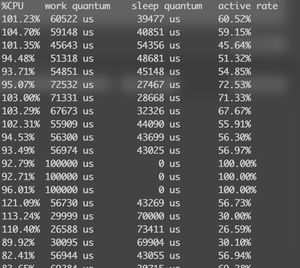
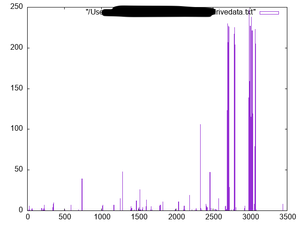
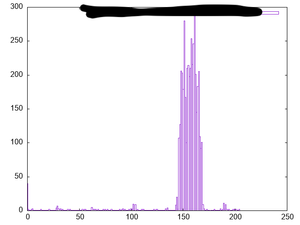
I have a support ticket open on issues with OneDrive. Doing my part to make sure the issues I hit are being worked there too. They also directed me to give my feedback here. That being said: I sync close to 40 sharepoint sites to my local machine. I regularly use CLI and other tools to examine and process data spread across those sites. I have used these for backup (Mac Time machine saved me more than once where a Teams site had data deleted by someone else and we did not notice for six months). I have teams sites where I only sync a portion of the site. The recent changes have done the following: - Orphaned old sync'd directories. - This broke scripts and tools looking for another path - The new file locations did not preserve what FoD settings I had selectively turned on - This broke Citrix functionality since the citrix client cannot see ~/Library via their client. - I wasn't even offered the option to migrate current syncs - There doesn't appear to be any cli to manage what is or isn't sync so at least if we wanted to maintain our config we could. e.g. I have twice been asked to delete the OneDrive client(losing all 40 teams sites and sync settings), only to have to re-create them again. There is no script I can run to re-restore syncs. - Since the upgrade(and I am running the latest according to tech support), anytime I use Excel, Powerpoint or Word, the OneDrive CPU process goes bonkers using 300% CPU. It got so bad I wrote software just to graph it misbehaving so I could show that data on my tech support tickets. I have observed it drive my Mac load average over 50 before too. I am running on a fully updated 2019 Macbook Pro w/ 32GB of RAM.3.8KViews0likes1Comment
Recent Blog Articles
No content to show